- 35 -
1
Press the Power Switch on the rear of
the set to turn the main Power on.
2
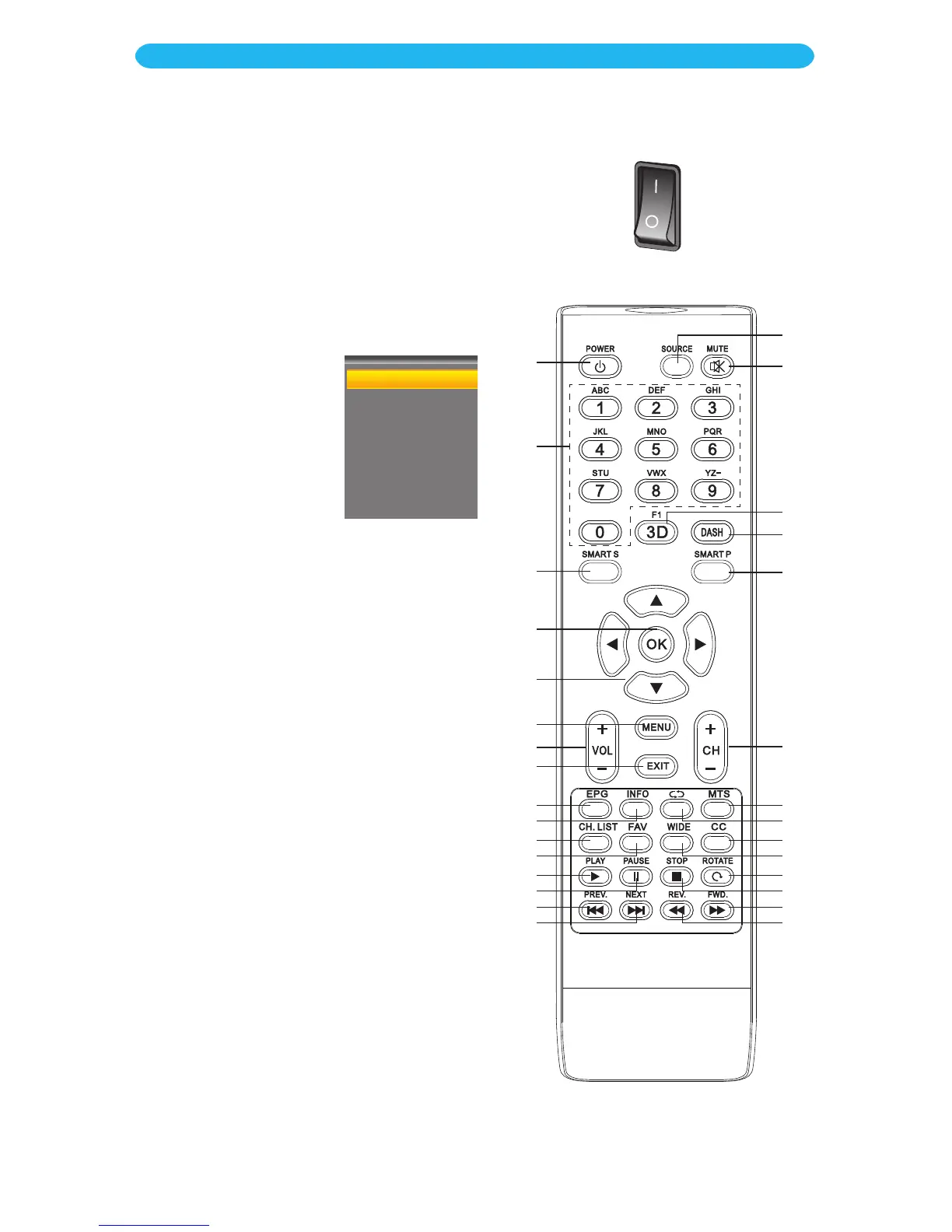
Press the Power button u to turn on
the unit; the blue Standby indicator will
turn off.
3
Press the SOURCE
button aq followed by
the Navigation qp
buttons y to select
the desired mode.
Press the OK button
x to confirm.
4
Adjust the volume level by pressing the
VOLUME Up or Down button V.
5
For proper operation, before selecting
channels, they must be set into the
unit’s program memory (see page 33).
6
Press and release the CHANNEL Up or
Down button bl. The TV automatically
stops at the next channel set into
memory.
You can also select a channel directly
using the DASH bt/0-9 v buttons
followed by the OK button x.
FUNCTION BUTTON OPERATION:
MUTE Button ar: Press to mute the sound.
Press again to restore.
F1/3D Button as: Press to freeze the picture
on the screen. Press again to resume the
video.
This set is not 3D, so the 3D portion of the
button does not perform any function.
1
2
3
9
10
11
12
13
14
15
16
23
24
25
26
27
28
29
30
22
21
20
19
18
17
7
4
5
6
8



 To Next Page