30
CH
Adjusting the picture preference
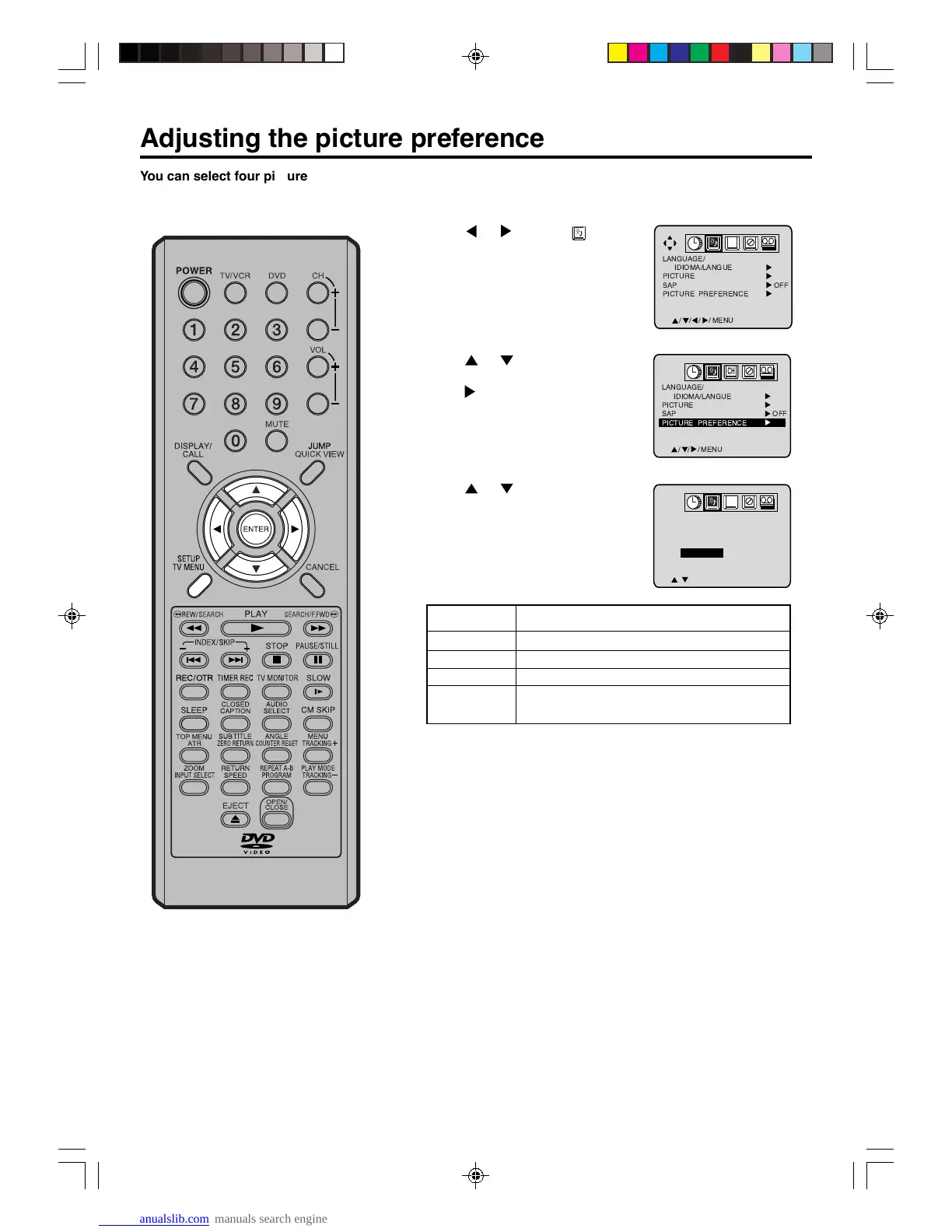
You can select four picture modes—
STANDARD, SPORTS, MOVIE, and
MEMORY—as described in the
following table:
1
Press SETUP/TV MENU in the TV/VCR mode.
The TV/VCR menu screen will appear.
2
Press or to select
option.
3
Press or to select
“PICTURE PREFERENCE”, then
press
.
4
Press or to select the item
you want to adjust. Press ENTER
to adjust the setting.
5
After your desired setting, press SETUP/TV MENU until the
menu screen disappears.
//
ENTER / MENU
PICTURE PREFERENCE
STANDARD
SPORTS
MOVIE
MEMORY
CH
Mode Picture Quality
STANDARD Standard picture quality (factory-set)
SPORTS Bright and dynamic picture (factory-set)
MOVIE Movie-like picture setting (factory-set)
MEMORY
Your personal preferences (set by you; see
“Picture control adjustment” on the page 29).
CH
5V40401A [En]30-35 2/3/06, 6:00 PM30



 To Next Page