9
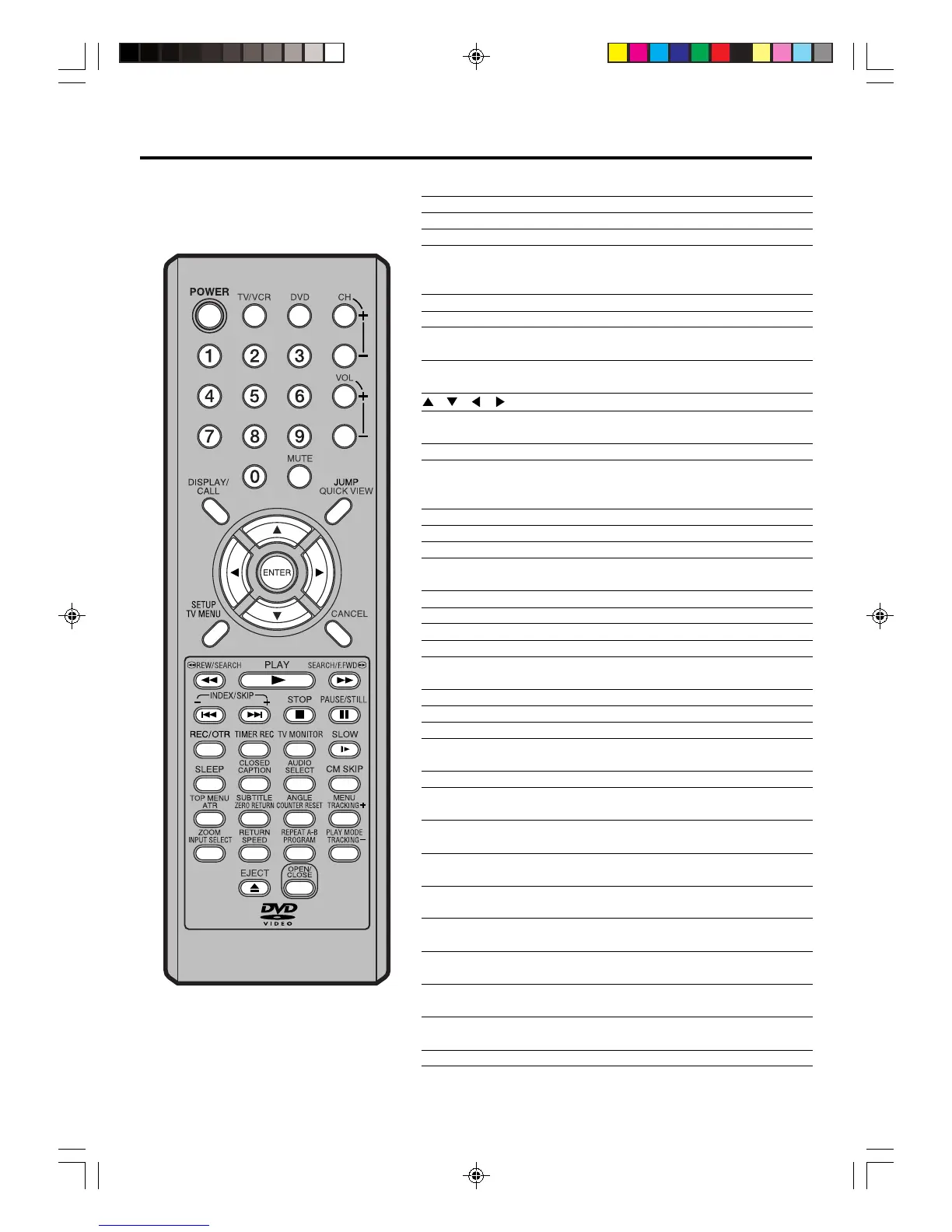
POWER Power on/off 10,15,16,19,43,44
TV/VCR
Press to operate TV/VCR 10,15,33,35,36,38,39
DVD
Press to operate DVD
10,38,43,44,52~56
CH +/– Select channel 10,20,36,38
0-9 Direct channel selection of TV 10,19,23,36,38
Input setting 46,47,49
Enter a password 24,26,55~57
VOL +/– Adjust volume of TV 19,20
MUTE Switch off the sound 20
DISPLAY/CALL Display TV/VCR or DVD operation status
16,20,25,34,35,37,39,43
JUMP Locating desired scene 47
QUICK VIEW Switch between present/last channel 20
/ / / Cursor buttons
ENTER Enter information in the menu
Select option in the menu
SETUP/TV MENU Display the setup menu
CANCEL Delete Timer program 40
Cancel input data in the setting mode
24,26,29,47,49,55,56
REW/SEARCH Rewind/Review playback 33,34,45
PLAY Playback 33,34,44,45,46,48,49,51,57
F.FWD/SEARCH Fast Forward/Forward search playback 33,34,45
INDEX +/– Search for the INDEX mark of a tape 35
SKIP +/– Skip chapter to forward or reverse direction 45
STOP Stop 33,35~38,44,46
PAUSE/STILL Still picture/Recording pause on/off 34,37,41,45
REC/OTR Recording 36,38,41
TIMER REC
Set the unit to start recording at a preset time
39,40
TV MONITOR Temporarily view a TV channel select on the
VCR while in the playback mode 34
SLOW Slow-motion playback 34,45
SLEEP Sleep timer 20
CLOSED CAPTION
Switch between TV/Caption/Text in Closed Caption mode
21
AUDIO SELECT Switches sound between mono and stereo 31
Change sound track language of DVD 50
CM SKIP Skip the unwanted short material of a tape 34
TOP MENU Select title of a DVD disc 51
ATR Digital AUTO TRACKING 34
SUBTITLE Set Subtitle of a DVD disc 50
ZERO RETURN
Stop the tape when the counter reaches 00:00:00
35
ANGLE Change playback angle of a DVD disc 51
COUNTER RESET
Reset the counter to 00:00:00 35
MENU Select menu of a DVD disc 51
TRACKING + Manual tracking button in playback mode 34
ZOOM Zoom (for DVD playback) 47
INPUT SELECT Switch the connected TV to external mode 14,41
RETURN Remove DVD set up menu 52~55,57,58
SPEED Sets the tape speed for recording 36,38,41
REPEAT A-B Repeat playback between A and B (DVD/CD) 48
PROGRAM
Confirm the timer program
28,40
PLAY MODE Select playback mode 48,49
TRACKING – Manual tracking button in playback mode 34
EJECT Eject a cassette tape 32,39
OPEN/CLOSE Open or Close the DVD tray 44,46,57
Remote control
Page
5V40401A [En]06-11 2/3/06, 5:58 PM9



 To Next Page