22
OUT
IN
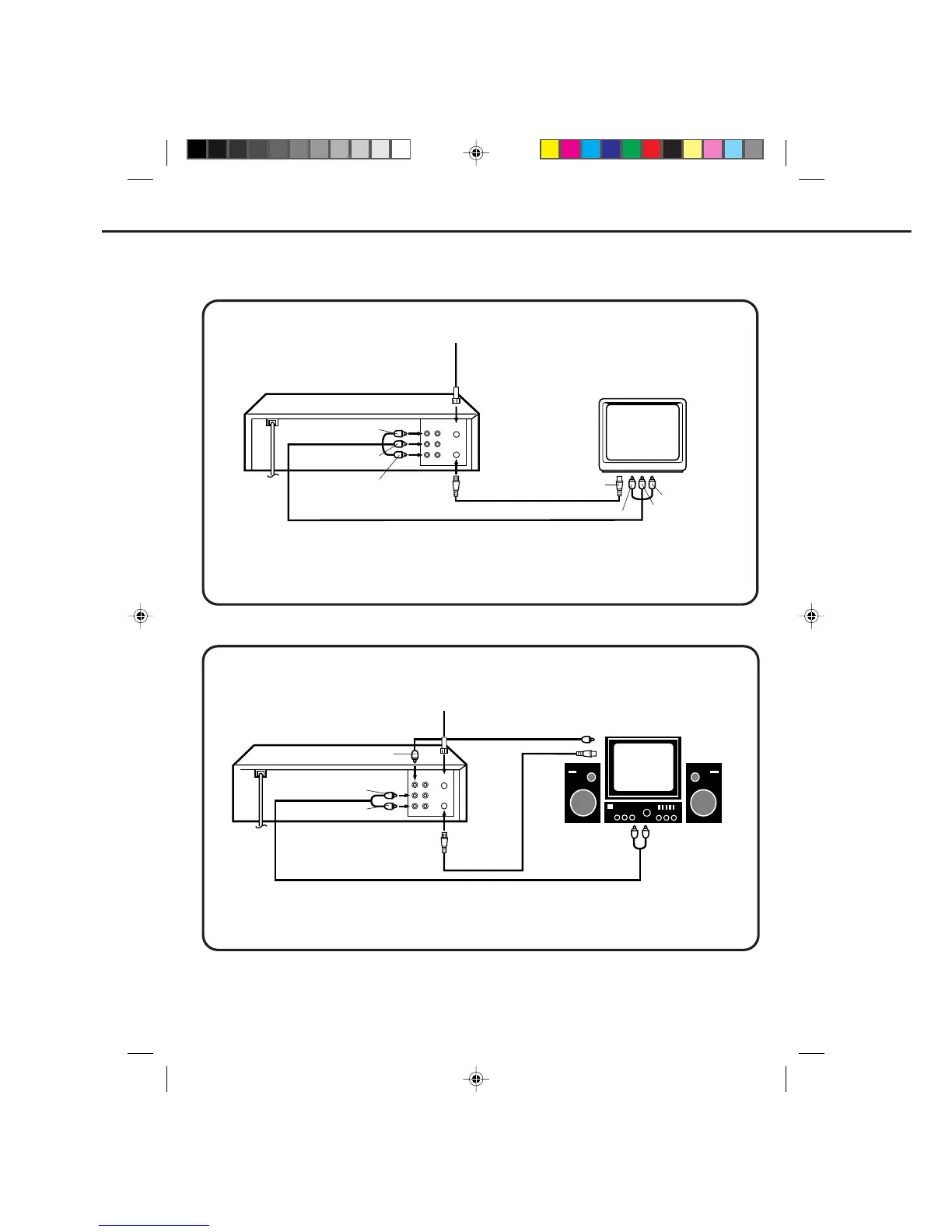
When you connect your VCR to a Stereo Component System, you can view the picture from the VCR while
enjoying powerful sound from your audio system.
AUDIO/VIDEO CONNECTIONS
AUDIO/VIDEO CONNECTION
If your TV has AUDIO IN and VIDEO IN jacks, you can connect your VCR to them to receive a higher quality
picture and sound. If you have a stereo, you can connect a stereo amplifier to enjoy powerful sound.
STEREO AMPLIFIER CONNECTIONS
TO AUX (R) IN
TO AUX (L) IN
OUT
IN
TO AUDIO (R) OUT
TO VIDEO OUT
TO AUDIO (L) OUT
AUDIO/VIDEO Cord (Not supplied)
TO VIDEO IN
TO AUDIO (R) IN
TO AUDIO (L) IN
TO ANT IN
TO VHF/UHF
OUT
TV
VCR
TO VHF/UHF IN
TO VHF/UHF IN
TO AUDIO (L) OUT
TO AUDIO (R) OUT
TO VIDEO OUT
TO VIDEO IN
VIDEO Cord
(Not supplied)
TO ANT IN
TO VHF/UHF
OUT
TV
VCR
AUDIO Cord (Not supplied)
Connect the AUDIO (L/R) OUT jacks on the VCR to the AUX (L/R) jacks on the stereo amplifier.
1. Connect the VIDEO OUT jack on the VCR to the VIDEO IN jack on the TV.
2. Connect the AUDIO (L/R) OUT jacks on the VCR to the AUDIO (L/R) IN jacks on the TV.
3. Set the VIDEO/TV selector of your TV to "VIDEO".
4C90301A-E(P20-29) 26'04'1999, 10:51 AM22


 To Next Page