45
ENGLISH
12
POWER
CHANNEL
MENU
ENTER
CANCEL
AUTO
TRACKING
SLOW
PAUSE/STILL
STOP
PLAY
REW/
REC/OTR
SKIP
SEARCH
3
45
6
789
0
/F.FWD
SET
TIMER REC TV MONI.
CALL
TV/VCR
AUDIO
SPEED
EJECT
CLOCK/
COUNTER
COUNT
RESET
ZERO
RETURN
INPUT
SELECT
INDEX
SLOW
1
2
3
NOTE: When you recorded an INDEX mark at the very beginning of the tape, the mark may not be found.
During INDEX search, the tape may stop and begin to play at a slightly different location.
INDEX may not function properly with old or worn out video tapes.
•
•
•
EXAMPLE: When the tape has four separate recorded
Programmes, select 4 to go to the beginning of the 4th
programme (4th index mark).
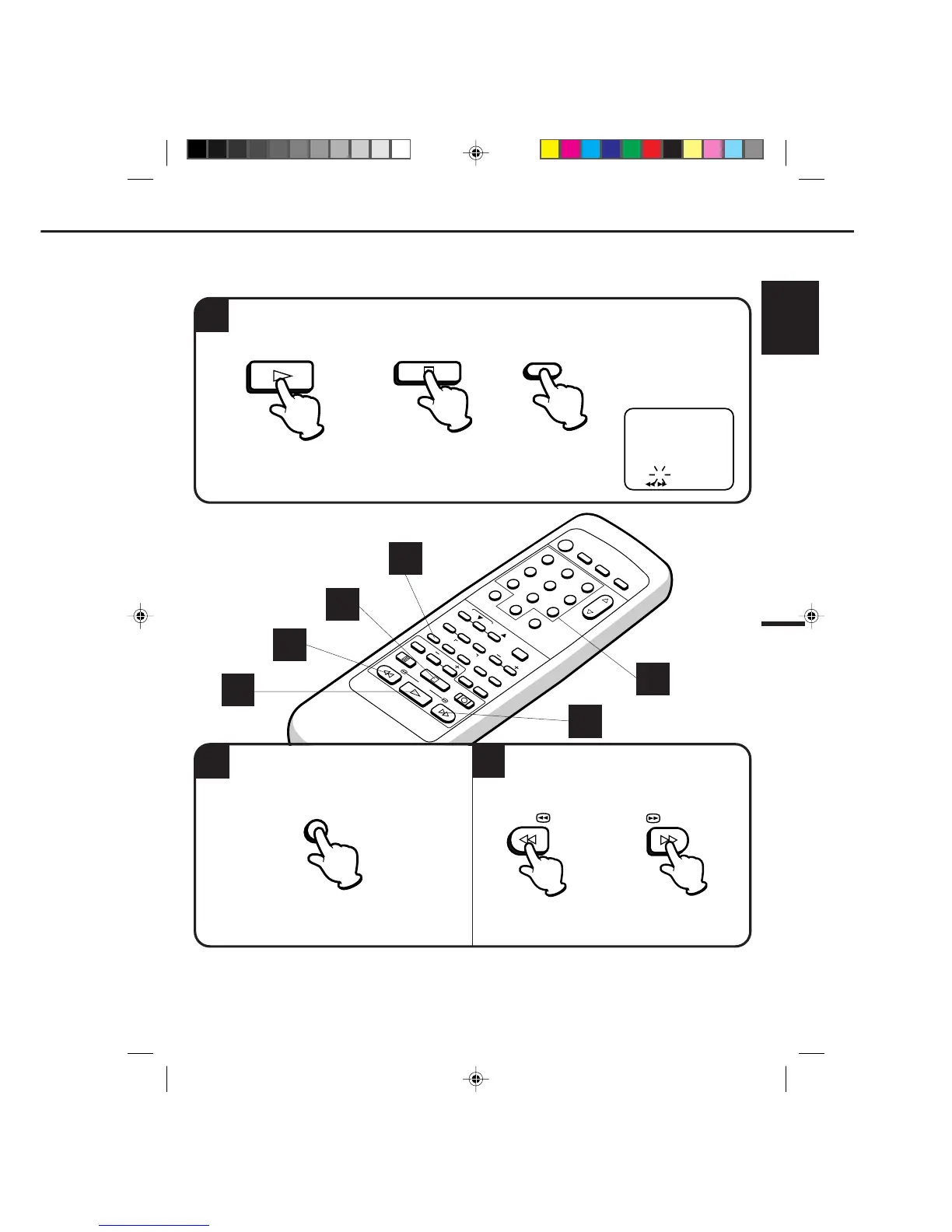
VIDEO INDEX SEARCH SYSTEM (INDEX)
The VIDEO INDEX SEARCH SYSTEM (INDEX) enables you to locate the beginning of any recording made on the
VCR. The Index Search function automatically records an INDEX mark on the tape whenever a recording is
initiated. This mark can easily be located by using the F.FWD and REW buttons.
SEARCHING FOR AN INDEX MARK
To skip over a selected number of INDEX marks, press the PLAY or STOP button, then press the INDEX
button.
Select the number of INDEX marks to be
skipped (up to 9) with the Channel Number
keys.
Press the F.FWD or REW button. The VCR will
skip over the selected number of INDEX marks,
the VCR will resume normal playback at the
selected mark.
OR
INDEX 1
〈
1-9/ / /INDEX
〉
1
1
3
1
3
2
PLAY
STOP
INDEX


 To Next Page