33
ENGLISH
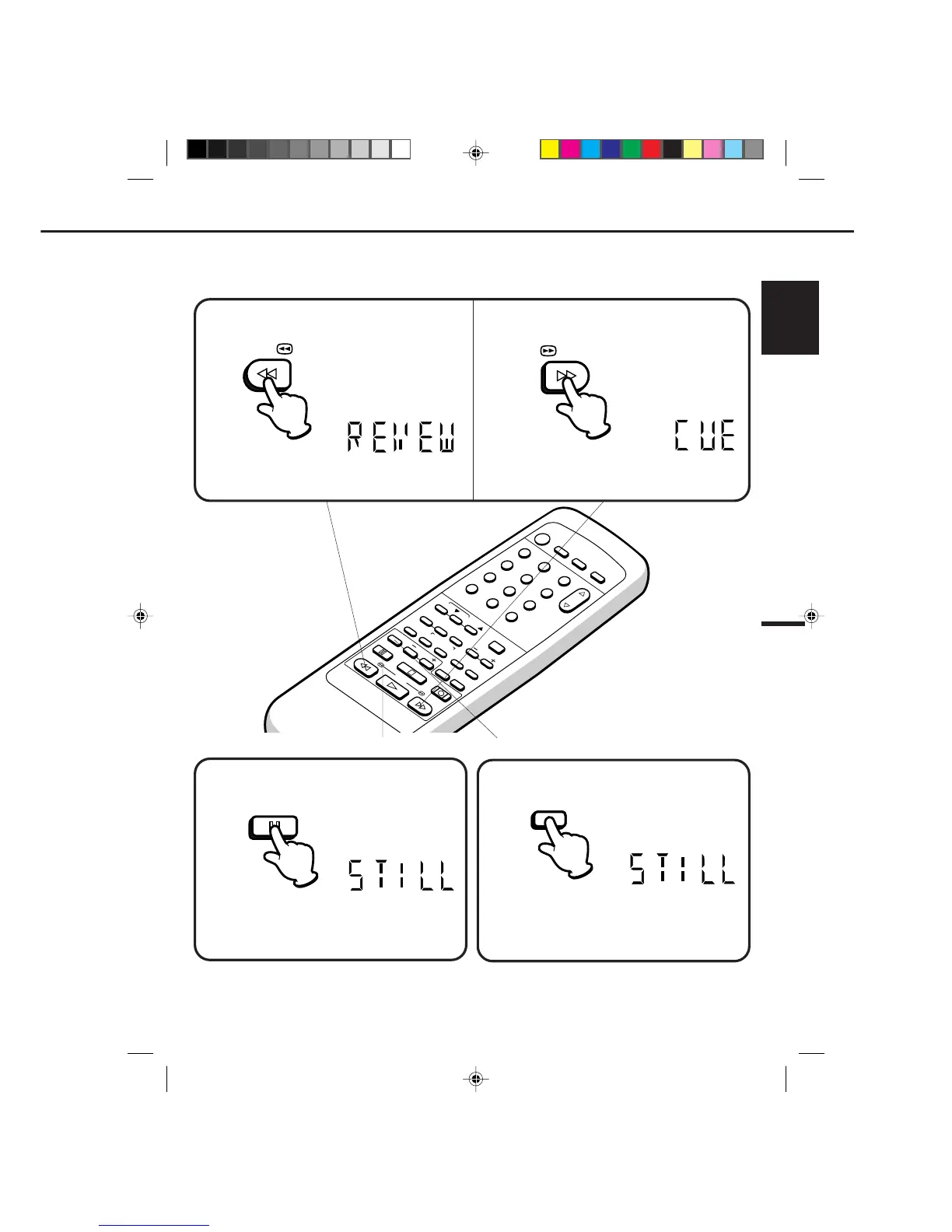
To visually search backward, press the REW button
once or twice in the PLAYBACK mode.
To visually search forward, press the F.FWD button
once or twice in the PLAYBACK mode.
SPECIAL PLAYBACK
•
•
•
•
NOTE:
TO VISUALLY SEARCH FOR DESIRED POINTS
When either the F.FWD or REW button is pressed in the PLAYBACK mode, the speed search picture will appear.
When pressed twice, the search picture will increase speed. Speed search time depends upon the speed used
(SP, LP or SLP) during recording. To rewind or fast forward a tape, press the STOP button, and then press the REW
or F.FWD button.
Press the SLOW button during STILL playback.
The still picture will advance by one frame each time
you press the button. Hold the button for continuous
frame by frame viewing.
Press the PAUSE/STILL button again to resume
normal playback.
FRAME BY FRAME ADVANCE
Press the PAUSE/STILL button in the PLAYBACK
mode.
TO WATCH A STILL PICTURE
The STILL indicator will light in the display about
4 seconds.
Press the PAUSE/STILL button again to resume
normal playback.
The REVEW indicator will light in the display about
4 seconds.
Press the PLAY button to resume normal viewing speed.
The CUE indicator will light in the display about
4 seconds.
Press the PLAY button to resume normal viewing speed.
12
POWER
CHANNEL
MENU
ENTER
CANCEL
AUTO
TRACKING
SLOW
PAUSE/STILL
STOP
PLAY
REW/
REC/OTR
SKIP
SEARCH
3
45
6
789
0
/F.FWD
SET
SLOW
TIMER REC TV MONI.
CALL
TV/VCR
AUDIO
SPEED
EJECT
CLOCK/
COUNTER
COUNT
RESET
ZERO
RETURN
INPUT
SELECT
INDEX
Best results during speed search playback can be obtained with cassette tapes recorded in the "SP" and "SLP" mode.
A few noise bars will appear on the picture
during SPEED SEARCH and STILL.
The audio output is muted
during SPEED SEARCH, STILL, FRAME ADVANCE and SLOW MOTION.
To prevent damage to the tape, CUE, REVIEW and STILL playback is automatically changed to the PLAYBACK mode
after 5 minutes.
33
/F.FWD
REW/
SLOW
PAUSE/STILL
4C90301A-E(P30-37) 26'04'1999, 10:50 AM33


 To Next Page