47
ENGLISH
12
POWER
CHANNEL
MENU
ENTER
CANCEL
AUTO
TRACKING
SLOW
PAUSE/STILL
STOP
PLAY
REW/
REC/OTR
SKIP
SEARCH
3
45
6
789
0
/F.FWD
SET
TIMER REC TV MONI.
CALL
TV/VCR
AUDIO
SPEED
EJECT
CLOCK/
COUNTER
COUNT
RESET
ZERO
RETURN
INPUT
SELECT
INDEX
SLOW
2
1
3
CHECK BEFORE YOU BEGIN
• Turn ON the TV and set to the
video channel 3 or 4.
• Turn ON the VCR POWER
button.
• Press the TV/VCR selector button
to select the VCR mode.
When a TV is connected with an
audio/video cable, turn the TV and
this VCR on, and select the video
input mode on the TV.
SEPARATE AUDIO PROGRAM (SAP)
〈
+
/
–
/ENTER/MENU
〉
MENU
TIMER REC SET
CH SET UP
VCR SET UP
SYSTEM SET UP
NO NOISE BACKGROUND
ON OFF
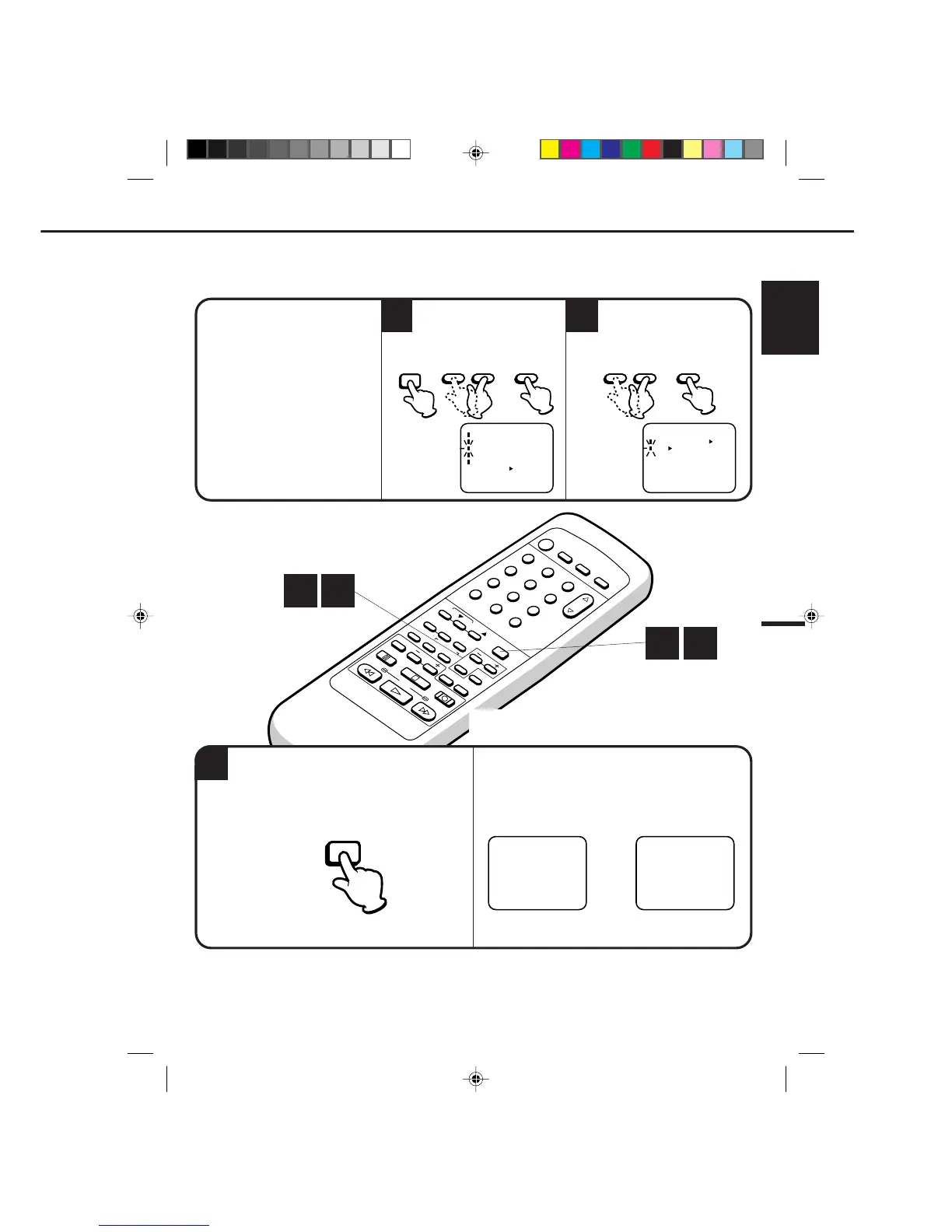
to select the VCR SET UP option,
then press the ENTER button.
Press the MENU button.
Press the SET + or – button
press the ENTER button to select
the ON position.
Press the SET + or – button
to select the SAP option, then
ENTER– SET +MENU ENTER– SET +
Press the MENU button twice.
When the VCR is turned on or a channel selection is
made, make certain the SAP is appared on the screen.
This means that the "Separate Audio Program"
broadcasting is available.
STEREO SAP
OR
LISTENING TO SAP (SEPARATE AUDIO
PROGRAM)
Your VCR is fitted with an SAP broadcast system which enables you to switch to a SEPARATE AUDIO
PROGRAM when viewing a selected channel.
This function applies only when the program is broadcast in multi languages through the SAP broadcast
system.
1 2
1 3
MENU
4C90301A-E(P44-47) 26'04'1999, 10:47 AM47


 To Next Page