10
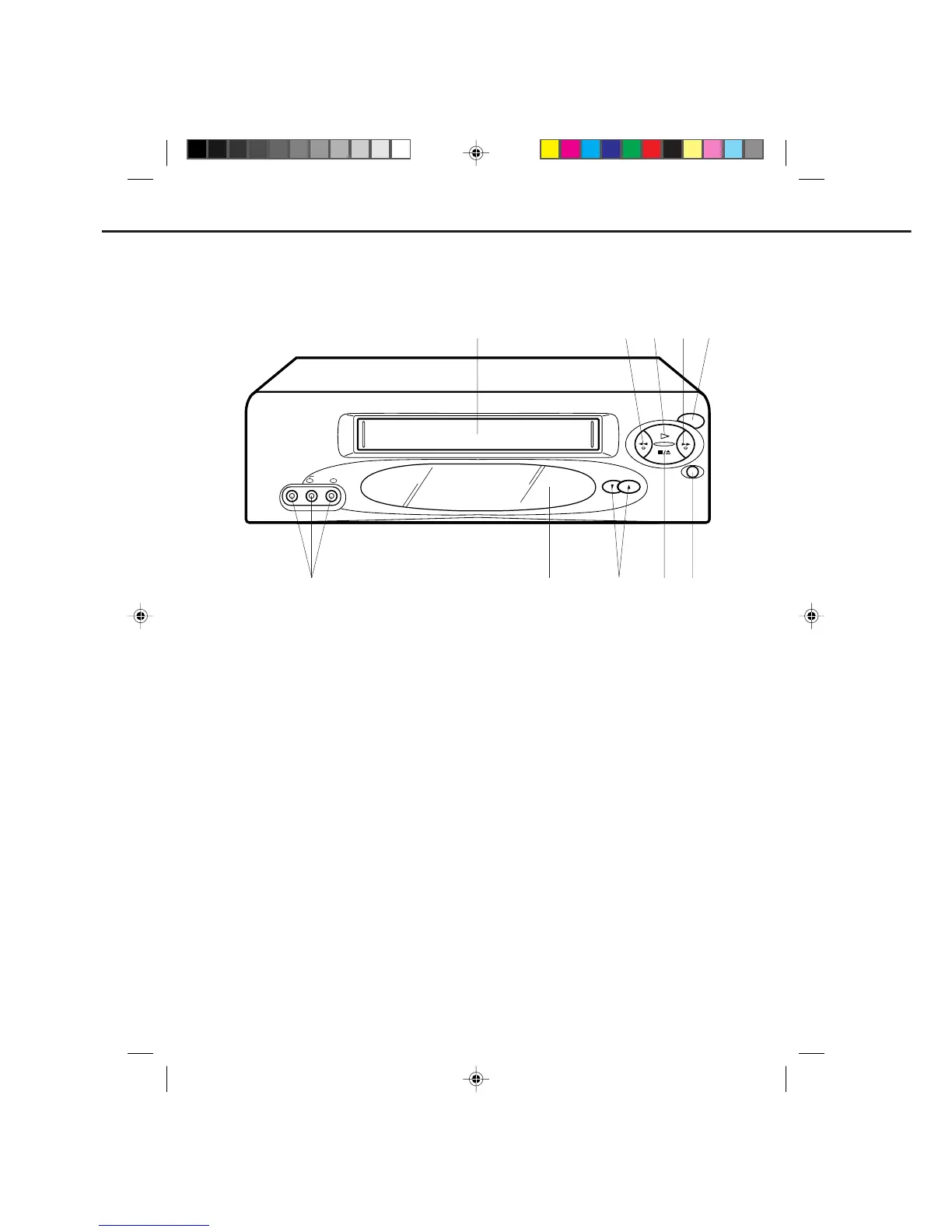
LOCATION OF CONTROLS
DESCRIPTION OF CONTROLS
1.
2.
3.
4.
5.
6.
Cassette Loading Slot - To insert or remove a
video tape.
REW button - In the STOP mode, this button rapidly
winds the tape backwards. In the PLAY mode, this
button activates Reverse Search.
PLAY button - Press to play a prerecorded tape.
F. FWD button - In the STOP mode, this button
rapidly winds the tape forward. In the PLAY mode,
this button activates Forward Search.
POWER button - Turns the VCR power on and off.
REC/OTR button - Press once to start normal
recording. Additional presses activate One Touch
Recording.
7.
8.
9.
10.
STOP/EJECT button - Press once to stop the tape
in any mode. Press again (on the VCR) to eject
the tape.
CHANNEL ▲ / ▼ buttons - Used to select a
channel for viewing or recording.
Remote Sensor - Signals from the Remote Control
are received here.
AUDIO/VIDEO IN Jacks - Audio and video signal
cables from an external source can be connected
here.
FRONT
POWER
REC/OTR
CHANNEL
VIDEO IN
PLAY
REW
F.FWD
STOP/EJECT
AUDIO IN
MONO
L R
1 2
9
67
10
45
8
3
4C90301A-E(P10-19) 26'04'1999, 10:53 AM10


 To Next Page