44
12
POWER
CHANNEL
MENU
ENTER
CANCEL
AUTO
TRACKING
SLOW
PAUSE/STILL
STOP
PLAY
REW/
REC/OTR
SKIP
SEARCH
3
45
6
789
0
/F.FWD
SET
SLOW
TIMER REC TV MONI.
CALL
TV/VCR
AUDIO
SPEED
EJECT
CLOCK/
COUNTER
COUNT
RESET
ZERO
RETURN
INPUT
SELECT
INDEX
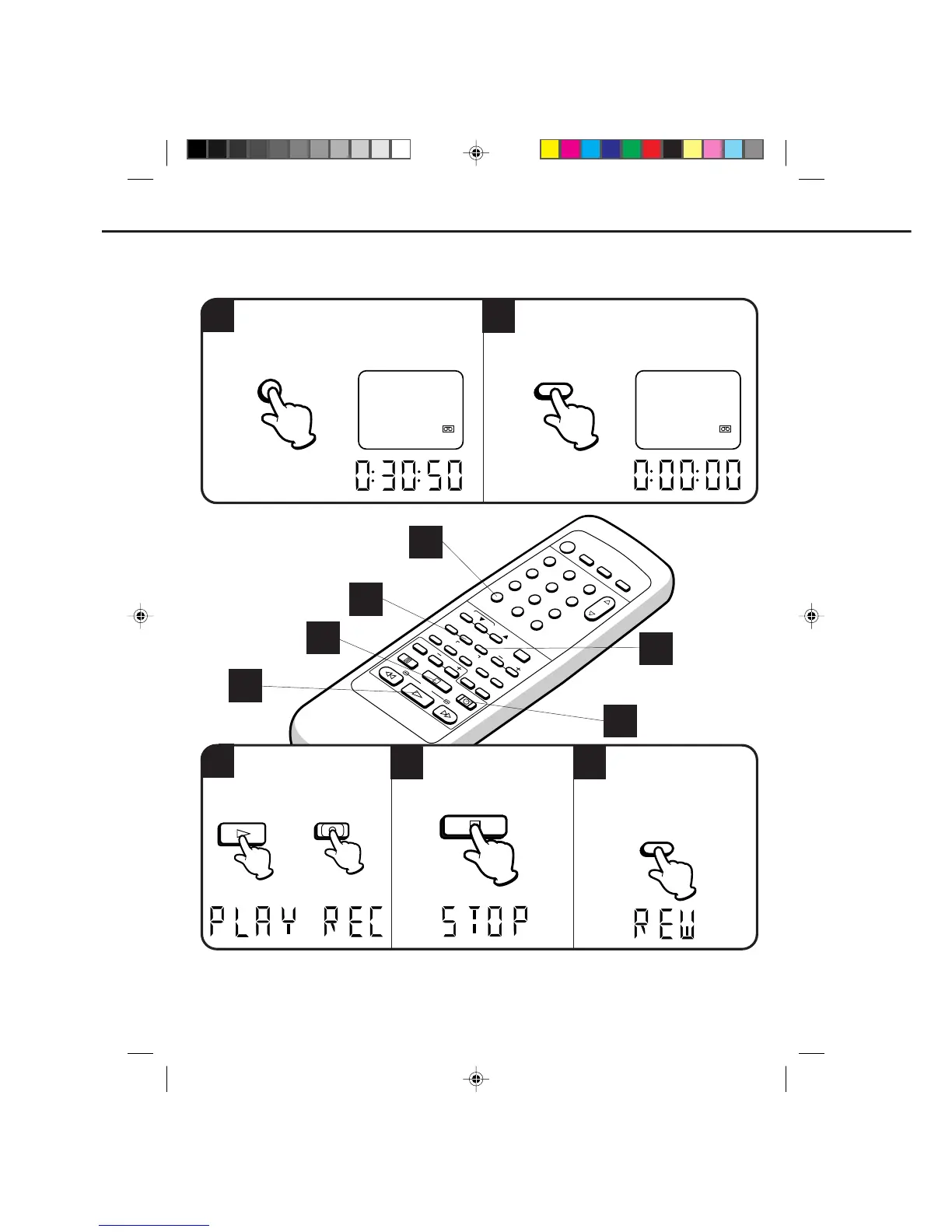
USING ZERO RETURN
1
3
4
5
Begin playback or recording.
Press the ZERO RETURN
button.
The tape will rewind and
automatically stop at the
“00:00:00” position.
Press the STOP button when
playback or recording is
finished.
OR
The zero return function provides a convenient method of rapidly returning to the starting point of recording
or playback. The starting point can be indexed for any location on the tape by pressing the COUNT RESET
button and ZERO RETURN button.
2
clock will change to the counter automatically in the
display.)
Press the CALL button to display the counter on
the screen. (When loading a cassette tape, the
Before playback or recording, press the
COUNT RESET button to set the counter to
“00:00:00”.
00 : 00 : 00 SP
8:30 AM THU CH125
00 : 30 : 50 SP
8:30 AM THU
CH125
PLAY
1
2
3
3
REC/OTR
CALL
COUNT
RESET
STOP
4
5
ZERO
RETURN
4C90301A-E(P44-47) 26'04'1999, 10:47 AM44


 To Next Page