48
PLAYBACK CAMCORDER
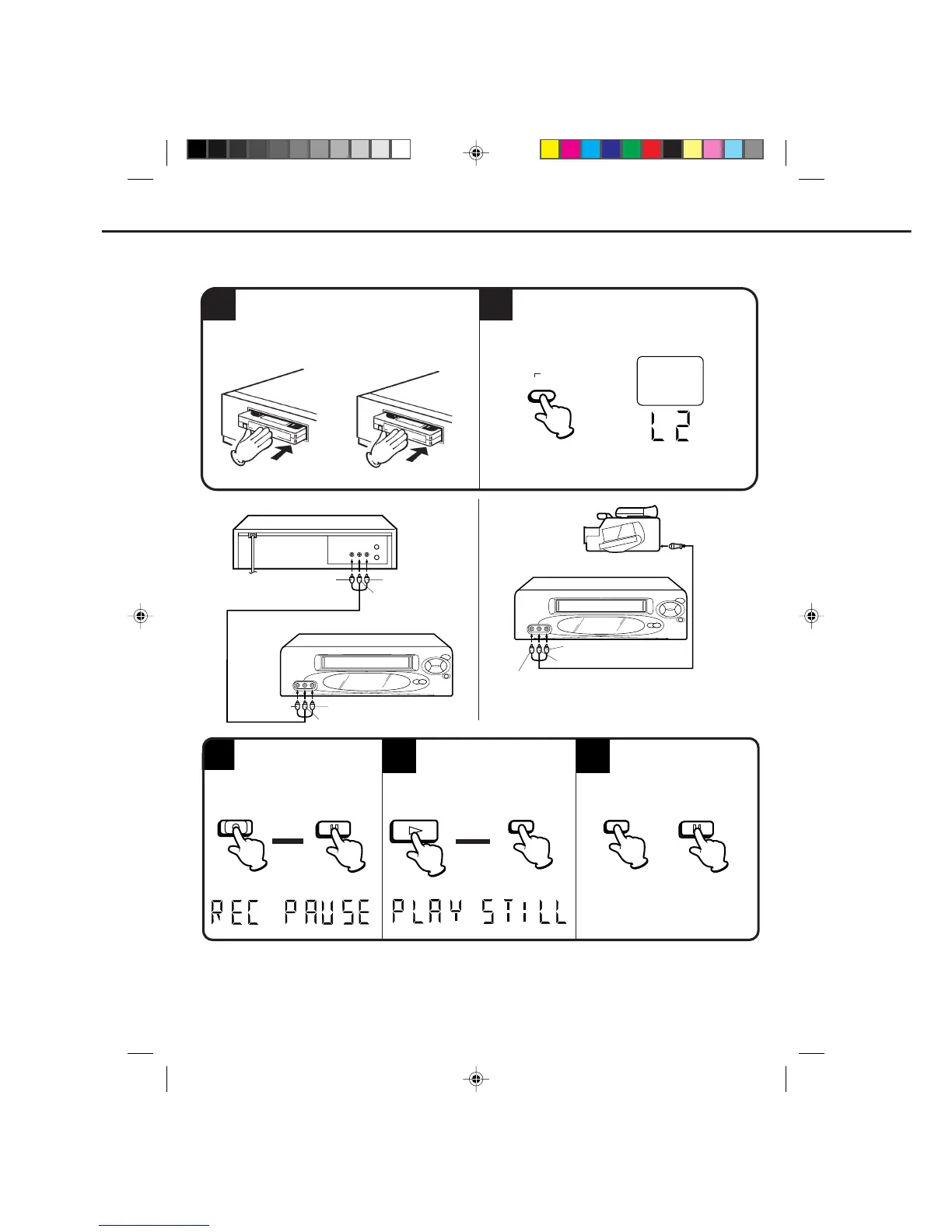
TO AV JACK
1
It is recommended that you set the SPEED to the SP mode on the recording VCR for best results.
Unauthorized recording of copyrighted television programs, films, video tapes and other materials may
infringe on the rights of copyright owners and violate copyright laws.
NOTE:
Load a blank cassette tape with the erase
prevention tab intact into the recording VCR.
Load a previously recorded tape into the
playback VCR or CAMCORDER.
For duplicating a previously recorded tape from a
camcorder, follow the camcorder manufacturer’s
instructions. A typical camcorder dubbing hookup is
shown above.
3
5
Press the PAUSE/STILL
button on both the VCRs
simultaneously to begin the
duplicating process.
4
Press the PLAY button on the
playback VCR, then press the
PAUSE/STILL button.
Press the REC/OTR button
on the recording VCR, then
press the PAUSE/STILL
button.
•
•
2
▲
▲
PLAYBACK VCR
AUDIO/VIDEO cord (Not supplied)
RECORDING VCR
TO VIDEO OUT
TO AUDIO (R) OUT
TO AUDIO (L) OUT
TO AUDIO (R) IN
TO AUDIO (L) IN
TO VIDEO IN
AUDIO/VIDEO cord
(Not supplied)
RECORDING VCR
TO AUDIO (R) IN
TO AUDIO (L) IN
TO VIDEO IN
If you connect the VCR to another VCR or camcorder, you can duplicate a previously recorded tape. Make all
connections before turning on the power.
DUPLICATING A VIDEO TAPE
Press the INPUT SELECT button twice to
select AUDIO/VIDEO input position. The
"LINE2" will appear on the screen. The L2
indicator will light up on the display on the
recording VCR.
PAUSE/STILL
REC/OTR
PAUSE/
STILL
PLAY
PAUSE/
STILL
PAUSE/STILL
SELECT
INPUT
LINE2
NOTE: You can also use the rear AUDIO/ VIDEO
IN jacks. Select "LINE1" by pressing the
INPUT SELECT button.
4C90301A-E(P48-49) 26'04'1999, 10:46 AM48


 To Next Page