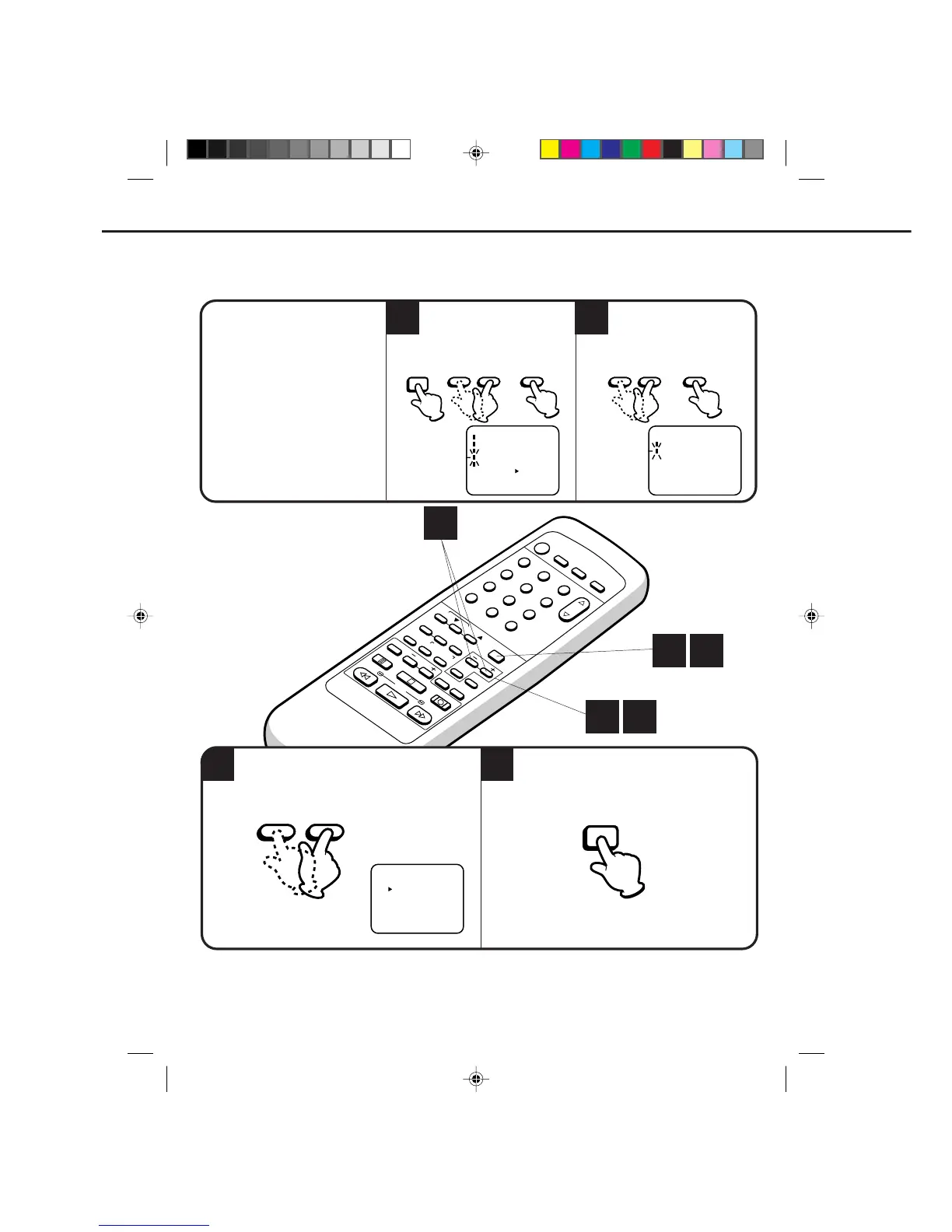
2
1
ENTER– SET +
select the SYSTEM SET UP option,
then press the ENTER button.
Press the MENU button.
Press the SET + or – button to
CHECK BEFORE YOU BEGIN
• Turn ON the TV and set to the
video channel 3 or 4.
• Turn ON the VCR POWER button.
• Press the TV/VCR selector button
to select the VCR mode.
When a TV is connected with an
audio/video cable,
turn the TV and this VCR on and
select the video input mode on
the TV.
Press the SET + or – button
to select the LANGUAGE
option, then press the ENTER
button.
Press the SET + or – button to select the desired
language: English, Spanish or French.
Press the MENU button 3 times.
ON-SCREEN LANGUAGE SELECTION
It you do not set the clock, the SYSTEM SET UP menu automatically appears when you press the
MENU button.
NOTE:
1 2
1 4
3
ENTER
〈
+
/
–
/ENTER/MENU
〉
LANGUAGE/IDIOMA/LANGUE
ENGLISH
FRANCAIS
ESPAÑOL
MENU
– SET +
4C90301A-E(P20-29) 26'04'1999, 10:52 AM24


 To Next Page