27
ENGLISH
12
POWER
CHANNEL
MENU
ENTER
CANCEL
AUTO
TRACKING
SLOW
PAUSE/STILL
STOP
PLAY
REW/
REC/OTR
SKIP
SEARCH
3
45
6
789
0
/F.FWD
SET
TIMER REC TV MONI.
CALL
TV/VCR
AUDIO
SPEED
EJECT
CLOCK/
COUNTER
COUNT
RESET
ZERO
RETURN
INPUT
SELECT
INDEX
SLOW
5
CHECK BEFORE YOU BEGIN
• Turn ON the TV and set to the video channel 3 or 4.
• Turn ON the VCR POWER button.
• Press the TV/VCR selector button to select the VCR
mode.
When a TV is connected with an audio/video cable,
turn the TV and this VCR on, and select the video
input mode on the TV.
1
〈
+
/
–
/ENTER/MENU
〉
CH SET UP
TV CATV
AUTO CH MEMORY
ADD/DELETE
〈
+
/
–
/ENTER/MENU
〉
MENU
TIMER REC SET
CH SET UP
VCR SET UP
SYSTEM SET UP
NO NOISE BACKGROUND
ON OFF
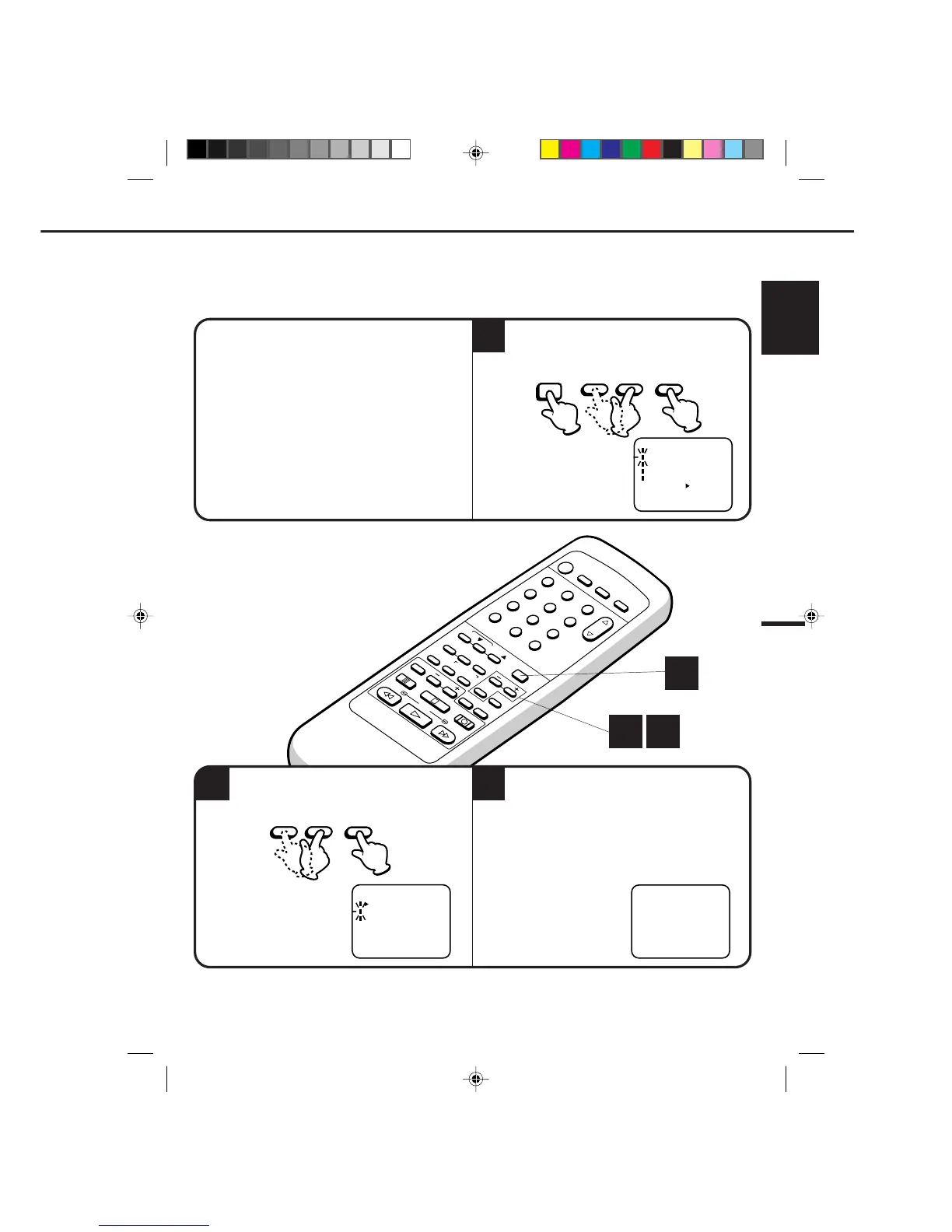
Press the MENU button.
Press the SET + or – button to select the CH
SET UP option, then press the ENTER button.
Press the SET + or – button to select the AUTO
CH MEMORY mode, then press the ENTER
button.
The auto tuning will start. The channel display
will count up and when finished, the screen
returns to normal.
2
3
The VCR can receive a maximum of 181 channels by presetting the channels into memory.
AUTOMATIC MEMORY TUNING
1 2
1
CH 001
– SET + ENTER
MENU
– SET + ENTER
4C90301A-E(P20-29) 26'04'1999, 10:52 AM27


 To Next Page