64
a
b
c
d
The headset
The headset
(a)
connects the fork to the frame, but
allows it to move freely. It must afford virtually no
resistance to moving, if your CENTURION bike is to
go straight, stabilizing itself as it runs. The shocks
caused by uneven road surfaces expose the headset
to considerable levels of stress. In this way it can
become loose and maladjusted.
G
Riding the bike with a loose headset
greatly increases the stress on the fork
and the bearings. This can lead to dam-
age to the fork. Risk of an accident!
Checking and readjusting
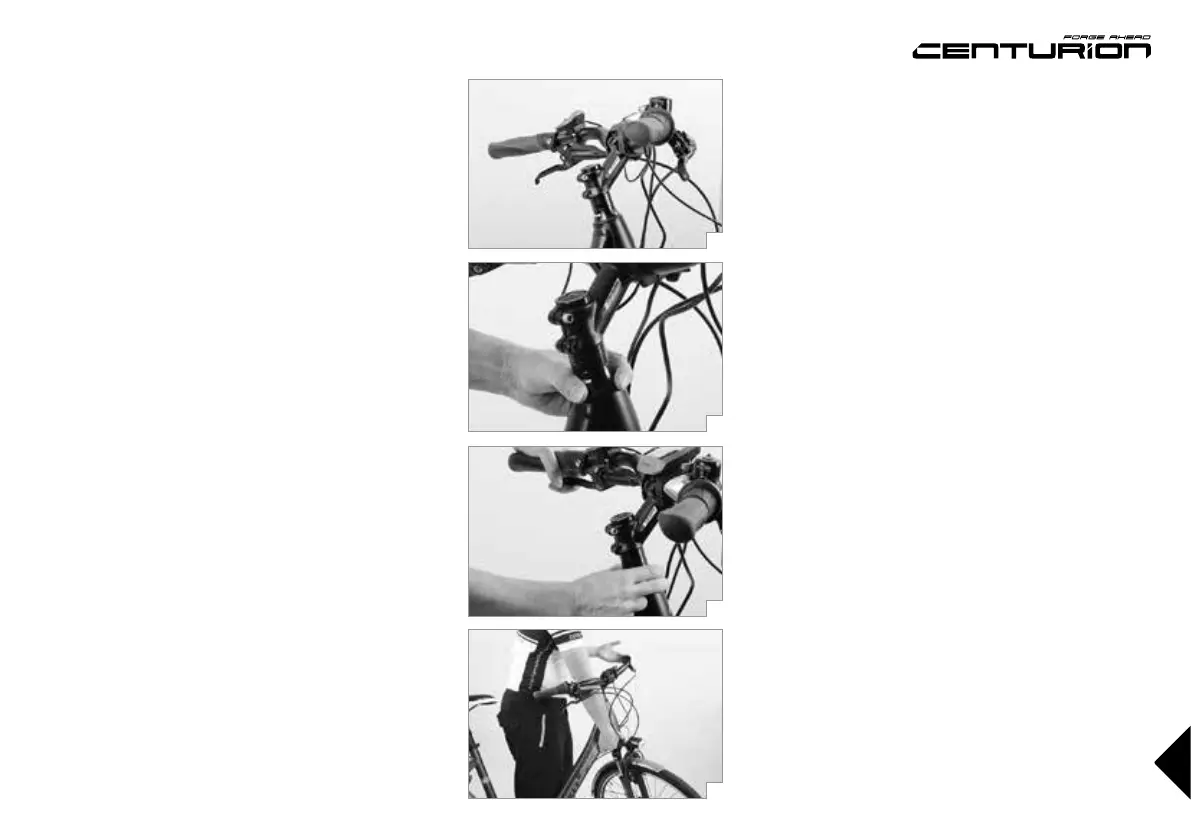
Check the headset for play by placing your fingers
around the upper head tube race
(b)
. Bring your
weight to bear on the saddle, pull the front brakes
with your other hand and push the CENTURION bike
firmly back and forth with the wheel remaining on the
ground. If the bearing has play, you will feel the upper
head tube race moving in jerks relative to the lower
head tube race - visible as a small gap in between the
head tube races
(c)
.
To check the bearing for ease of running, lift the
frame until the front wheel is suspended in the air
(d)
.
The handlebars should turn from far left to far right
without feeling roughness or tightness at any point.
With a gentle tap on the handlebars the fork should
turn easily from the middle position.
If you face any problems during the test, contact your
CENTURION dealer.
G
Adjusting the headset requires a certain
amount of experience and should there-
fore be left to your CENTURION dealer.
Threadless headsets – Aheadset
®
This headset system is characterized by the fact that
the stem is not in the fork steerer tube but clamps
it from outside. Hence the stem is an important
constituent part of the headset, clamping it therefore
also sets the adjustment. You generally only need
one or two Allen keys and a torque wrench to adjust
an Aheadset
®
.
Release the clamping bolt(s) located on the side
of the stem by one to two turns. Gently tighten the
countersunk adjusting bolt on top a little, e.g. by a
quarter turn, by using an Allen key.
Align the stem so that the handlebars are not slanted.
Make sure the front wheel is in line with the top tube
and the stem. Tighten up the stem clamping screws.
Use a torque wrench and never exceed the maxi-
mum torque values! You will find the prescribed val-
ues in the chapter “Recommended torque settings”,
directly on the components and/or in the operating
instructions of the component manufacturers on this
CENTURION CD-ROM.
Check the headset for play as described above.
Take care not to tighten the bearing too much, as
this could easily destroy it.



 To Next Page