10
mn-4203
3.2 Loading Media
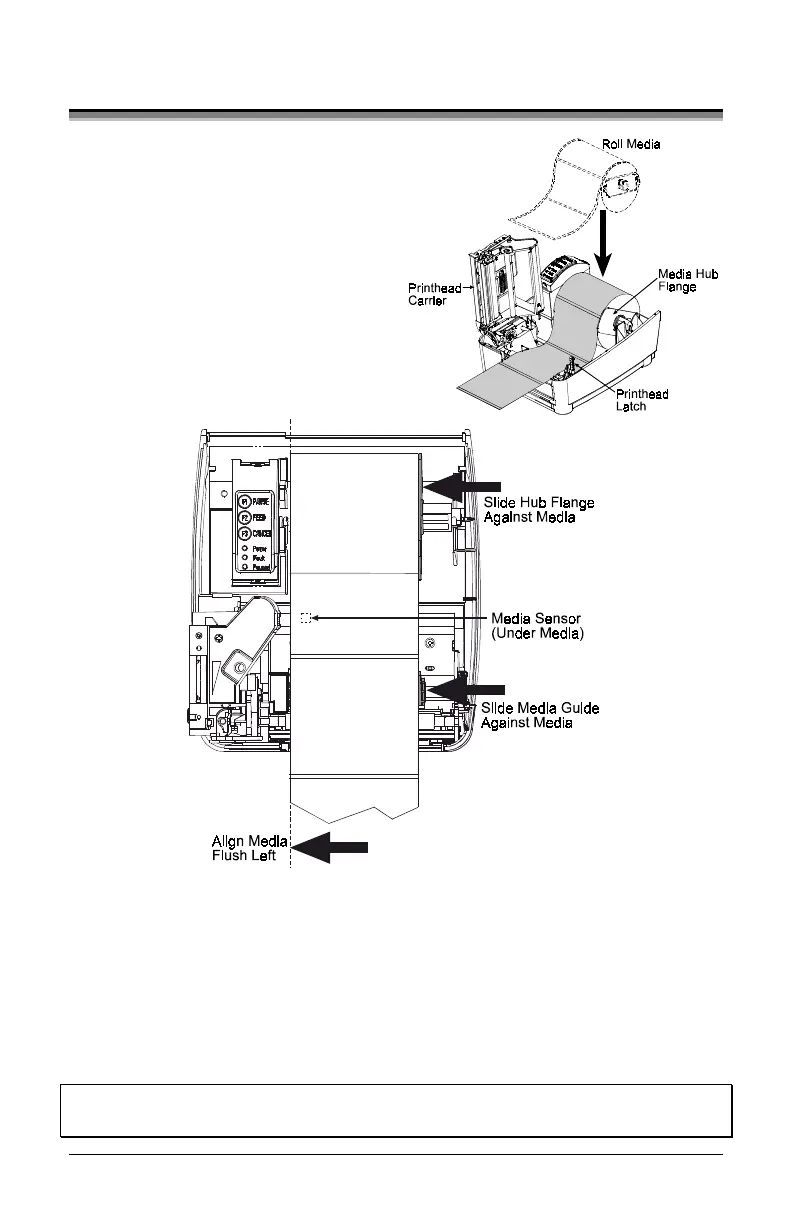
1. Open the cover.
2. Push the Printhead Latch toward
the back of the printer and raise
the Printhead Carrier Assembly.
3. Place a roll of media (labels
facing up) on the media hub and
insert them into the printer. Slide
the Media Hub Flange against the
roll of media.
4. Route the media as shown below.
5. Slide the Media Guide to the edge of the media.
6.
Close the Printhead Carrier Assembly and press down until it locks into
place.
7. Close the cover and press the ‘Feed’ button several times to feed the media
and ensure proper tracking. If the printer does not correctly sense the top of
each label it may be necessary to perform the Calibration Procedure, Section
4.5.
Note: The printer is factory set for 4-inch media and ribbon, when using
different width media/ribbon please refer to Chapter 5.


 To Next Page