3. Operating QA-ES
This chapter explains the operating controls, switches and menus
of the QA-ES, and details how to use them in ESU testing.
3.1 Control Switches
and Connections
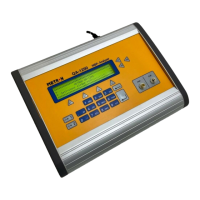
Front Panel
1. Power Switch Turns the power on and off.
2. Encoder Sets values according to the specified range and
choose between different operations/ measurement
ranges.
3. Enter Admits newly specified information.
4. Cancel Cancels a new value and returns to previously cho-
sen value.
5. LCD Display Shows messages, test results and function menus.
6. Function Keys Fl - F5 are used to select the functions shown on the
bottom line of the LCD display, i.e., for selecting the
function that is directly above the key.
7. RF-Detect Indicates when the ESU is activated.
8. Remote Indicates that REMOTE CONTR. (F4) has been
pressed.
9. Scope Output
Connector
BNC-cable connector for attenuator signal in real
time. (When oscilloscope output is desired.)
1



 To Next Page