Need help?
Do you have a question about the MFB SYNTH Pro and is the answer not in the manual?
Covers safe placement, ventilation, and proper electrical connection procedures for the device.
Safety measures during operation, including handling liquids, ensuring stability, and preventing foreign objects.
Guidelines for cleaning and servicing, emphasizing professional repair and avoiding harsh chemicals.
Outlines the device's authorized functions and proper disposal methods, classifying it as special waste.
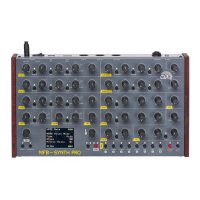
Introduces the MFB SYNTH PRO as an eight-voice polyphonic analog synthesizer with advanced features.
Details the initial power-up procedure, connections, and warm-up period for tuning stability.
Explains how to adjust sound shaping functions using controls and how parameters are displayed in the top row.
Describes how to access and use the real-time waveform display and adjust trigger/timing values.
Explains the LEDs that visualize the currently active voices (1-4 red, 5-8 green).
Guides on selecting, saving, and programming new presets, including bank management and hints for avoiding issues.
Details the eight voice modes (Poly, Poly1+7, Chord+4, Mono, Unisono, Rotate) and their assignments.
Explains how to adjust the octave register (16', 8', 4') for each oscillator, with LED indicators.
Details the DTUNE 1/2/3 functions for fine-tuning per VCO and how to adjust them using the MISC section.
Explains DCO-mode for stable tuning and the automatic tuning procedure, including hints for optimal use.
Describes continuous waveform blending (Sub, Saw, Triangle, Square, Extra) and the SUB oscillator's function.
Details modulation sources for Pitch and Wave (LFO, Env) and how intensity is adjusted via MOD controls.
Describes how to set glide time and curve (linear/logarithmic) using MISC button 4 and MENU Additional.
Explains how to synchronize VCO2 and VCO3 to VCO1 for classic sync sounds, noting DCO-mode limitations.
Details using VCO3 to modulate VCO1/VCO2 frequency, specifying sources and intensity, and DCO-mode limitations.
Describes using LEVEL controls to adjust the volume levels of the individual VCOs.
Details the multi-mode filter (LP, BP, HP) and its controls like LP/BP/HP for mode selection.
Describes the dedicated lowpass filter (SSI2144) with a steeper slope and its controls.
Explains switching between serial/parallel routing (PAR/SER) and using GLOBAL CUTOFF for simultaneous frequency control.
Details filter modulation sources (LFO, Env) and key follow intensities, with assignment options in menu settings.
Explains summing filter outputs (MIX) and spreading them in the stereo panorama using the STEREO button.
Describes the three ADSR envelopes with loop functions, their assignments (VCA, Filters), and parameter controls.
Details LFO1 and LFO2 features, including rate, waveform selection (blend, sample&hold), and reset/1-shot modes.
Explains VCA control typically by ENV 1 and possible additional modulation using MOD AMT.
Lists sync values for LFO1 and LFO2, and options for LFO2 modulating LFO1.
Details available effects (Reverb, Delay, Chorus), type selection, and blending wet/dry signals with DRY MIX WET.
Explains the function of the MASTER OUT control for adjusting the overall output level.
Introduces the sequencer's capability to store 240 patterns, each up to 16 steps, for monophonic or polyphonic entry.
Guides on selecting, storing, and programming sequences, including bank management and hints for avoiding issues.
Details how to program sequences step-by-step using a MIDI keyboard, including note/chord entry and pauses.
Explains how to activate the arpeggiator, its modes (Up, Down, Up/Down), and the hold-function.
Describes setting tempo (BPM) and shuffle values for the sequencer and arpeggiator, with hints for synchronization.
Details how to transpose an arpeggio with the hold-function enabled using a connected MIDI keyboard.
Covers adjustments for MIDI send/receive channels, clock source (Int/Ext), and controller changes.
Explains transmitting/receiving presets, sequences, and updating firmware via the USB PC port.
Details power input, USB PC port for data transfer, and USB MIDI controller connection.
Explains MIDI IN, OUT, THRU ports, headphone output, and main audio outputs for connecting to external gear.
Lists MIDI Control Change (CC) numbers and their corresponding synthesizer parameters, along with value ranges.
Lists further MIDI Control Change (CC) numbers and their corresponding synthesizer parameters, including envelopes and effects.
Explains how MIDI data sending/receiving is enabled via MENU MIDI, including channel change and program change settings.
States compliance with harmonized European standards and EH-directive for electromagnetic compatibility.
 General
| Type | Analog Synthesizer |
|---|---|
| Polyphony | 8 voices |
| Arpeggiator | Yes |
| Waveforms | Square, Triangle |
| LFOs | 2 LFOs |
| Envelopes | 3 ADSR envelopes |
| Keyboard | No |
| Connectivity | MIDI In/Out |
| Oscillators | 3 VCOs per voice |
| Filters | 24dB/octave low-pass filter |

 To Next Page