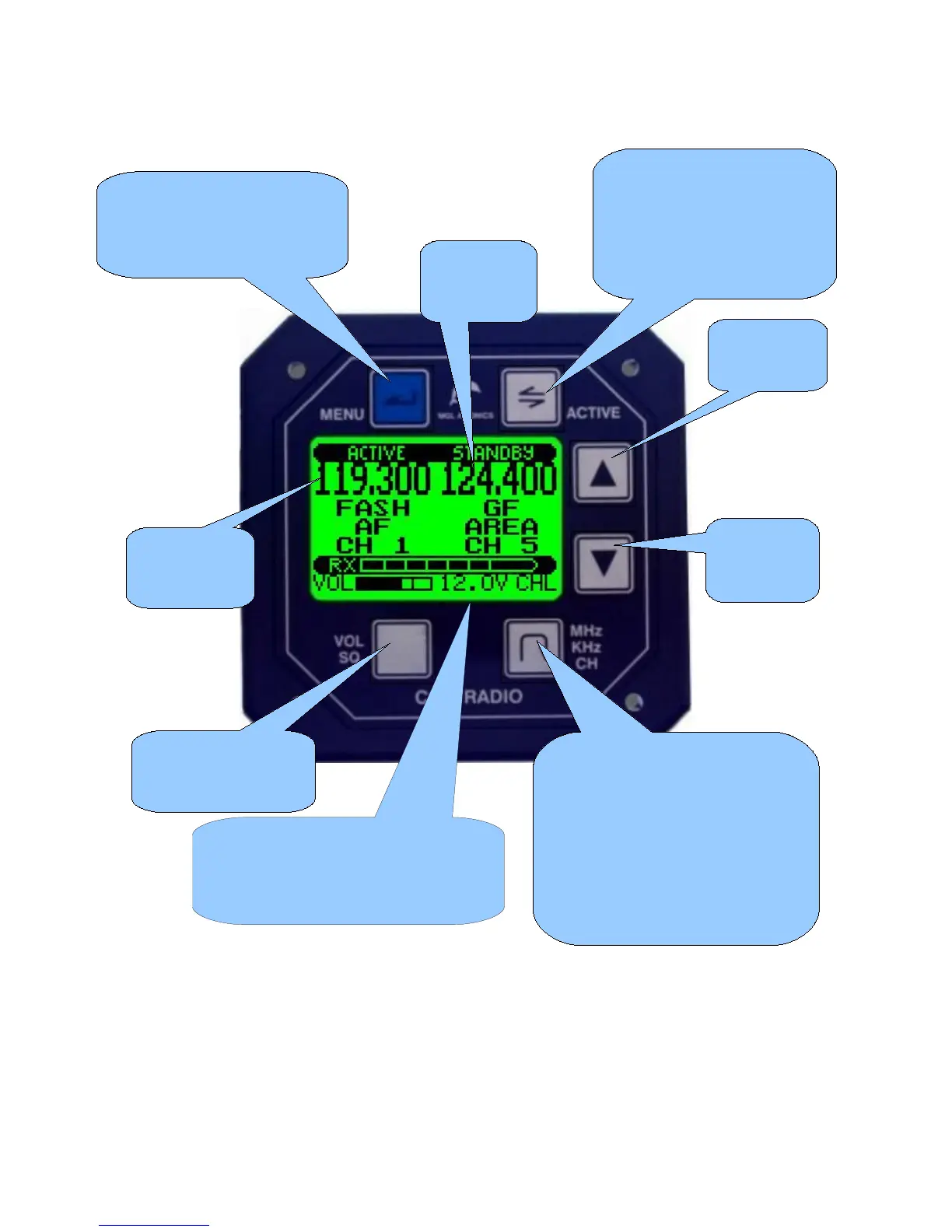
The V10 Panel
The above picture shows the V10 transceiver in its most typical application as “Flip-Flop”
frequency selection system. The V10 transceiver can be operated in other modes depending
on its setup and installation.
FLIP-FLOP mode
In this mode you change/edit the standby frequency while receive and transmit operate on the
active frequency. Active and standby frequencies may be interchanged using the “Active”
Press this button to
enter the menus. Here you
will find many adjustments
and setups
Pressing this button
exchanges active and
standby frequency.
Note: holding this button
down enables further
functions
The current
active
frequency
Increase
a value or
setting
Decrease
a value or
setting
Select volume or
squelch level to be
changed
Select MHZ, KHZ or channel to
be changed. Hold down this
button for 2 seconds to change
between MHZ/KHZ and Channel
mode. Hold down this button for
1 second when in MHZ/KHZ
mode to change between 50
and 25 KHZ tuning steps.
The current
standby
frequency
Status bar showing volume or
squelch level, voltage or transmitter
temperature and active frequency
selection mode



 To Next Page