EasyManua.ls Logo

Mi-Light MiBoxer - User Manual

Mi-Light MiBoxer
12 pages
Print Icon
To Next Page IconTo Next Page
Loading...
Subordinate New Brand
5 in 1 LED Controller (WiFi + 2.4G)
Instrucon Manual
....................................................................................... 2
................................................................................ 3
......................................................................................... 3
........................................................................ 3
.................................................... 4-7
..................................................................... 4
................................................... 5
........................................................ 5-6
.................................................................. 6
.......................... 7
................................................... 7-8
.............................................................. 9
................................................ 10
...................................... 11
................................................................................................ 12
Product features
Set up output mode
PUSH Dimming
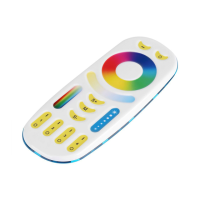
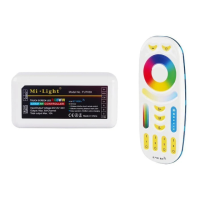
Compable with remote
2.4G RF remote control instrucon
Link / Unlink Instrucons
Auto transming & Synchronizaon
Dynamic mode table selecon
PWM frequency switching
“Do Not Disturb” mode is acvated and shut down
Smartphone app control instrucon
Alexa voice control instrucon
Google home voice control instrucon
DMX512 LED transmier control instrucon
Aenon
Contents
Question and Answer IconNeed help?

Do you have a question about the Mi-Light MiBoxer and is the answer not in the manual?

Summary

Product Features

Setup Output Mode

PUSH Dimming

Compatible 2.4 G RF Remote Controls

2.4 G RF Remote Control Instructions

Linking Code Instructions

Instructions for linking the remote control to the LED controller.

Unlinking Code Instructions

Instructions for unlinking the remote control from the LED controller.

Auto Transmitting & Synchronization

Explains signal auto-transmitting and dynamic modes synchronization between controllers.

Dynamic Mode Table Selection

Details how to select different dynamic mode tables for the controller.

PWM Frequency Switching

Guide on switching between high and low frequency PWM for the controller.

Do Not Disturb Mode Activation

Instructions for activating and deactivating the "Do Not Disturb" mode.

Smartphone App Control Instruction

Network Configuration

Steps for configuring the controller with the smartphone app and WiFi network.

App Do Not Disturb Mode Control

How to control the "Do Not Disturb" mode using the smartphone application.

Alexa Voice Control Instruction

Google Home Voice Control Instruction

DMX512 LED Transmitter Control

DMX512 LED Transmitter Link;Unlink

Step-by-step guide for linking and unlinking the DMX512 transmitter with the controller.

Attention

Overview

This document describes the MiBoxer 5-in-1 LED Controller, which supports WiFi and 2.4G wireless control.

Function Description:

The MiBoxer 5-in-1 LED Controller is a versatile device designed for controlling LED lights. It utilizes WiFi, Bluetooth, and 2.4G wireless transmission technologies, offering low power consumption and strong anti-interference capabilities. The controller can be integrated with the "Tuya Smart" app for comprehensive wireless control, including dimming, remote control, group control, scene control, timing control, music movement, biorhythm, sleep plan, wake plan, one-key execution, and automation. When the router is disconnected, Bluetooth allows for direct connection and control at close range. It also supports traditional 2.4G remote control.

Important Technical Specifications:

  • Wireless Technology: WiFi + Bluetooth + 2.4G wireless transmission.
  • Color Options: 16 Million colors to choose from.
  • Adjustability: Color temperature, brightness, and saturation are adjustable.
  • Remote Control Distance: Up to 30m for 2.4G RF remote control.
  • Output Modes: Supports Single Color, Dual White, RGB, RGBW, and RGB+CCT output modes, selectable via a "SET" button.
  • PUSH Dimming: Short press to turn ON/OFF, long press for stepless dimming.
  • DMX512 Controllable: Only for RGB+CCT output mode, requires a DMX512 LED transmitter.
  • Network Configuration: Supports 2.4GHz WiFi networks (does not support 5G routers).

Usage Features:

Output Mode Setup:

The controller allows users to set the correct output mode based on the type of lights being used. This is done by continuously pressing the "SET" button. The indicator color changes to confirm the selected mode:

  • White Light: Single Color
  • Yellow Light: Dual White
  • Red Light: RGB
  • Green Light: RGBW
  • Blue Light: RGB+CCT If no operation is performed within 3 seconds, the setting will log out.

PUSH Dimming:

A physical PUSH switch is available for basic control:

  • Short press: Turns the light ON/OFF.
  • Long press: Provides stepless dimming of brightness. Releasing and repeating the long press will alternate between increasing and decreasing brightness.

2.4G RF Remote Control Instruction:

Linking Code:

  1. Power off the controller for 10 seconds, then power on again, or short press "SET" once, or turn on the light via the PUSH switch.
  2. Within 3 seconds, short press the "I" button on the remote control 3 times.
  3. The lights will blink 3 times slowly, indicating successful linking.
  • Note: If the light does not blink slowly, linking has failed. Lights that are already linked cannot be linked again.

Unlinking Code:

  1. Power off the controller for 10 seconds, then power on again, or short press "SET" once, or turn on the light via the PUSH switch.
  2. Within 3 seconds, short press the "I" button on the remote control 5 times.
  3. The lights will blink 10 times quickly, indicating successful unlinking.
  • Note: If the light does not blink quickly, unlinking has failed. Lights that are not linked do not need to be unlinked.

Auto Transmitting & Synchronization (Remote Control Only):

  • Remote Signal Auto Transmitting: One light can transmit signals from the remote to another light within 30m. As long as there is a light within 30m, the remote control distance becomes limitless.
  • Dynamic Modes Auto Synchronization: Multiple lights can synchronize if they are in the same dynamic mode and linked with the same remote, provided the distance between each light is within 30m.

Dynamic Mode Table Selection (Remote Control Only):

The controller offers two dynamic mode tables:

  • Select Dynamic Mode Table 1 (Default): While the light is in static mode, short press the "S+" button 5 times quickly. The blue light will flash 3 times slowly, confirming activation of static mode. Dynamic modes include Mardi Gras, Automatic color change, Sam, Gemstone, Twilight, American, Fat Tuesday, Party, and Slow Color Splash. Brightness, saturation, and speed are adjustable.
  • Select Dynamic Mode Table 2: While the light is in static mode, short press the "S-" button 5 times quickly. The yellow light will flash 3 times slowly, confirming activation of static mode. Dynamic modes include Seven colors gradual change, White light Gradual change, RGB gradual change, Seven colors jump to change, Jump to change randomly, Red light gradual change +Flash 3 times, Green light gradual change +Flash 3 times, Blue light gradual change +Flash 3 times, and White light gradual change +Flash 3 times. Brightness, saturation, and speed are adjustable.

PWM Frequency Switching (Remote Control Only):

  • Switch to High Frequency: Press the "OFF" button once within three seconds, then press the "ON" button 5 times. The LED light will flash 2 times quickly upon successful activation.
  • Switch to Low Frequency: Press the "ON" button once within three seconds, then press the "OFF" button 5 times. The LED light will flash 2 times slowly upon successful activation.

"Do Not Disturb" Mode (Default Activated):

This mode is useful in areas with frequent power failures to save energy.

  • Turn ON (Remote Control): Press the "OFF" button 3 times within three seconds, then press the "ON" button 3 times. The LED light will flash 4 times quickly.
    • Attention (when activated): If the light is OFF (e.g., turned off by app or remote), it will remain OFF after a power cycle. Users must turn power OFF and ON twice, or use the app/remote to activate the light. If the light is ON, it will remain ON after a power cycle.
  • Turn OFF (Remote Control): Press the "ON" button 3 times within three seconds, then press the "OFF" button 3 times. The LED light will flash 4 times slowly.
    • Attention: If "Do Not Disturb" mode is closed, the light will always be "ON" after a power cycle.

Smartphone APP Control (Tuya Smart):

  1. Download and Install: Search for "Tuya Smart" in Apple or Google store or scan the provided QR code. Register or log in to the app.
  2. Network Configuration:
    • Connect the controller to a power supply.
    • Confirm the indicator light is flashing quickly (2 flashes per second). If not, long press the "SET" key until it flashes quickly, or power off and on the controller 6 times.
    • Connect your phone to a 2.4GHz home WiFi network.
    • Open the app, click "+" in the upper right corner.
    • Select "Lighting" on the left, then "Light Source (BLE+Wi-Fi)".
    • Follow the app prompts to complete the configuration.
  • App Turn ON/OFF "Do Not Disturb" Mode: In the app, select the light, go to "More," then "Power-on behavior" to toggle the mode.

Alexa Voice Control:

  1. Add the device to the "Tuya Smart" app first.
  2. Open the Alexa App.
  3. Click "More" (bottom right), then "Skills & Games".
  4. Click "Q" (top right), type "Smart life," and search.
  5. Click the "Smart Life" skill, follow instructions to link and enable voice control (e.g., "Alexa, turn off bedroom light").

Google Home Voice Control:

  1. Add the device to the "Tuya Smart" app first.
  2. Open the Google Home App.
  3. Click "+" (top left), then "Set up device".
  4. Click "Works with Google".
  5. Click "Q" (top right), type "Smart life," and search.
  6. Click the "Smart Life" skill, follow instructions to link and enable voice control.

DMX512 LED Transmitter Control (Purchased Separately):

  • Link/Unlink:
    1. Choose the zone on the DMX512 transmitter (FUTD01) by pressing "+" or "-".
    2. Link: Power off the controller for 10 seconds, then power on, or press "SET" once. Within 3 seconds, short press the "SET" button on the controller 3 times while the indicator is ON. The controller indicator will flash 3 times slowly.
    3. Unlink: Power off the controller for 10 seconds, then power on, or press "SET" once. Within 3 seconds, short press the "SET" button on the controller 5 times while the indicator is ON. The controller indicator will flash 10 times quickly.
  • Note: If linking or unlinking fails, repeat the steps.

Maintenance Features:

  • Attention:
    • Turn off the power supply before installation.
    • Ensure input voltage matches device requirements.
    • Do not disassemble the device unless you are an expert, as it may cause damage.
    • Avoid using the light in areas with wide-range metal or strong electromagnetic waves, as this may severely affect remote distance.

Mi-Light MiBoxer Specifications

General IconGeneral
BrandMi-Light
ModelMiBoxer
CategoryController
LanguageEnglish

Related product manuals