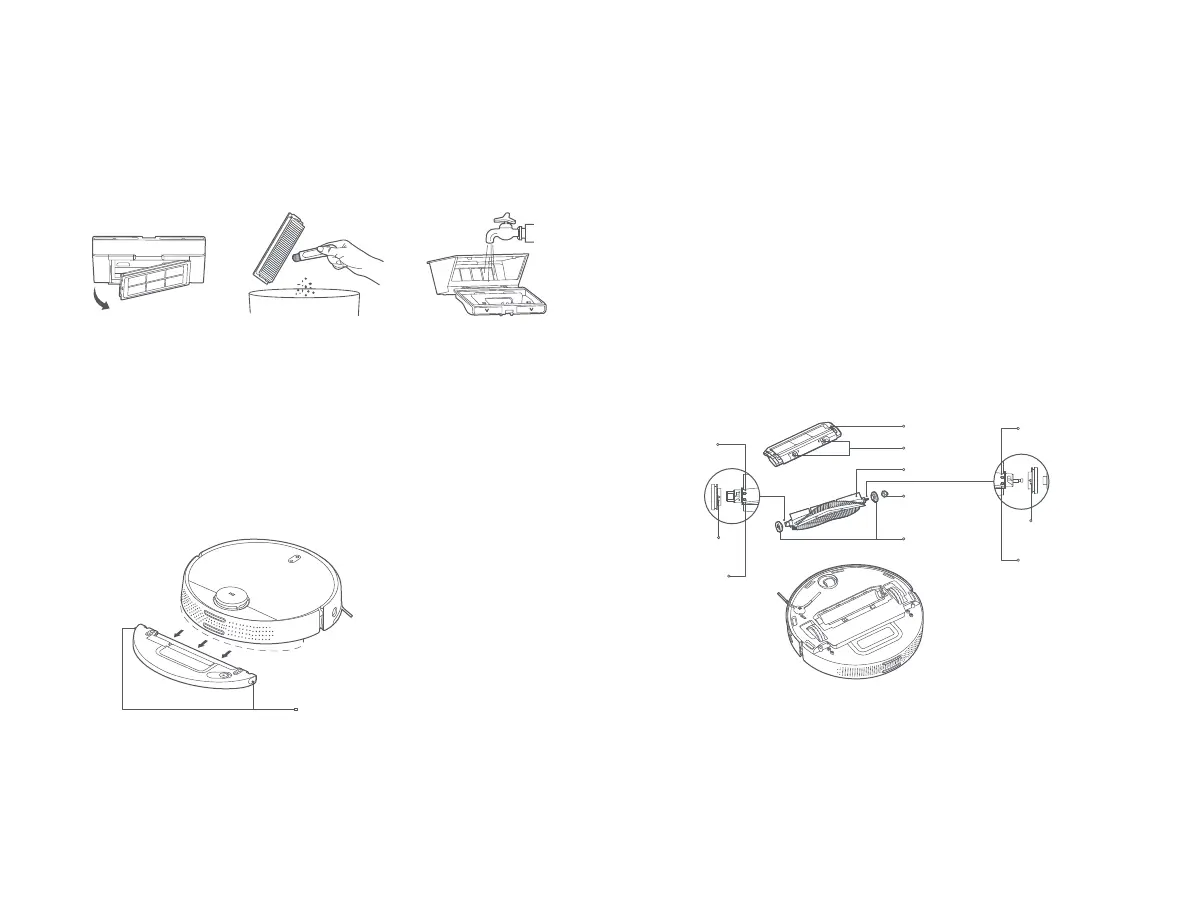
3. Remove the filter, and use the cleaning tool to clean the dust
compartment and the filter, and then wash them with clean water.
Install the dust compartment and the filter back aer fully drying them.
Simultaneously press and hold both the release buons of the water tank,
and then slide it out from the boom of the vacuum-mop as illustrated.
Note: It is recommended to thoroughly clean the dust compartment at least once a
week. Make sure to fully dry the dust compartment and the filter before use (at least
dry them for 24 hours).
Note: Aer mopping, immediately remove the water tank, empty out any remaining
water, and clean and dry the mop pad to prevent lingering odor and mildew.
Water Tank
Water Tank Release Buon
Brush
1. Flip the vacuum-mop over and press and hold the two release buons to
remove the brush cover.
2. Remove the brush upwards.
3. Pull out the brush bushing.
4. Rotate the brush holders until the alignment mark on each holder is
aligned with the unlocking mark, and then remove the brush holders
from both ends of the brush.
5. Use the blade of the cleaning tool to cut the hair tangled on the brush
and thoroughly clean the brush.
6. Reinstall the brush holders and the brush bushing.
7. Reinstall the brush and the brush cover, and press the brush cover
securely into place.
Brush Cover
Release Buon
Brush
Brush Bushing
Brush Holders
Locking Mark
Unlocking Mark
Alignment Mark
Locking Mark
Unlocking Mark
Alignment Mark
14



 To Next Page