Micro-Air, Inc. Page 15 EasyTouch Operations Manual
Rev 3.0 4/3/17
9.1 FAMU Operator Controls and Display
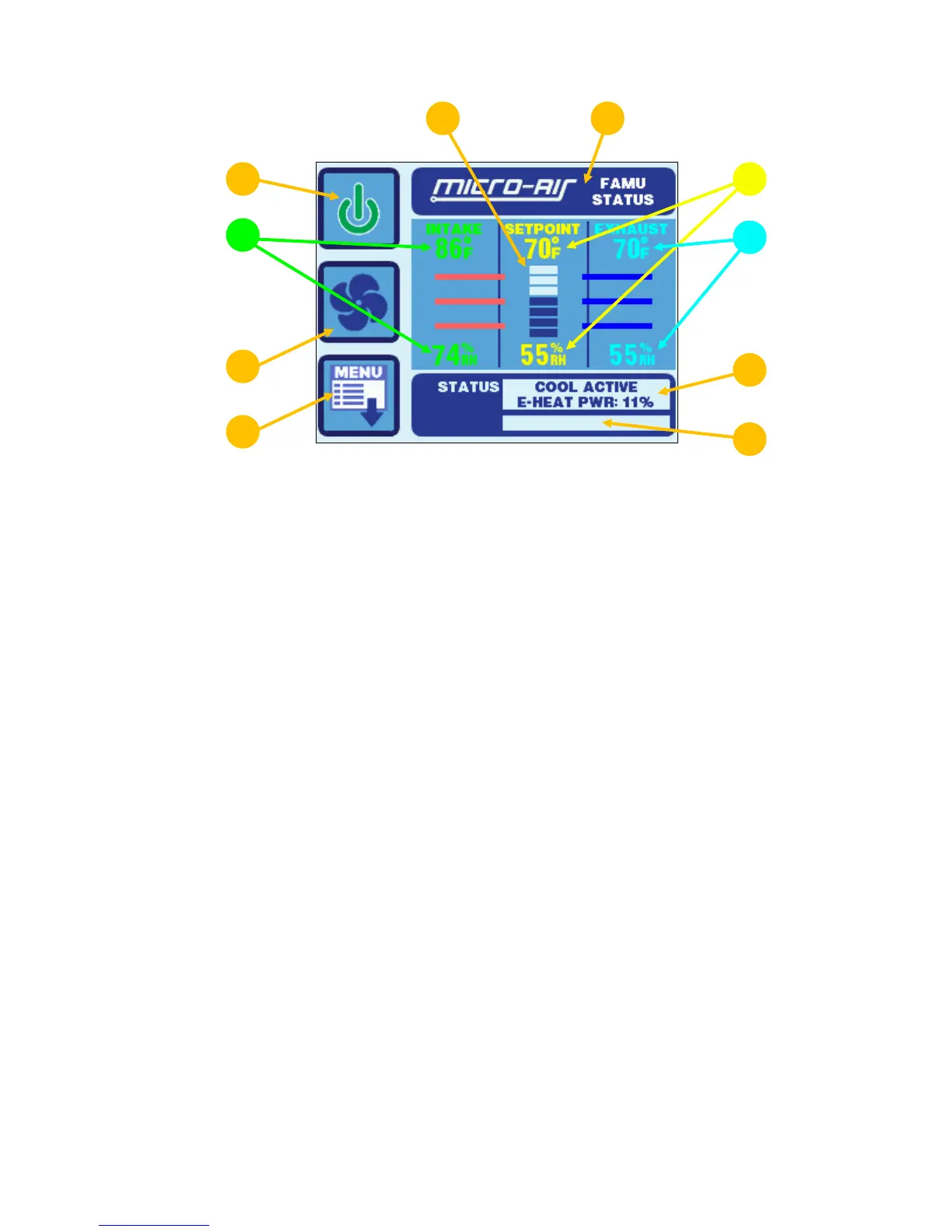
Figure 10 – EasyTouch FAMU Screen Icons & Functions
1. Power On/Off Button - Press and release to toggle between the ON (green) and OFF (red)
operation.
2. Fan Button – The Fan button is used to control the fan speed. The Fan button will rotate when
the fan is on, and will be stationary when the fan is off. See section 9.3 for more information on
the controlling the fan speed.
3. Menu Button – The Menu button allows access to the EasyTouch Main Menu and all sub-menus
beyond. See section 11 for more information on the menus.
4. Fan Speed Indicator – This indicator is a bar graph that shows the speed at which the fan is
currently operating. There are 3 fan speeds with EasyTouch: 1 bar lit indicates low speed, 4
bars lit indicate medium speed, and 7 bars lit indicate high speed.
5. Force Sleep Mode Button - Press and release to force Sleep Mode to initiate immediately, if
enabled. See section 15.3 for more information on Sleep Mode.
6. Intake Temperature & Relative Humidity – These values are the live temperature and relative
humidity as read from the intake sensor, plugged into the “OUTSIDE / RH” jack.
7. Set Point Temperature & Relative Humidity – These values are the set point temperature and
relative humidity currently assigned for the FAMU system. See section 12.5 (FAMU DX) or
section 12.6 (FAMU CW) for more information on these set point values.
8. Exhaust Temperature & Relative Humidity – These values are the live temperature and
relative humidity as read from the exhaust sensor, plugged into the “ALT. AIR / RH” jack.
9. Operational Status & Fault Help Button – This display area indicates the current operational
status of the control, including standby and active states, fault states, fault recovery, and fault
lockout. The status is split into two lines. The first line indicates the cooling operation status and
the second line indicates the electric heater operation status. If a fault is active, touching this
status area will display the Fault Help screen for the active fault. See section 9.3.2 for more
information on fault displays.
10. Filter Maintenance Status – If enabled, this display area indicates when it is time to clean or
replace the air filter. See section 12.1.6 for more information on the Air Filter Reminder.



 To Next Page