Micro-Air, Inc. Page 17 EasyTouch Operations Manual
Start
Read
Intake
Sensor
(T
I
& RH
I
)
T
I
≥ (T
SP
+ Diff1)?
DP
I
>=
(DP
SP
+Diff2)?
Calculate
Dew Points
(D
PI
& DP
SP
)
Turn On
Valve
T
E
< (T
SP
– Diff3)?
T
E
> (T
SP
+ Diff3)?
T
I
<= T
SP
? DP
I
<= DP
SP
?
Turn Off
Valve
Increase
Electric Heat
Decrease
Electric Heat
Elec Heat
Update Interval
Expired?
Yes
No
No
Yes Yes
No
Yes
No
No
Yes Yes
No
No
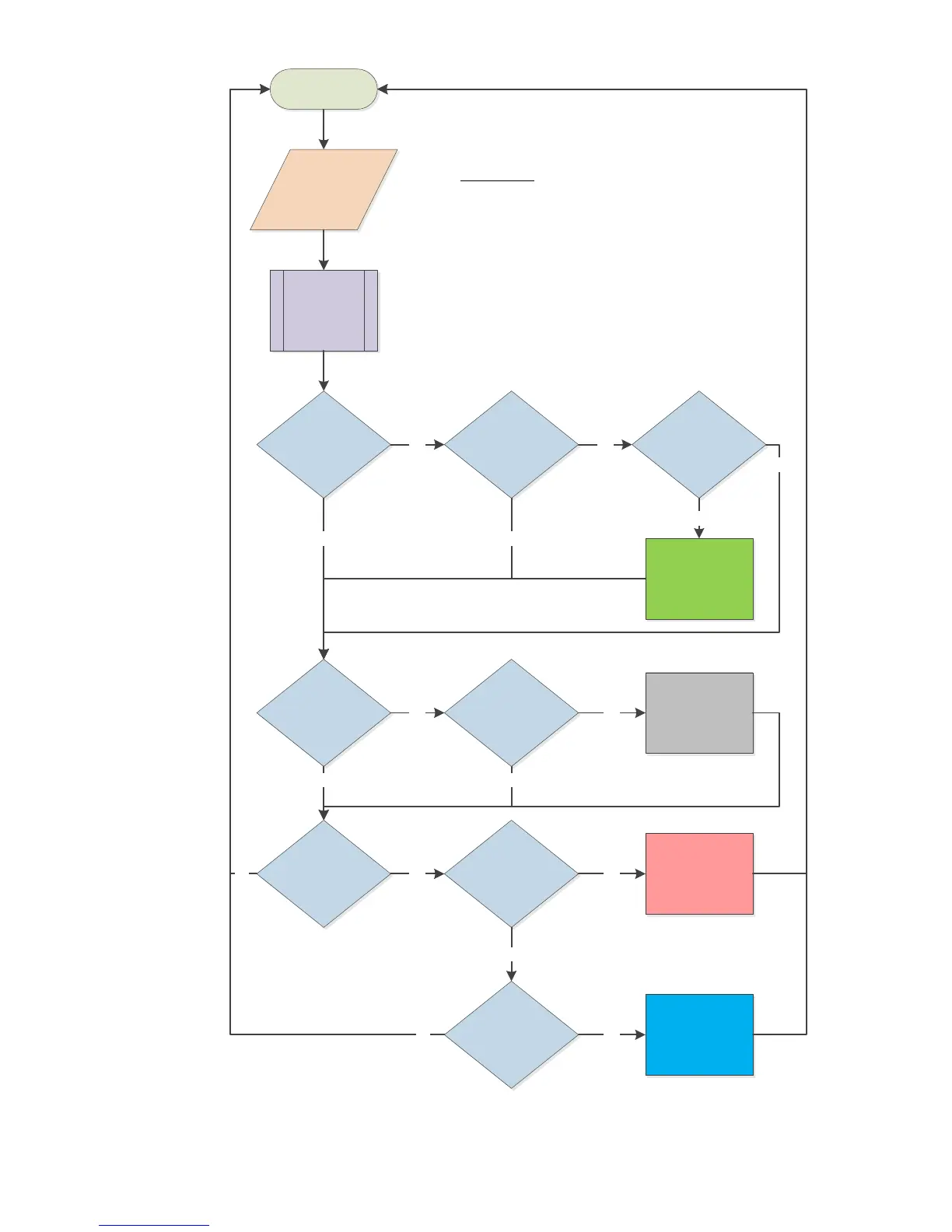
Symbol Key:
T
SP
= Set Point Temperature
DP
SP
= Set Dew Point
T
I
= Intake Temperature
DP
I
= Intake Dew Point
RH
I
= Intake Relative Humidity
T
E
= Exhaust Temperature
T
CW
= Chilled-Water Loop Temperature
Diff1 = Cooling Control Differential
Diff2 = Dew Point Control Differential
Diff3 = Heating Control Differential
FAMU CW Operation Flowchart
T
CW
< T
I
?
Yes
Yes
No



 To Next Page