
 Need help?
Do you have a question about the microHAM ARCO and is the answer not in the manual?
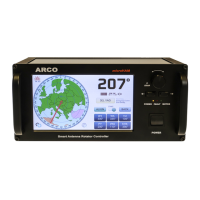
Describes the front panel components and their functions.
Details the connectors and ports on the rear of the ARCO unit.
Explains the process of synchronizing the antenna rotator with its sensor.
Instructions on how to set the rotator to its mechanical center.
Details the process of calibrating the antenna position and limits.
Covers general settings like rotator name, location, time, and screensaver.
Settings for customizing the look of the main screen and map.
Configuration options for the connected rotator model, sensor, and motor.
Setup for multi-controller environments and synchronization groups.
Details settings for antenna aiming, calibration points, and speed.
Configuration for connecting the ARCO to a local Ethernet LAN network.
Setting up remote control via a client-server connection over the Internet.
Information on firmware updates, configuration saving/loading, and protocols.
Procedure for updating the ARCO firmware using a USB flash drive.
How the ARCO installs as a serial port on various operating systems.
Wiring instructions for POT (potentiometer) sensors.
Wiring instructions for RHEO (rheostat) sensors.
Wiring instructions for magnetic reed contact sensors.
Wiring instructions for HALL or PWM sensors.
Wiring instructions for digital quadrature encoders.
Wiring instructions for SEI BUS absolute encoders.
 General
| Type | Antenna Rotator Controller |
|---|---|
| Supported Rotators | Yaesu, Prosistel |
| Control | USB |
| Interface | USB |
| Compatibility | Windows, Linux, Mac OS |

 To Next Page