EasyManua.ls Logo

Micronta 22-195A - RANGE CONTROL MODES; Manual Range Selection; Returning to Autorange

Default Icon
36 pages
Print Icon
To Next Page IconTo Next Page
To Previous Page IconTo Previous Page
Loading...
RANGE
CONTROL
Autorange
is
a
convenient
feature,
but
some-
times
it
may
be
quicker
to
manually
set
the
range,
as
when
you
are
going
to
measure
values
which
are
known
to
be
within
a
cer-
tain
range.
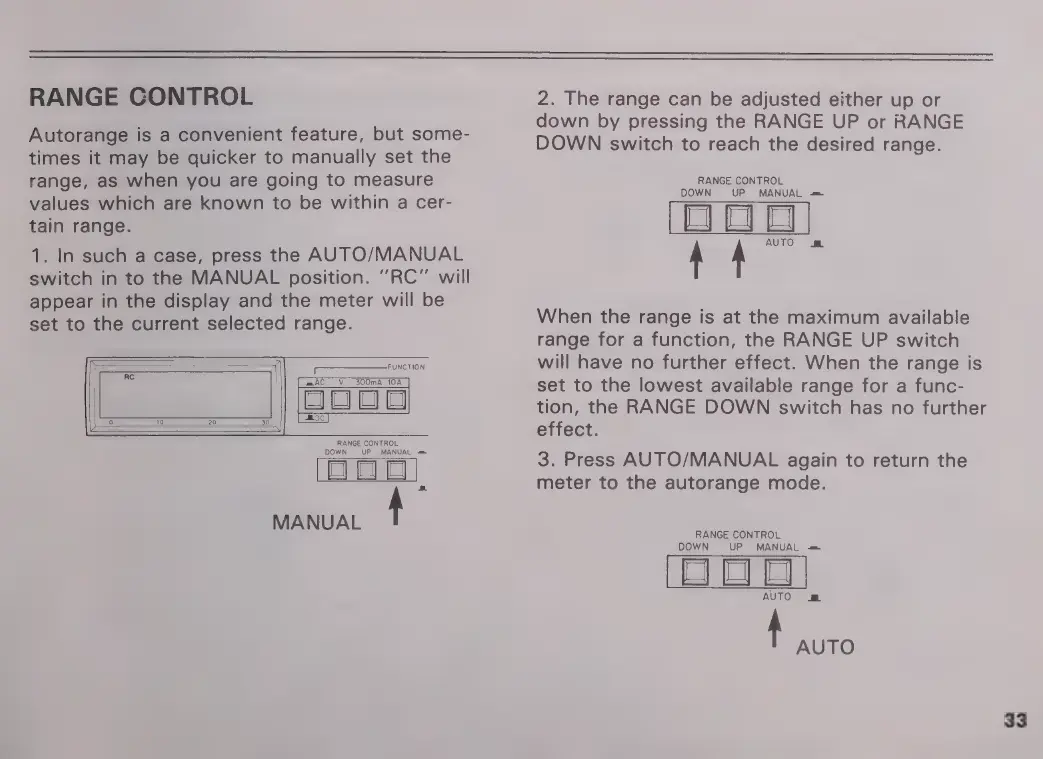
1.
In
such
a
case,
press
the
AUTO/MANUAL
switch
in
to
the
MANUAL
position.
"RC"
will
appear
in
the
display
and
the
meter
will
be
set
to
the
current
selected
range.
FUNCTION
axAC
V
300mA
10A
RANGE
CONTROL
DOWN
NUAL
=
MANUAL
t
2.
The
range
can
be
adjusted
either
up
or
down
by
pressing
the
RANGE
UP
or
RANGE
DOWN
switch
to
reach
the
desired
range.
RANGE
CONTROL
DOWN
UP
MANUAL
=
FE
When
the
range
is
at
the
maximum
available
range
for
a
function,
the
RANGE
UP
switch
will
have
no
further
effect.
When
the
range
is
set
to
the
lowest
available
range
for
a
func-
tion,
the
RANGE
DOWN
switch
has
no
further
effect.
3.
Press
AUTO/MANUAL
again
to
return
the
meter
to
the
autorange
mode.
RANGE
CONTROL
DOWN
UP
MANUAL
=
AUTO
m
à
AUTO
33

Related product manuals