EasyManua.ls Logo

Micronta 22-195A - DIODE CHECK PROCEDURE; Diode Test Procedure

Default Icon
36 pages
Print Icon
To Next Page IconTo Next Page
To Previous Page IconTo Previous Page
Loading...
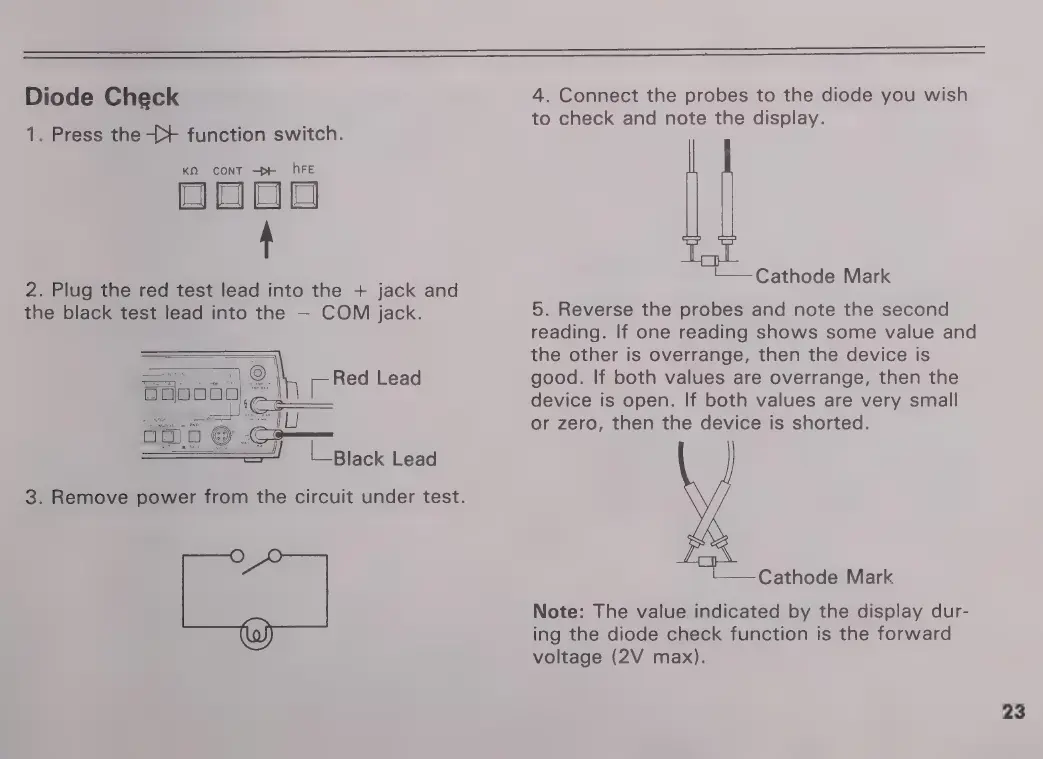
Diode
Check
1.
Press
the
{+
function
switch.
KO
CONT
>
hFE
j
2.
Plug
the
red
test
lead
into
the
+
jack
and
the
black
test
lead
into
the
COM
jack.
E
Red
Lead
L
Black
Lead
3.
Remove
power
from
the
circuit
under
test.
4.
Connect
the
probes
to
the
diode
you
wish
to
check
and
note
the
display.
(——
Cathode
Mark
5.
Reverse
the
probes
and
note
the
second
reading.
If
one
reading
shows
some
value
and
the
other
is
overrange,
then
the
device
is
good.
If
both
values
are
overrange,
then
the
device
is
open.
If
both
values
are
very
small
or
zero,
then
the
device
is
shorted.
L———
Cathode
Mark
Note:
The
value
indicated
by
the
display
dur-
ing
the
diode
check
function
is
the
forward
voltage
(2V
max).
23

Related product manuals