EasyManua.ls Logo

Micronta 22-195A - PRE-OPERATION CHECKLIST; Initial Power-Up and Self-Test; Practicing Range Control

Default Icon
36 pages
Print Icon
To Next Page IconTo Next Page
To Previous Page IconTo Previous Page
Loading...
12
CHECK
BEFORE
OPERATION
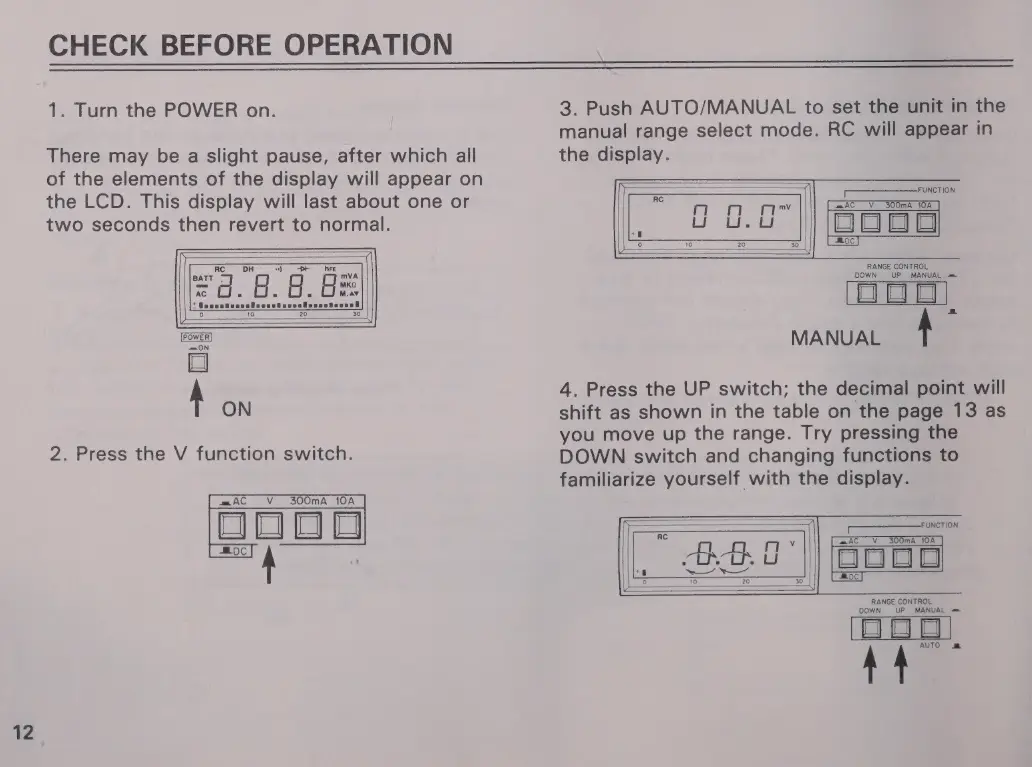
1.
Turn
the
POWER
on.
There
may
be
a
slight
pause,
after
which
all
of
the
elements
of
the
display
will
appear
on
the
LCD.
This
display
will
last
about
one
or
two
seconds
then
revert
to
normal.
—ON
$
on
2.
Press
the
V
function
switch.
m=
AC
V
300mA
10A
m
n
3.
Push
AUTO/MANUAL
to
set
the
unit
in
the
manual
range
select
mode.
RC
will
appear
in
the
display.
FUNCTION
[SE
-AC
V
300mA
10A
RANGE
CONTROL
OWN
|
UP
MANUAL
=
MANUAL
A
4.
Press
the
UP
switch;
the
decimal
point
will
shift
as
shown
in
the
table
on
the
page
13
as
you
move
up
the
range.
Try
pressing
the
DOWN
switch
and
changing
functions
to
familiarize
yourself
with
the
display.
Se
UNCTION
AC
V
300mA
10A
Doo
RANGE
CONTROL
DOWN
UP
MANUAL
=
O
OO
LE

Related product manuals