20 Xpress Basics
Placing Discs on Spindles
As an automated disc production system, Xpress transports discs to
various processing stations internally. The operator’s only physical task
is to load blank discs for processing on the input spindle(s) and remove
finished discs from the output spindle(s).
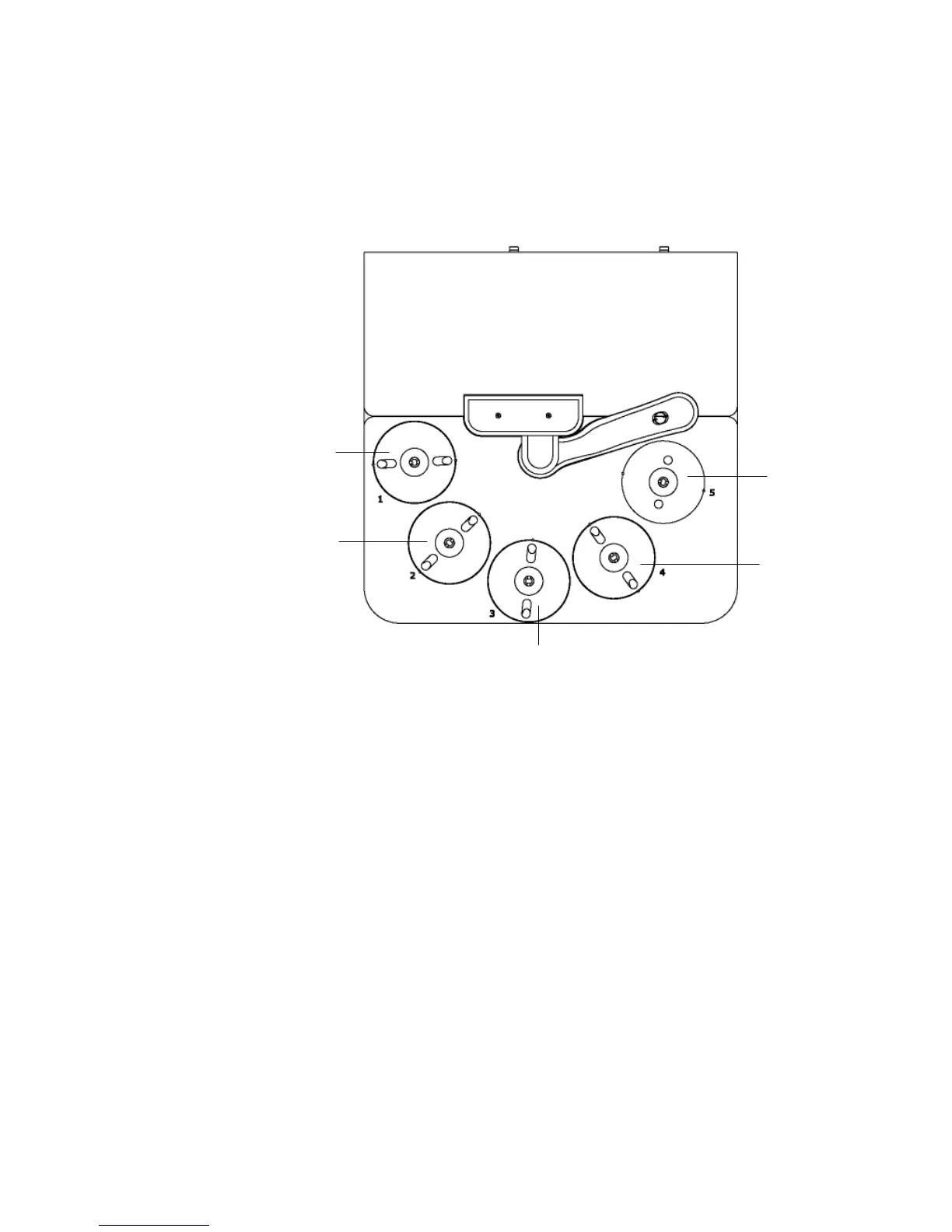
The diagram below shows the location and function of the various
spindles, viewed from above.
Each spindle holds 200 discs. To process a total of 600 discs with only 4
spindles, some spindles must be used to hold both blank and written
media (not at the same time). To start, blank media are loaded on
spindles 1, 2 and 3 and spindle 4 is left empty. Blank discs will be
retrieved from spindle 3 and completed discs will be placed on spindle 4.
When all discs have been removed from spindle 3, the whole operation
shifts by one spindle and blank discs will be retrieved from spindle 2 and
completed discs will be placed on (the now empty) spindle 3. When all
discs on spindle 2 have been used, the operation will shift one more time
and blank discs will be retrieved from spindle 1 and completed discs will
be placed on spindle 2. When all 600 discs have completed, there will be
discs on spindles 2, 3 and 4 and nothing on spindle 1.
When the disc production software is started, the production system
automatically resets itself to take discs from spindle 3 and places finished
discs on spindle 4. This is true even if the system was previously taking
discs from spindle 2 or spindle 1.
Whenever the disc production software is started, blank discs must be
loaded on spindles 3, 2 and 1 and spindle 4 must be empty.
Spindle #1
Tertiary Input Spindle (3
rd
200 discs)
Spindle #2
Secondary Input Spindle
(2
nd
200 discs)
Spindle #5
Reject Spindle
Spindle #4
Output Spindle
Spindle #3
Primary Input Spindle (1
st
200 discs)


 To Next Page