Xpress Basics 17
Initial System Calibration
One of the programs included with the system is a calibration utility.
This utility includes a quick initial system test for checking the basic
disc-transporting functions. Follow the procedure below to run this test.
Prepare for the checkout procedure
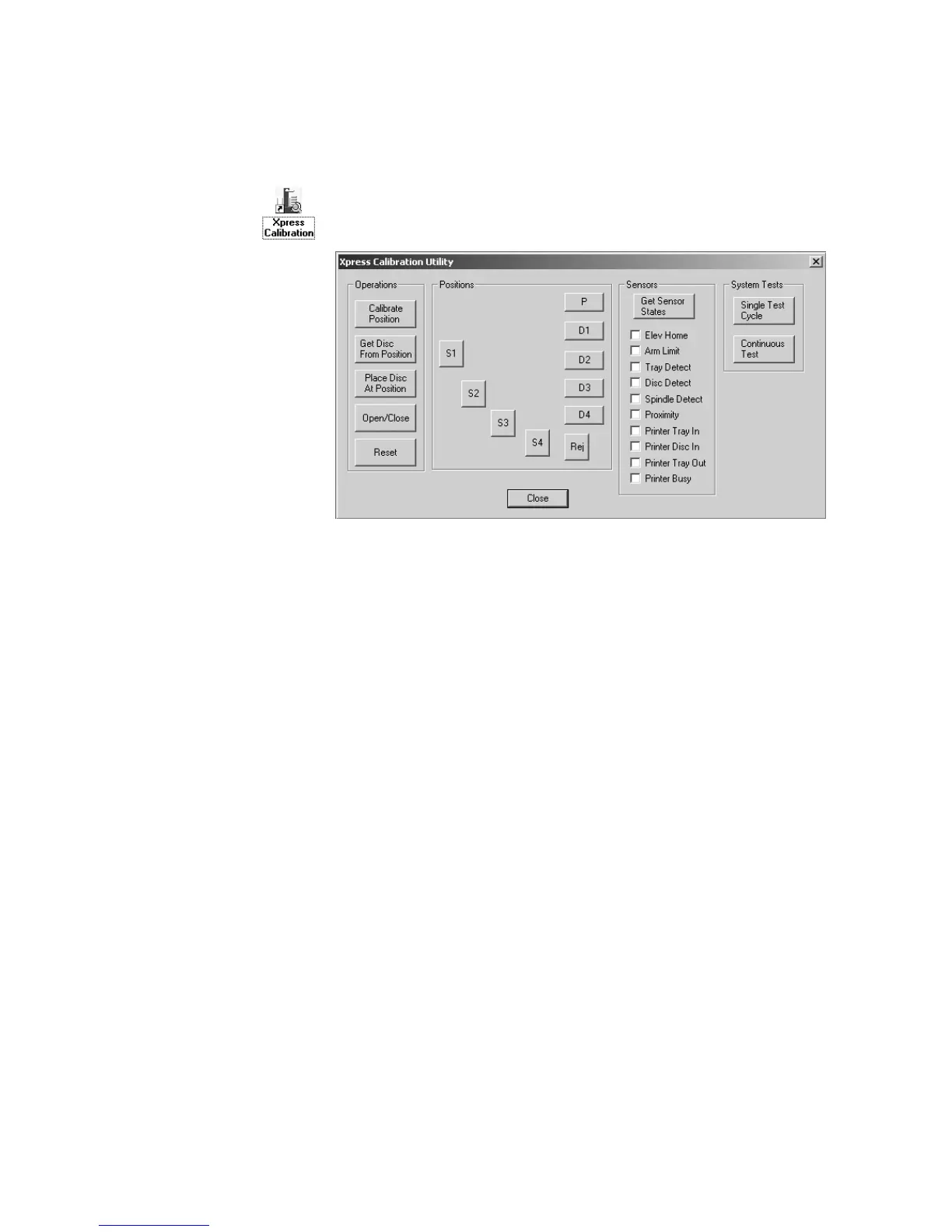
Place a few discs on spindle 3. Start the calibration utility program by
double-clicking the program’s desktop icon, shown here to the left. The
calibration utility’s window will open (shown below).
Set up and run the quick test once
The test will simulate a single disc being copied. Click the single test
cycle
button to start the test.
1. A disc will be picked up from spindle 3.
2. The top disc writer drive tray will open and the disc will be placed
into the tray.
3. The disc writer drive tray will close, then open.
4. The disc will be picked up from the disc writer, and the drive tray
will close.
Note: If a printer is installed, the printer tray will open, and the disc will
be placed in the tray: The printer tray will close, and the disc writer drive
tray will close. The printer tray will then open, and the disc will be
picked up from the printer tray, and the printer tray will close.
5. If no printer is installed, the disc will be picked up from the disc
writer drive tray and dropped on spindle 4.


 To Next Page