Flight Mode / ALTITUDE OPERATION
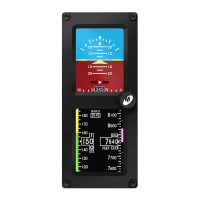
The Altimeter Indicator portion of the display will always appear on
the bottom display when oriented vertically and can be congured
to appear on the right or left display when oriented horizontally
(Image 8).
The Altimeter consists of four parts: Altitude Window, Altitude
Scale, Barometric Setting Window and optional Altitude/Vertical
Trend Bar.
The Altitude Window displays the current, barometric corrected
altitude. The digits of the display are in increments of twenty and
the window is expanded over this portion of the number to display
a minimum spread of forty units. The numbers will ‘roll’ or scroll
to assist in quick reference to the increasing or decreasing nature
of the aircraft’s altitude. The hundreds, thousands and ten-thousands
digits appear to the left of the tens digits with the thousands and
ten-thousand digits slightly larger than the others. The Altitude Pointer
(triangle) to the right of the window points to the associated position
on the Altitude Scale of the current altitude. Altitude units of measure
appear below the Altitude Window and can be changed during Flight
Mode using the Options Menu (see Options Menu, page 19). The
pilot may select feet or meters.
The Altitude Scale is positioned vertically along the right margin of
the display. The current altitude is always in the middle of the scale
and indicated by the Altitude Pointer on the right side of the Altitude
Window. The scale has numeric indications every one-hundred units
with minor graduations every fty units and sub-graduations every
twenty-ve units. In horizontal installations, the scale spans
approximately 400 units from top to bottom. In vertical installations,
the scale spans approximately 500 units from top to bottom. The
scale will ‘roll’ or scroll to assist in quick reference to the increasing
REV. F Sept 15, 2015 Manual Number 9017846
10


 To Next Page