Options Menu / BRIGHTNESS ADJUSTMENT
SAM can be congured to adjust its brightness based on the
aircraft’s manual lighting bus control or automatically, based on
the ambient lighting conditions using the photocell sensor on the
unit. For either option, the pilot or crew member can temporarily
override the current brightness and manually increase or
decrease brightness.
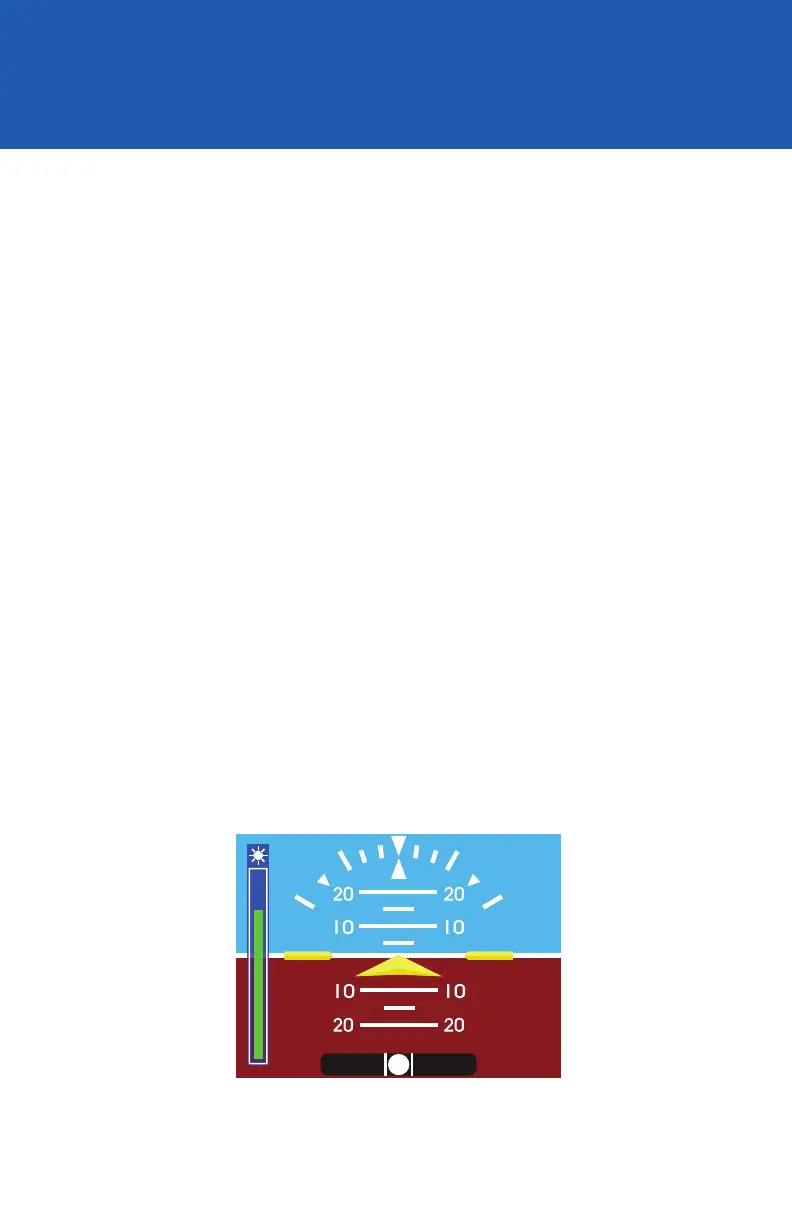
To adjust brightness, briey press the Control Knob. The
brightness bar will appear overlaid on the Attitude Display
and turning the Control Knob will increase or decrease the
current setting (Image 28). A second push will remove the
brightness adjust bar before it times out.
While the unit remains powered, the manual adjustment will remain
saved and any change in the lighting bus or photocell sensor will
increase or decrease the brightness from the newly set manual
adjustment point.
When the unit is powered OFF, the manual adjustment will be
reset and default to the lighting response curve programmed
into memory per the settings in the Conguration Mode setup
by the installer.
Image 28
REV. F Sept 15, 2015 Manual Number 9017846
29


 To Next Page