Operating principles
22
Touch display
The touch display can be scratched
by pointed or sharp objects, e.g.
pens.
Only touch the display with your
fingertips.
If your fingers are cold, the Touch
display may not react.
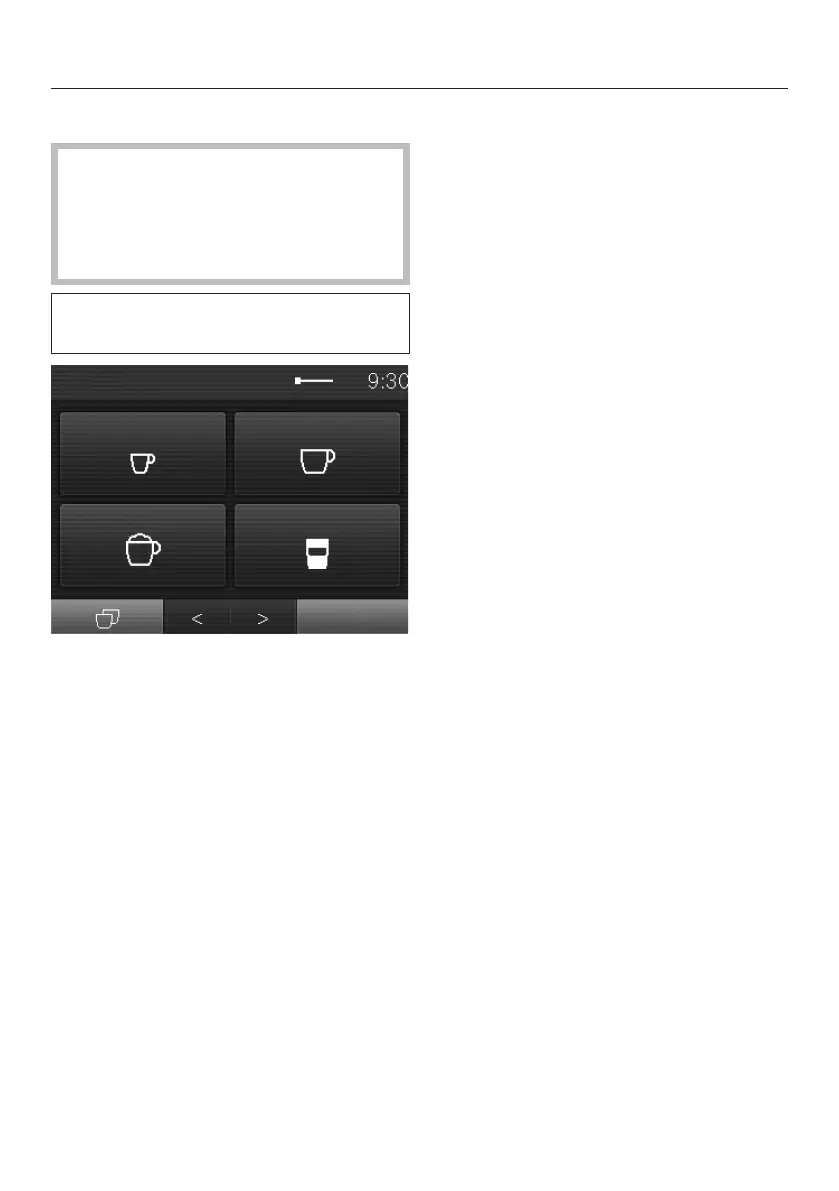
The display is divided into three
sections.
The current menu name is displayed in
the top left and the time in the top right
of the display. Depending on the
number of items in the menu, a scroll
bar may also appear in the middle.
The middle row shows the current
menu and options. The most popular
drinks are depicted with symbols in the
Drinksmenu. See “Symbols in the
display” for an explanation of the
symbols.
You can scroll to the right or left using
the and arrows at the bottom of
the display. Context-dependent
functions and menus can be found to
the left and right of the arrow sensors.
Operating actions
You can only select options which are
highlighted in light grey.
Each time you touch a possible option
the relevant field lights up partially or
completely orange.
Selecting or calling up a menu
Touch the field you want with your
finger.
Scrolling through menus
You can scroll left or right using the
and arrow sensors.
Touch the arrow sensor for the
direction you want to go.
Exiting a menu (“Back” sensor)
Touch the sensor to return to the
previous screen.
Entries made before this which have not
been confirmed withOK will not be
saved.



 To Next Page