Parameters
49
Pre-brewing ground coffee
When the pre-brewing function is
switched on, the freshly ground coffee
is first moistened with a little hot water.
Then the remaining water is forced
through the moistened coffee at high
pressure. This helps release the flavour
of the coffee.
You can set pre-brewing for a normal
length of time or an extra long length of
time. Alternatively, you can switch off
the “Pre-brewing” function.
The machine is supplied with the “Pre-
brewing” function switched off.
Bean type
You can display which type of bean is
saved for the coffee drink or change the
allocation.
Grinder setting
When the beans are ground correctly,
the coffee or espresso will flow evenly
into the cup with a good crema.
The crema should have an even
hazelnut brown colour.
The grinder setting you select will be
used for all coffee drinks.
There are various ways to tell whether
the coffee grinder is set correctly.
The coffee has been too coarsely
ground if:
– espresso or coffee flows into the cup
too quickly,
– the crema is very pale and uneven.
Set a finer grinder setting.
The coffee has been too finely ground
if:
– espresso or coffee flows into the cup
very slowly,
– the crema is dark brown.
Set a coarser grinder setting.
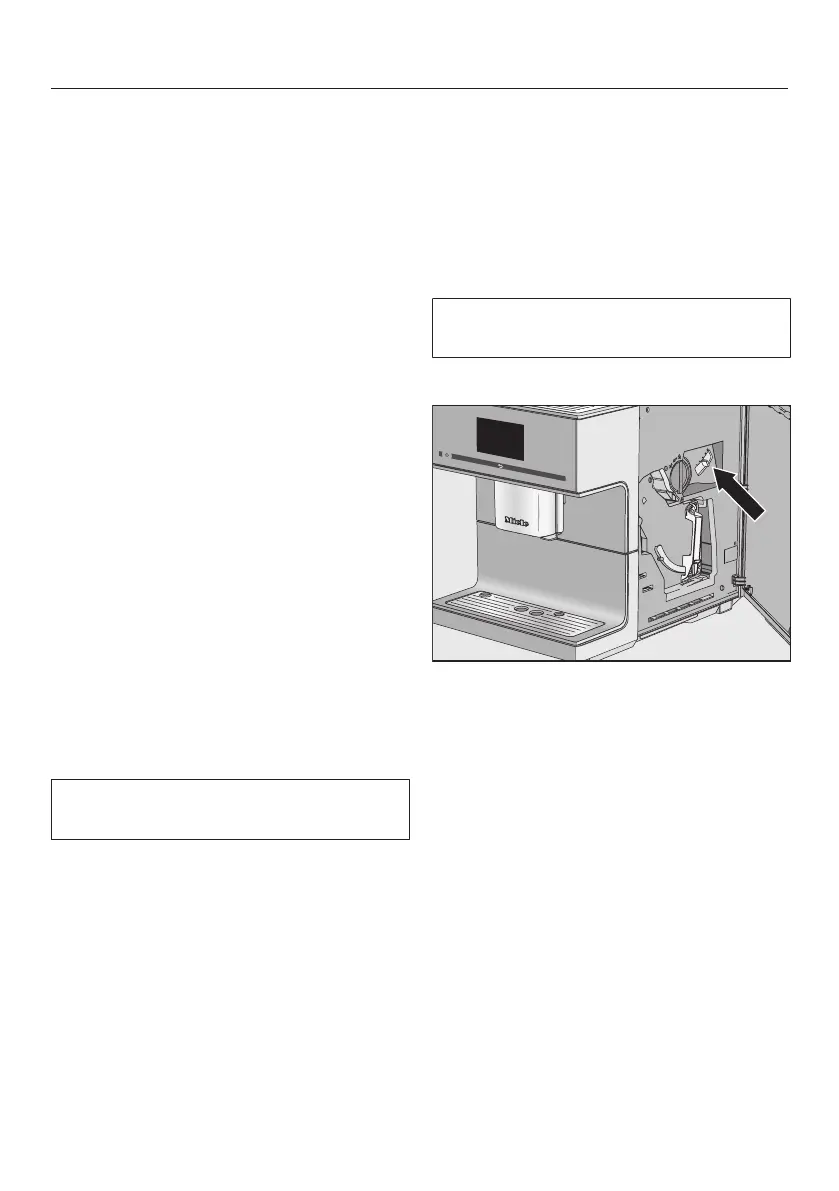
The grinder setting is set for all bean
types.
Open the appliance door.
Push the slide control at most one
setting to the left (for finer grinding) or
one setting to the right (for coarser
grinding).
Close the appliance door.
Make one cup of coffee.
Then you can adjust the grinder setting
again.



 To Next Page