Use
17
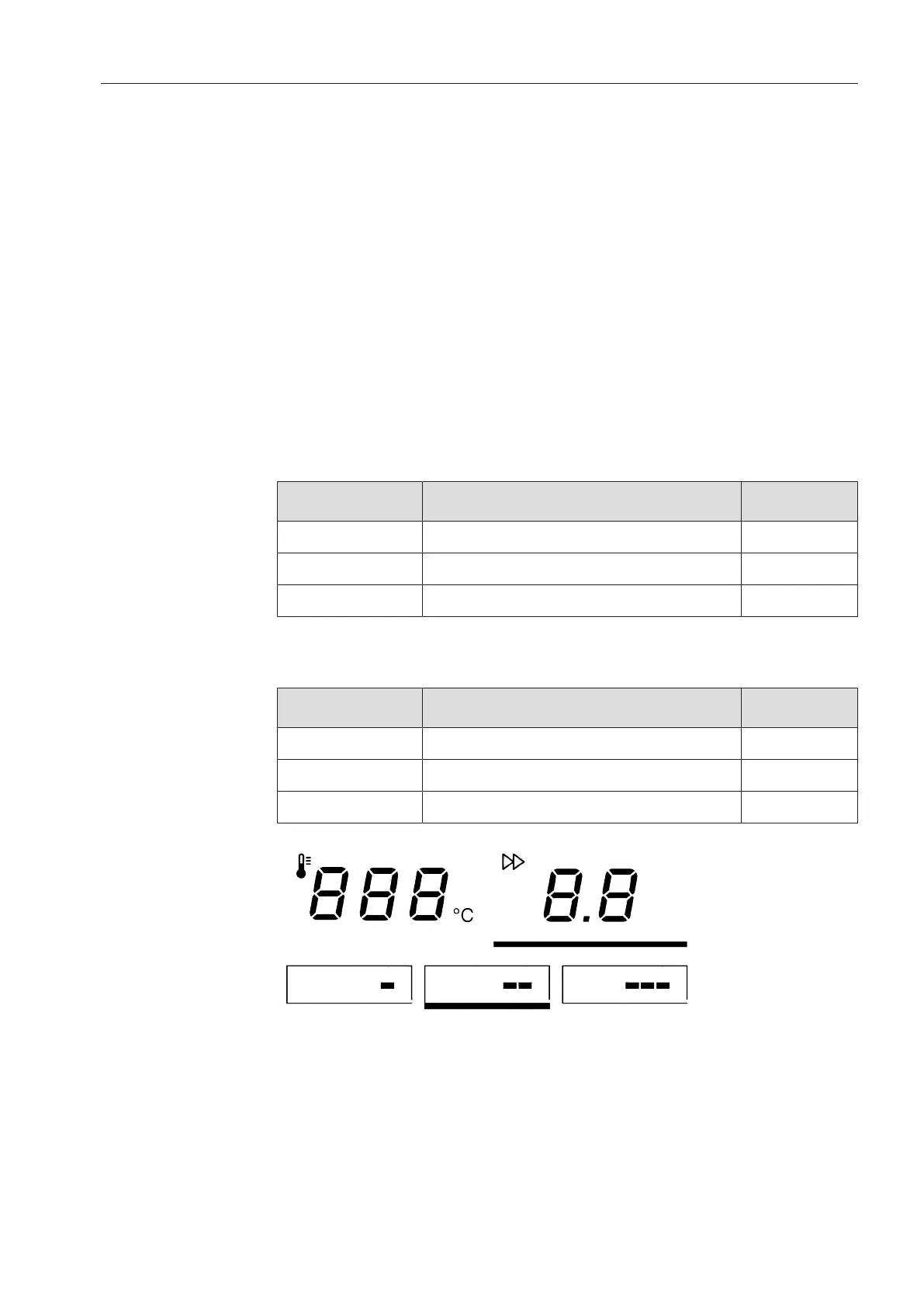
The selected temperature selection button will be highlighted with a
bar underneath and the heater plate heated / cooled to the appropri-
ate temperature.
Changing the
value of a temper-
ature selection
button
Press the temperature selection button you want to change the
value for.
When keeping the button pressed, the bar will light up underneath it
and the current temperature value will appear in the display.
Press the or –button to set the temperature you want to save for
that button.
Then press and hold the temperature selection button highlighted
with a bar underneath until it flashes once.
The new temperature value is now saved for that temperature selec-
tion button.
Speed of ironer
PRI210/214:
Symbol Speed range
m
/
min
Low speed range 1.5–2.2
Medium speed range 2.3–3.2
High speed range 3.3–4.0
PRI217:
Symbol Speed range
m
/
min
Low speed range 1.5–2.4
Medium speed range 2.5–3.4
High speed range 3.5–4.5
Spin speed selection buttons
The roller speed can be set either via the spin speed selection but-
tons (//) or alternatively via the and –buttons.



 To Next Page