Operating the washing machine
14
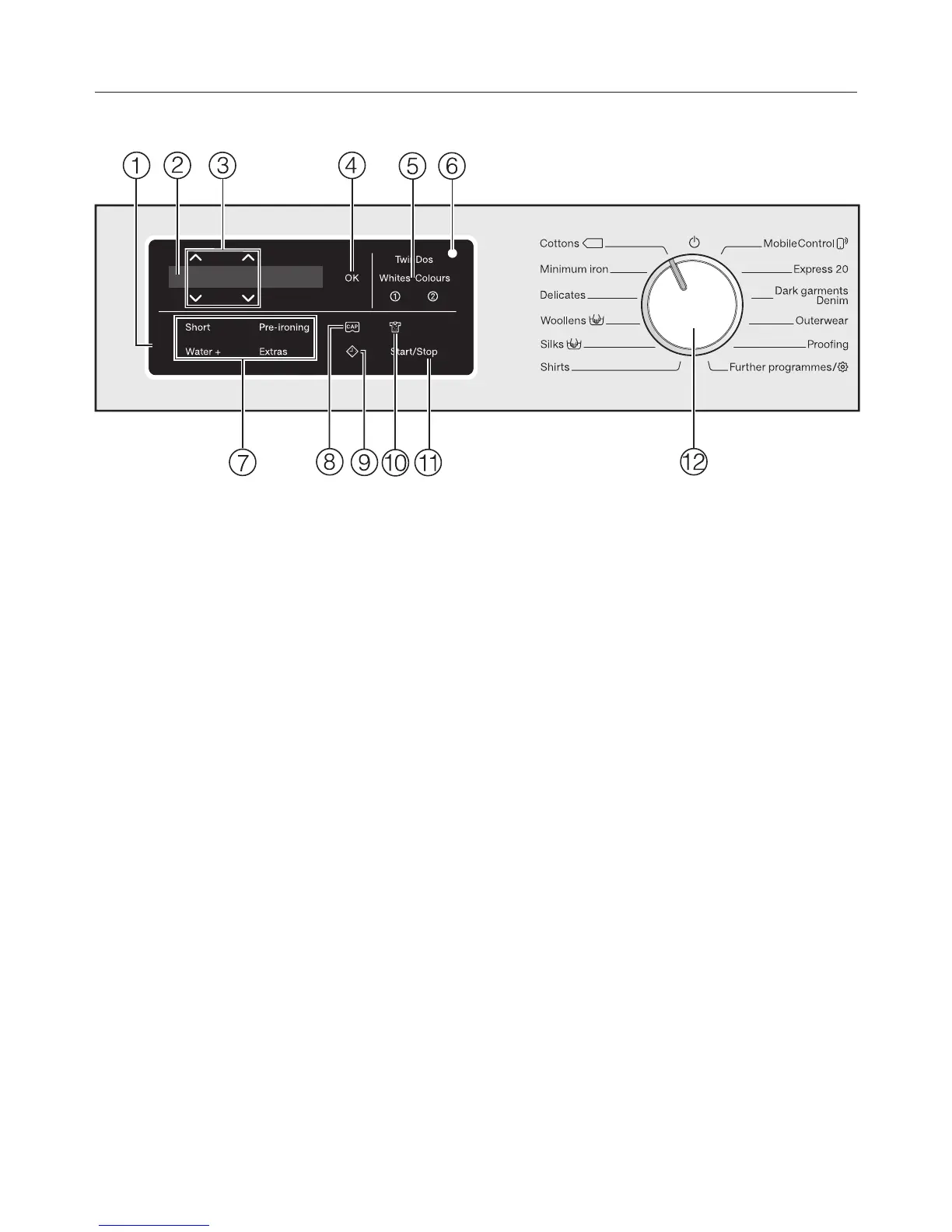
Control panel
a
Control panel
The control field consists of a
display and various sensor controls.
The individual sensors are explained
in the following sections.
b
Display
The following values are shown in
the display and/or selected from it:
1. The temperature, spin speed and
time left for the selected wash
programme.
2. The individual values of the
selection lists for Extras and
settings.
c
Sensor controls
Values shown in the display can be
changed with the sensors. The
sensor increases the value or
moves the selection list up; the
sensor decreases the value or
moves the selection list down.
d
OK sensor
Confirm selected values with the OK
sensor.
e
TwinDos sensors with options for
Whites and Colours
The TwinDos sensor is used for
deactivating and activating
automatic detergent dispensing.
Depending on the colour mix of your
load, you can control the detergent
combination by selecting Whites or
Colours.
Further information can be found in
the “TwinDos” chapter.
f
Optical interface
For service technicians.




 To Next Page