Operating the washing machine
14
How the control panel works
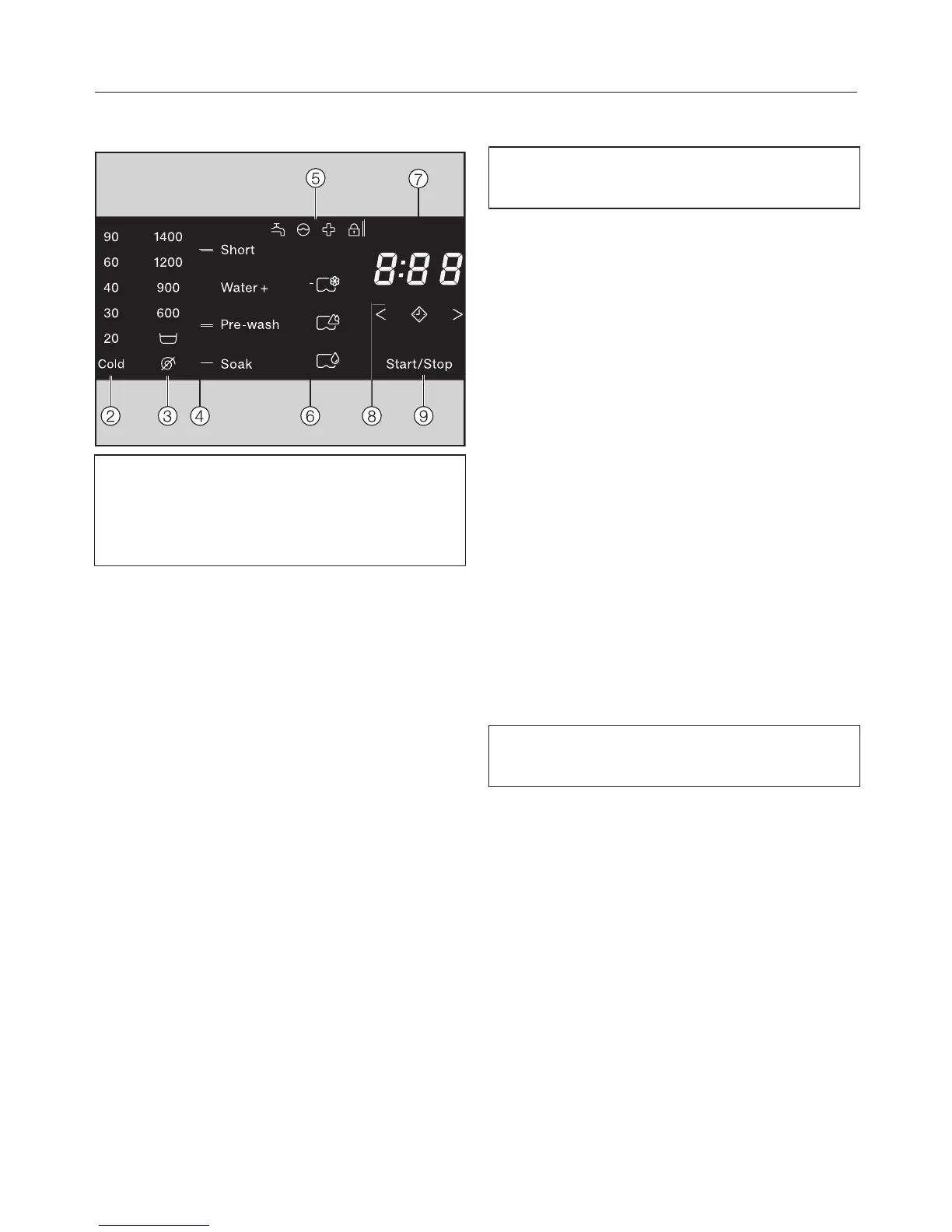
The , , , , and sensors
react to fingertip contact. Selection is
possible as long as the respective
sensor is illuminated.
If a sensor is brightly lit, this means:
currently selected
If a sensor is dimly lit, this means:
selection possible
and sensors for temperature
and spin speed
After selecting a wash programme with
the programme selector, the
recommended temperature (in °C) and
spin speed (in rpm) light up brightly.
Selectable temperatures and spin
speeds light up dimly.
Sensor controls for Extras
You can select Extras to augment the
wash programmes.
If a wash programme has been
selected, the sensor controls for the
possible Extras light up dimly.
Indicator lights
–
lights up if there are faults with the
water inlet and drainage
–
lights up if excess detergent was
used
–
lights up as a reminder about hygiene
information
–
lights up if the door of the washing
machine is locked
CapDosing
The CapDosing sensors are used for
activating cap dosing.
–
Fabric care (e.g. fabric conditioner)
–
Additives (e.g. detergent enhancers)
–
Detergent (for the main wash only)




 To Next Page