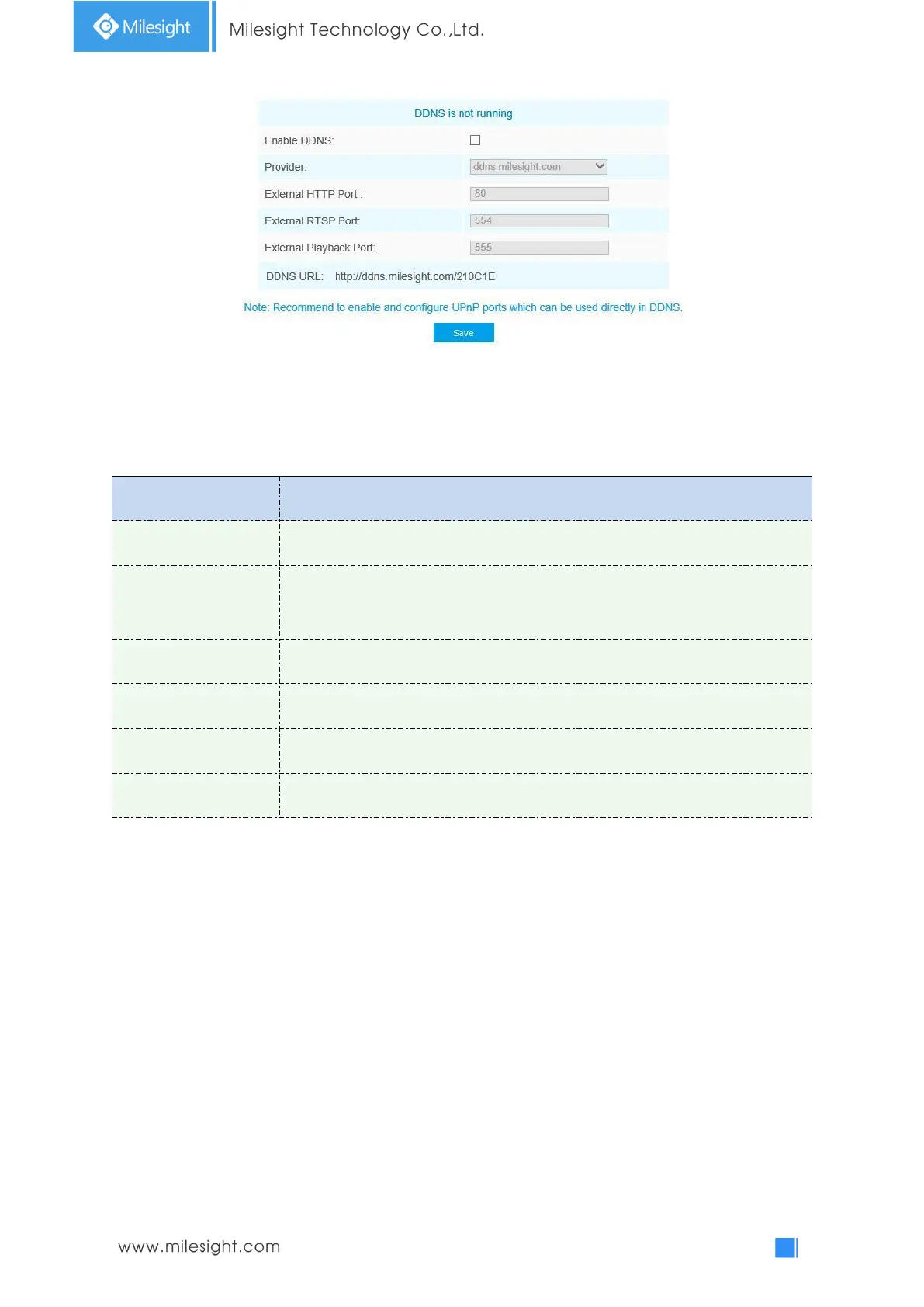
You can choose “ddns.milesight.com” as provider for DDNS. After enabling it, you can access the
device via the URL “http://ddns.milesight.com/MAC address” .
Table 4-4-13 Description of the buttons
Check the checkbox to enable DDNS service
Get support from DDNS provider: ddns.milesight.com, freedns.afraid.org,
dyndns.org, www.no-ip.com, www.zoneedit.com. You can also customize the
provider for DDNS.
A string used for verifying, only for "freedns.afraid.org"
Account name from the DDNS provider, unavailable for "freedns.afraid.org"
Account password, unavailable for "freedns.afraid.org"
DDNS name enabled in the account
Note:
1)Please do the Port Forwarding of HTTP Port and RTSP Port before you use Milesight DDNS.
2)Make sure that the internal and the external port number of RTSP are the same.
Email
Alarm video files can be sent to specific mail account through SMTP server. You must configure the
email settings correctly before using it.



 To Next Page