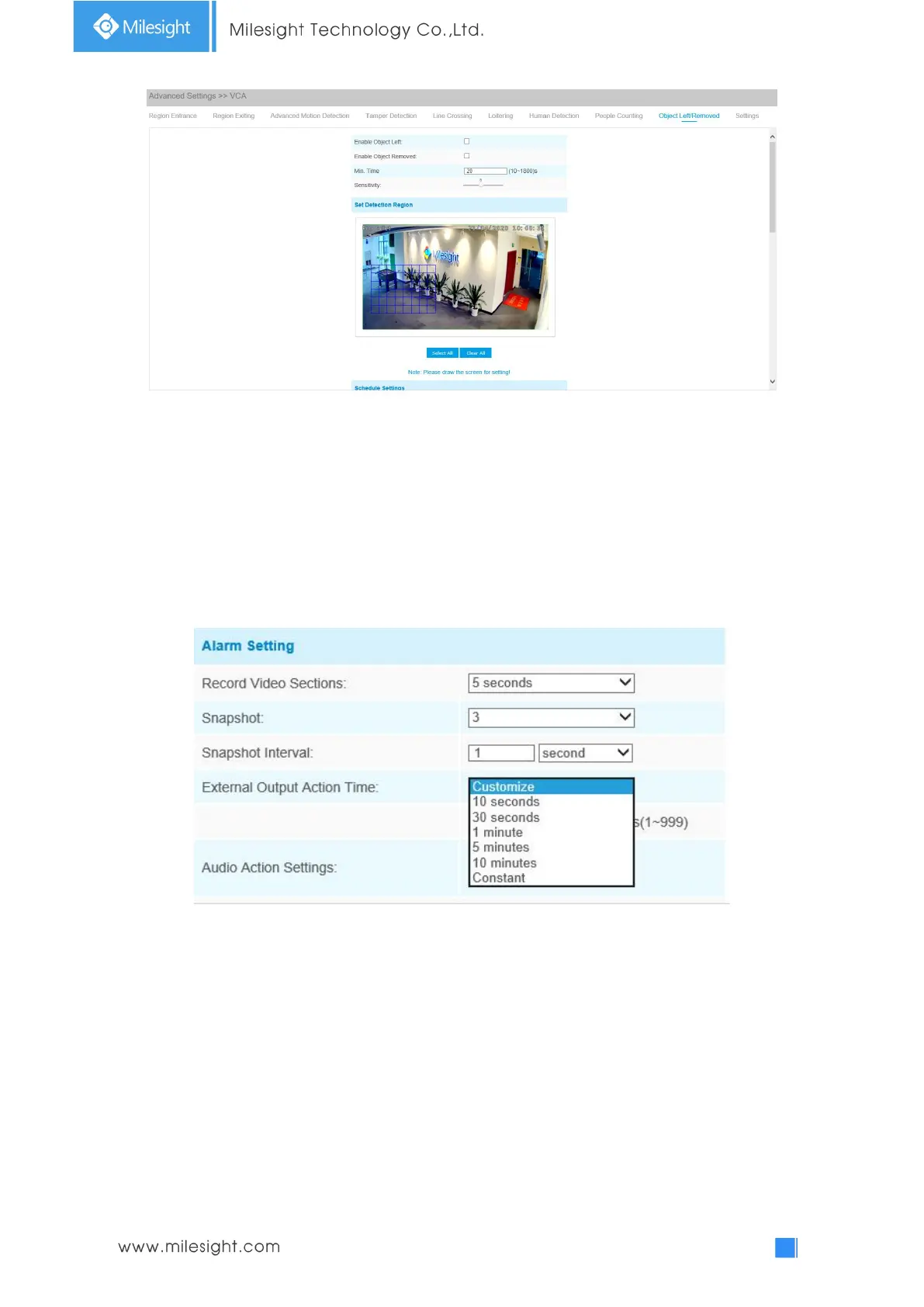
Step1: Enable Object Left or Object Removed(Or you can enable both features at the same time);
Step2: Set minimum time;
Step3: Set detecting sensitivity;
Step4: Set detection region;
Step5: Set detection schedule;
Step6: Set alarm action;
Step7: Set alarm settings. If you enable External Output and choose Constant External Output
Action Time, when an object is left/removed from the selected regions, External Output Action
alarm time will be always constant till the alarm is released.
Note:
1. After setting minimum time from 3s to 1800s, any objects are left in the selected area or
removed from the selected area over the minimum time will trigger the alarm.
2. Object Left/Removed is optional, if you need this function, please contact Milesight sales first.
Settings
Milesight VCA provides the primary setting for the whole VCA functions. “Minimum Size” is to set
the whether an object is big enough to trigger other settings. The frame you draw on the screen
means that only if the object size is bigger than the frame, the settings for other VCA functions will
take effect. Maximum Size means opposite, the frame you draw on the screen stands for that only
if the object size is smaller than the frame, the settings for other VCA functions will take effect.











 To Next Page