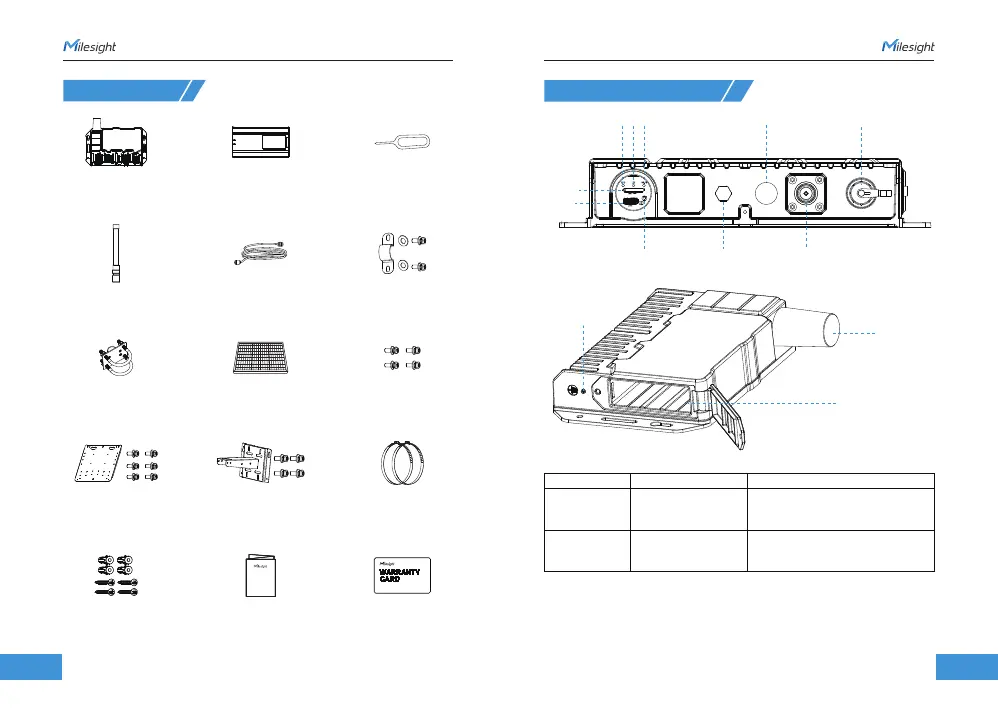
1. Packing List
2. Hardware Introduction
12
2
1313
www.milesight.com
www.milesight.com
Button Descriptions:
Function Action LED Indicator
Turn On/Off Wi-Fi
Reset to Factory
Default
Quick press the
button once.
Press and hold the button
for more than 5 seconds.
SYS LED quickly blinks.
Wi-Fi off: W-Fi LED off
Wi-Fi on: Wi-Fi LED static on.
Cellular & GPS
Antenna
Battery Compartment
Grounding Stud
4 × Wall Mount Screw Kits 1 × Warranty Card1 × Quick Start Guide
1 × Battery Pack1 × SG50 Device 1 × SIM Card Ejector Tool
1 × Antenna U-bolt Kit
1 × Solar Panel
(With M12 Power Cable)
4 × Mounting Screws
1 × LoRaWAN® Antenna 1 × Antenna Coaxial Cable (1m)
1 × Antenna U-strap Kit
1 × Mounting Bracket Kit1 × Solar Panel Bracket Kit 2 × Hose Clamps
SIM Slot
Type-C
USB
Button Vent Plug
Wi-Fi AntennaLED Area
DC Power Connector
LoRaWAN®
Antenna Connector



 To Next Page