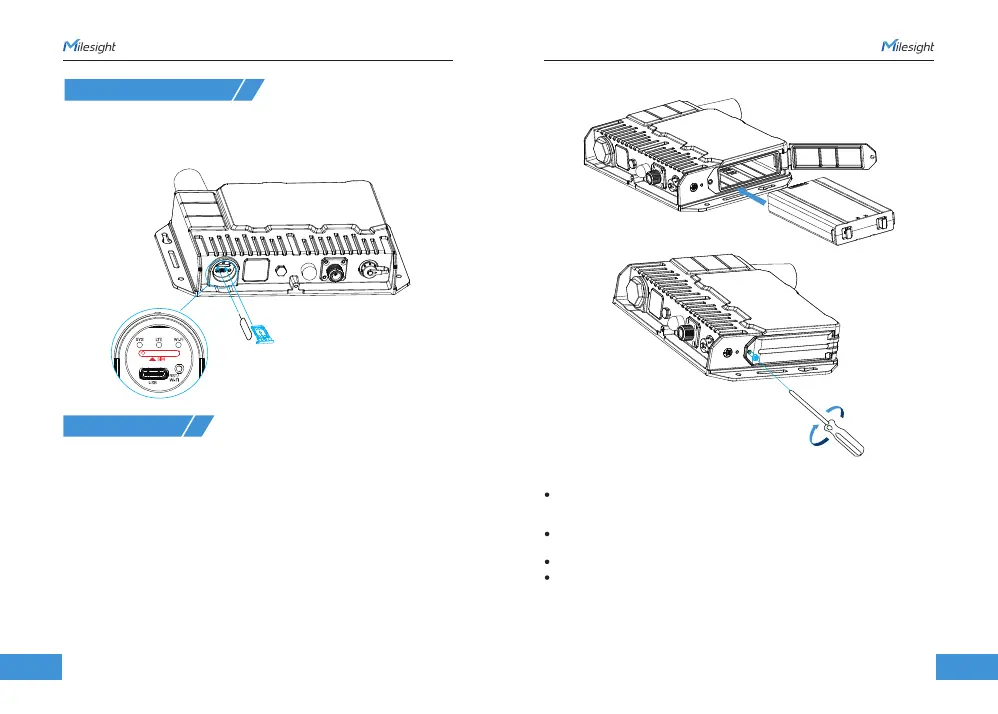
3. SIM Card Installation
4. Power Supply
1 4 15
www.milesight.com
www.milesight.com
1. Take the SIM cover down, use an ejector tool to open the SIM card tray. Insert the nano
SIM card, then put the slot with the SIM card back into the device.
2. Rotate back the cover and tighten it with a wrench to prevent water from entering the
device.
SG50 can be powered by either a 12-24 VDC external supply or solar panel. I n the
meantime, the internal battery pack will also be charged. When the external supply
is disconnected or there is not enough power for the solar panel, SG50 can be powered
by the internal battery pack.
Battery Installation
1. Release the fixing screw on the side of the device, and remove the battery compartment
cover.
2. Push the battery into the battery compartment as the icon shows.
3. Fix the cover back to the device using the fixing screw.
Note:
After installing the battery, the device will not power on automatically. Please connect
the power cable of the solar panel to the device to turn it on. When the power cable is
disconnected, the device will power off.
The device can not be charged when its temperature is more than 50°C. Please avoid
direct exposure of the device to sunlight.
The battery should be removed from the device if it will not be used for an extended period.
Hold the latches on the battery pack to pull it out.



 To Next Page