1 10 111
www.milesight.com
www.milesight.com
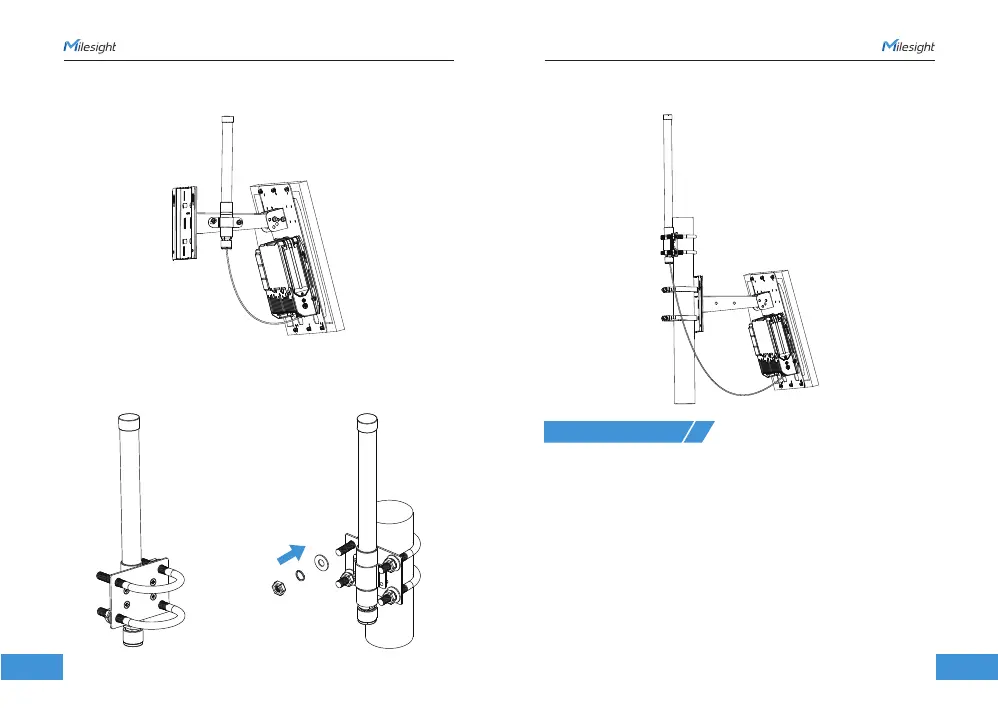
1. Pass the LoRaWAN® antenna through the antenna clamp and fix it using 4 screws,
then wrap the U-bolt around the pole and fix the clamp with nuts and other accessories.
SG50 provides a web-based configuration interface for management. If it is the first time
you configure the device, please use the default settings listed below:
Wi-Fi SSID: Gateway_XXXXXX
Wi-Fi IP Address: 192.168.23.1
Username: admin
Password: password
Configuration Steps:
1. Ensure the Wi-Fi LED is statically on.
2. Enable Wireless Network Connection on your computer and search for the SSID to
connect it.
3. Type 192.168.23.1 to the browser to log in the web GUI of device.
Antenna U-bolt Installation
6. Web GUI Access
2. Connect one end of the antenna coaxial cable to the LoRaWAN® antenna, the opposite
end to the device’s antenna connector.
2. Connect one end of the antenna coaxial cable to the LoRaWAN® antenna, and the
opposite end to the device's antenna connector.



 To Next Page