1
8 19
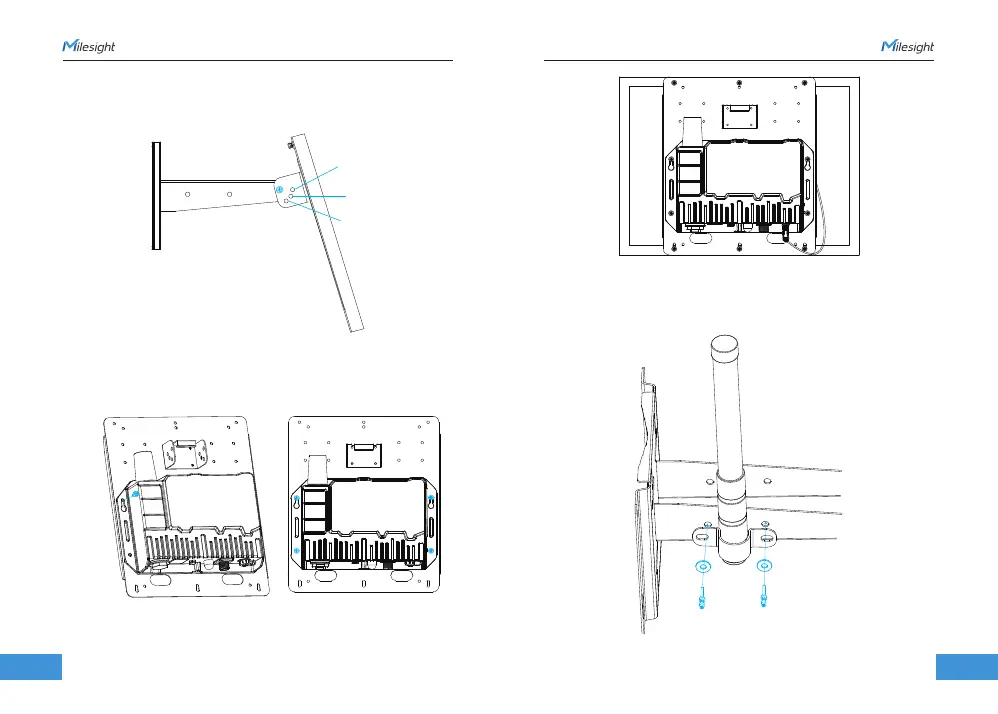
Antenna U-strap Installation
Device Installation
www.milesight.com
www.milesight.com
2. Hang the solar panel bracket onto the mounting bracket and fix both parts using 2 fixing
screws first. Adjust the angle of the solar panel bracket (15°, 45°, and 75° is optional) based
on the installation environment. Then fix the remaining two screws to the solar panel bracket.
1. Pass the LoRaWAN® antenna through the U-strap clamp and fix the U-strap clamp to
the side of the mounting bracket using 2 flat washers and 2 screws.
1. Fix the device to the opposite side of the solar panel bracket using 4 screws. When
installation, it is suggested to fix the 2 screws on the top at first.
2. Install antennas as subsequent steps.
15°
45°
75°
3. Connect M12 power cable of solar panel to DC power connector of device, the device
will power on automatically.



 To Next Page