. A complete Parts List is available at www.MillerWelds.com
OM-1500-7 Page 28
SECTION 7 − SETTING SEQUENCE PARAMETERS
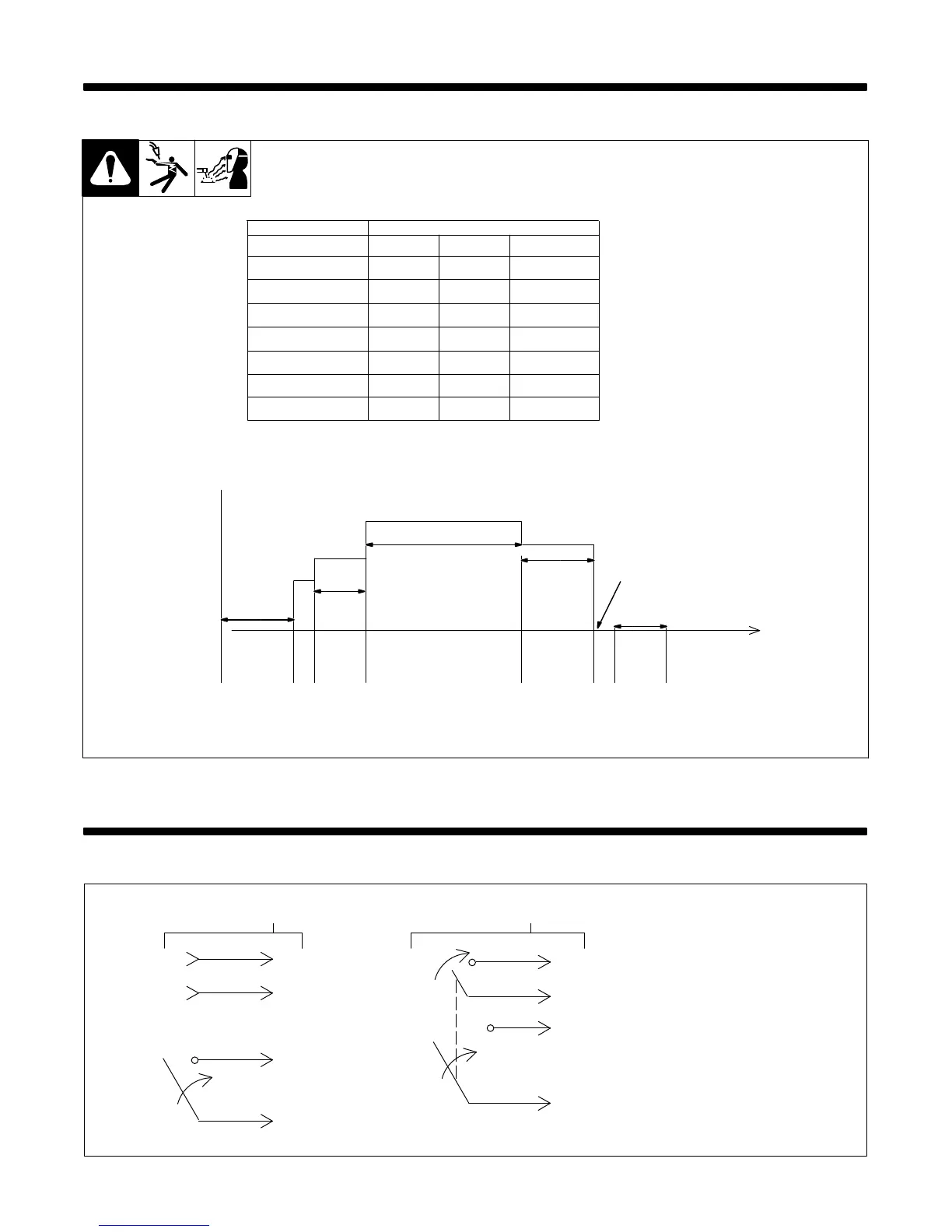
7-1. Sequence Parameters In A Program
. For more information on
Sequence Push Button see
Section 6-12.
If time is set to zero in Weld
sequence, welding continues until
gun trigger is released.
If time is set to zero in any timed
sequence except Weld, the
sequence is skipped.
Trigger
Pressed
Trigger
Released
Time
Start
Time
Preflow
Weld Time
Crater
Time
Postflow
Start
Burnback
Time
Time
Time
PostflowCrater
WeldRun-In
Preflow
Burnback
Sequence
End
Volts IPM Seconds
4. Weld
5. Crater
6. Burnback
7. Postflow
2. Run-In
0-100.0
0-5.00
0-0.25
0-9.9
XX
X
X
X
X = Setting available.
3. Start 0.00-5.00XX
1. Preflow 0-9.9
Sequence Parameters
X
SECTION 8 − SETTING DUAL SCHEDULE PARAMETERS
8-1. Optional Dual Schedule Switch Diagrams
1 Maint 2P (Maintained-Contact
2-Pole Switch)
2 Maint 1P (Maintained-Contact
1-Pole Switch)
. Will not function with trigger
hold and dual schedule. A
DSS-9 is recommended for
this application.
1
2
3
4
B
A
TR
2
11
22
3A
4B
DSS-8DSS-9
1



 To Next Page