OM-225 590 Page 37
SECTION 6 − OPERATING THE WELDING GENERATOR
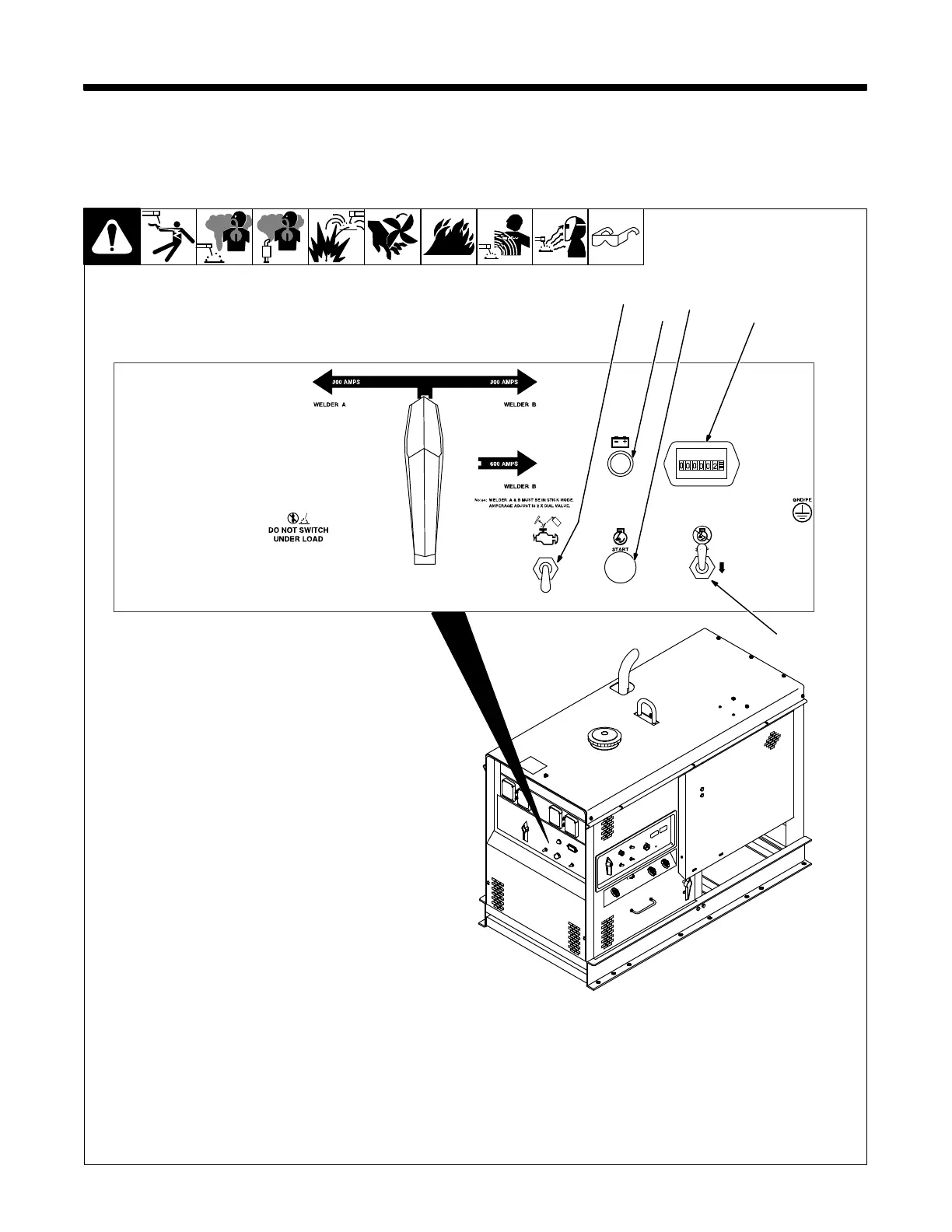
When facing the front panel, the Welder B controls and weld terminals are on the right and the Welder A side controls and weld terminals are on
the left.
6-1. Engine Controls
See Section 6-3 for weld control
descriptions.
1 Engine Start Button
2 Stop Switch
3 Ether Starting Aid Switch (Optional)
Push switch up and release while cranking
engine to release ether.
To Start: Press button and use Ether switch
(if necessary). Release button when engine
starts.
If the engine does not start, let engine
come to a complete stop before attempt-
ing restart.
To Stop: Push switch down and hold. Re-
lease when engine stops.
4 Battery Charging Warning Light
Light goes on when battery is not charging.
NOTICE − If light goes on, stop engine and
check alternator and engine belt.
5 Engine Hour Meter
225 543 / 804 289-A
45
1
2
3




 To Next Page