00110230w Rev 10/20 10 of 24
TIP
Pressing the Menu button
will end any procedure
Gating Method
There are two options for setting the default gates (upper and lower diameter or volume limits of the histogram)
prior to counting. One option is to choose “Use Last” and the other is “Auto” which automatically sets the gates
based on the histogram profile. The gates can also be changed manually after the count has been performed.
Manual gating is recommended when using the 40 µm sensor or when optimizing counting parameters
for a new sample.
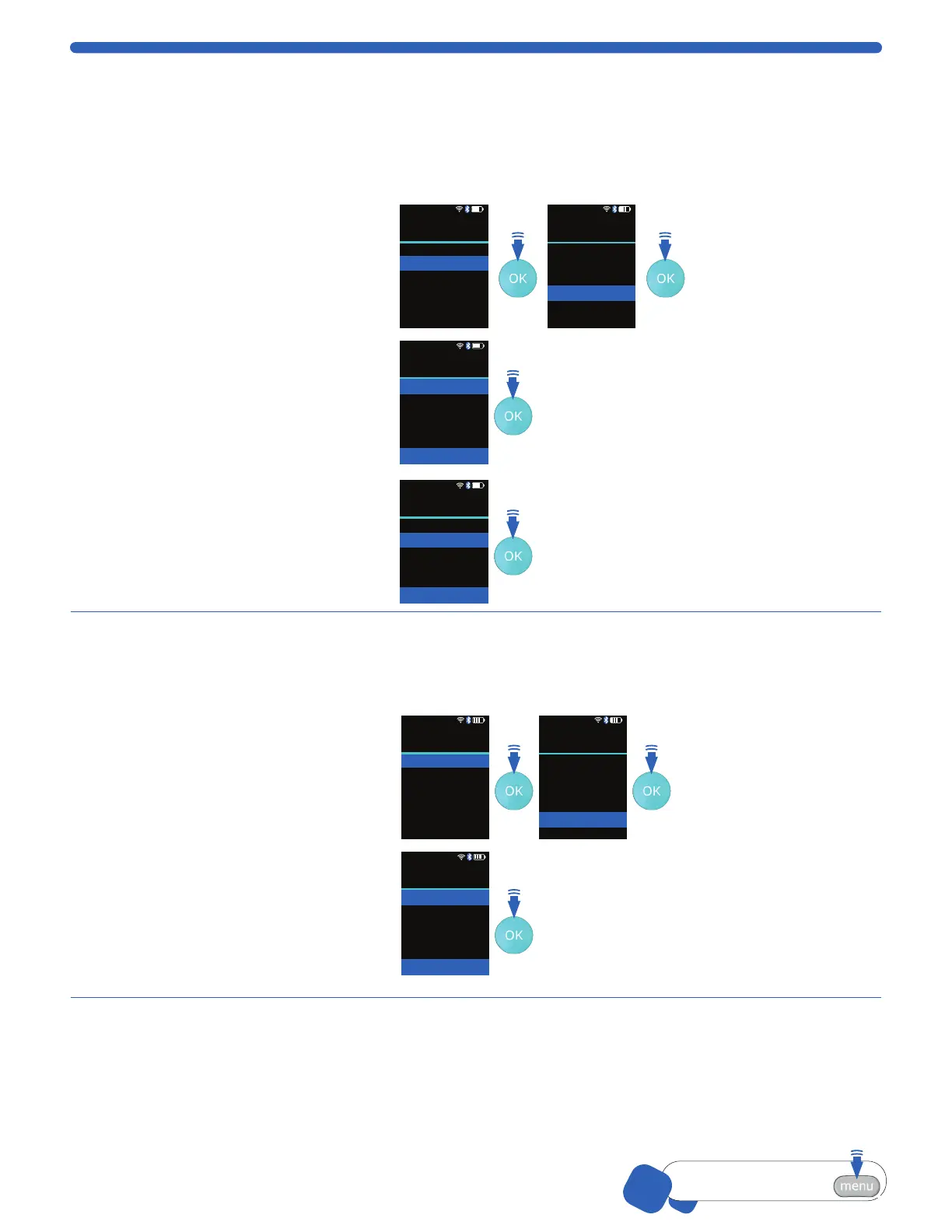
1. From the Settings menu, select
Gating Method and press the
OK button.
2. Scroll to select desired setting,
and press the OK button.
Auto
This setting will set the gates
automatically based on the
histogram profile. Use this setting
when sampling Scepter™ 3.0
Test Beads.
Use Last
This setting maintains on
whatever gating parameters were
last set by the user, either during
a count or during post count
data management.
01-Feb-18 14:16
Menu
Home<
Histograms
Settings
Help
01-Feb-18 14:16
Settings
Back
Date & Time
Bluetooth
Wifi
Gating Method
Display Units
<
01-Feb-18 14:16
Gating Method
Back
Auto
Use Last
<
Press OK to accept
01-Feb-18 14:16
Gating Method
Back
Auto
Use Last
<
Press OK to accept
Display Units
Set the histogram default display to either cell (or particle) volume in picoliters (pL) or in cell (or particle)
diameter in microns (µm). Individual histograms can be switched in the Histogram Explorer, p.13.
Use the ARROW buttons to scroll
through options.
1. Scroll to Histograms, press the
OK button.
2. Select Display Units and press
the OK button.
Menu
Home<
Histograms
Settings
Help
Settings
Back
Date & Time
Bluetooth
Wifi
Gating Method
Display Units
<
3. Scroll to choose Diameter (μm)
or Volume (pL).
Note: Scepter™ 3.0 shows
your last choice first.
4. Press the OK button to return
to the Settings menu.
01-Feb-18 14:16
Display Units
Back
Diameter (µm)
Volume (pL)
<
Press OK to accept


 To Next Page