00110230w Rev 10/20 11 of 24
TIP
Pressing the Arrow buttons
to scroll through options
Sensors
Technology
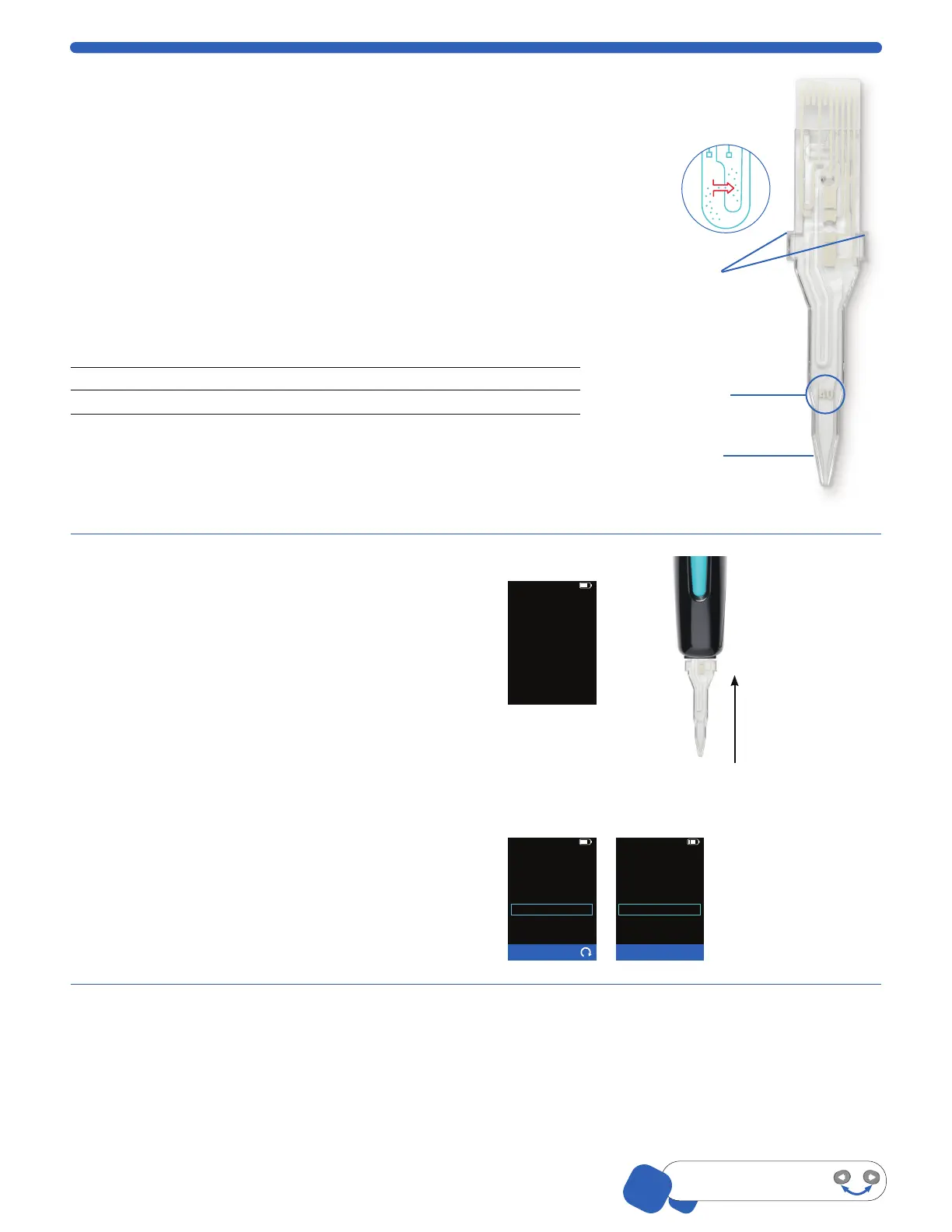
The Scepter™ 3.0 Sensors are microfluidic channels designed to replicate the
Coulter Principle. Cell suspension is drawn into the reservoir channel and through
the aperture sensing region. Increase in resistance causes an increase in voltage
proportional to cell size (diameter). For each passing cell, voltage changes are
recorded providing sample count and concentration. The sample is contained in
the sensor and disposed of after each sample reading.
The Scepter™ 3.0 can be used with either a 60 μm or a 40 μm sensor.
Depending on the sample being counted, some user optimization may be
required relating to cell size and concentration.
Sensor
size Operating Range
Sensor X-Axis
Scale (µm)
Working Diameter
Range (µm)
40 µm 50,000–1,500,000 cells/mL 4-20 5-15
60 µm
10,000–500,000 cells/mL 6-36 8-25
Sensors are not reusable. Attempting to reuse the sensor will result in an error
message on the instrument. However, an unused sensor may be removed from
the Scepter™ 3.0 and reinserted. Only Scepter™ 3.0 Sensors will fit into the
Scepter™ 3.0 instrument. Do not use sensor if visibly damaged.
Attach the Sensor
1. When the Scepter™ 3.0 is powered on, it
will show Attach the Sensor to begin.
2. Holding the sensor with the sensor size
number facing you, and the Scepter™ 3.0
with the screen facing you, firmly insert the
sensor into the sensor port, The sensor stop
wings prevent over insertion.
IMPORTANT: To avoid severe instrument
damage and costly repair, orient the sensor
correctly before inserting it into the attachment
port. Extreme force is not required to insert
the sensor. Check the orientation of the sensor
if having difficulty.
01-Feb-18 14:16
Home
Attach the Sensor
to begin...
3. When the sensor is properly inserted,
Scepter™ 3.0 will begin Characterizing
the Sensor.
4. The screen will indicate
Submerge the Sensor...then press OK.
You are ready to begin Cell Counting.
Counting Process
Please wait...
Characterizing
the Sensor
60µm Sensor
Counting Process
Ready
Submerge
the Sensor...
then press OK
60µm Sensor
Sensor Size
“40“ or “60” must
face forward before
inserting
Confirm the device
and sensor size marking
are facing forward
Sensor
Stop Wings prevent
over-inserting
sensor into
Scepter™ 3.0
Reservior
channel
Gently but firmly,
push sensor into
sensor port until
the Sensor Stop
Wings meet
the device
Precise Coulter
technology


 To Next Page