00110230w Rev 10/20 4 of 24
Parts and Functions
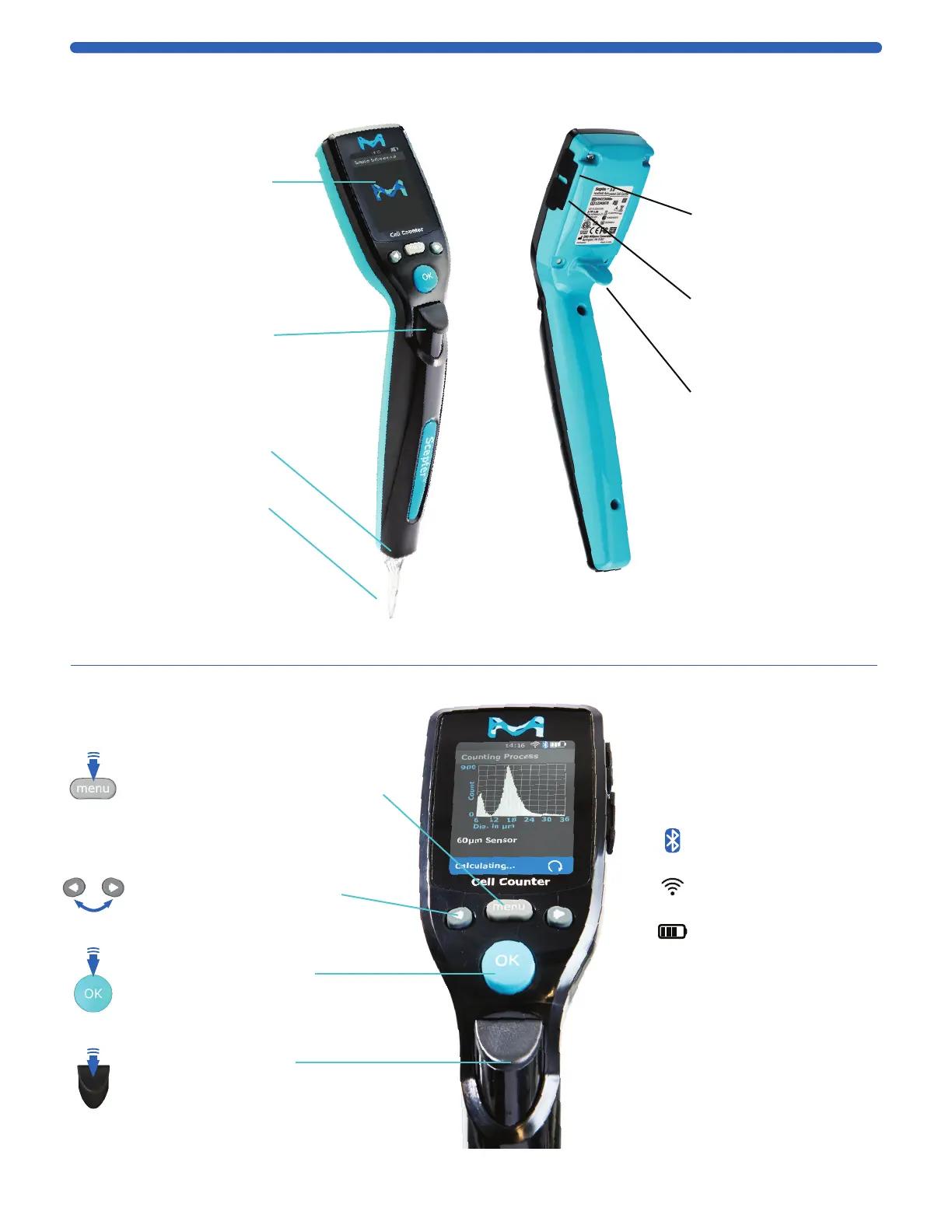
Features
Sensor Port
Insert sensor
Disposable Sensor
• Required for
sampling cells
• 40 µm or 60 µm
• See Attach the Sensor,
p.10 before inserting
MENU Button
• TURN ON / OFF: press and hold
• Return to the menu screen
• Abort any process immediately
ARROW Buttons
• Scroll through menus:
right = down, left = up
• Scroll to next/previous histogram
OK Button
• Accept selected fields
• Advance to continue
EJECT Button
Ejects the sensor
Tech Service Port
For Service use only
USB Port
Connects instrument to
USB thumb drive
Ergonomic Hook
• Allows comfortable
handling of the
instrument
• Secures the instrument
to charger
Control Buttons and Screen Icons
Display Screen
• Displays all information
needed for operation
• Displays histograms with
with cell concentration,
and diameter or volume
Bluetooth
®
icon
connected if visible
Wi-Fi
®
icon
connected if visible
Battery life indicator icon
Continue Arrow appears
in the lower right corner
of the screen, only when
there are additional
menu options. Scroll to
see more options
Eject Button
Ejects Sensor
V
Instrument Schematic


 To Next Page