Chapter 1. Controls
PELLERIN MILNOR CORPORATION
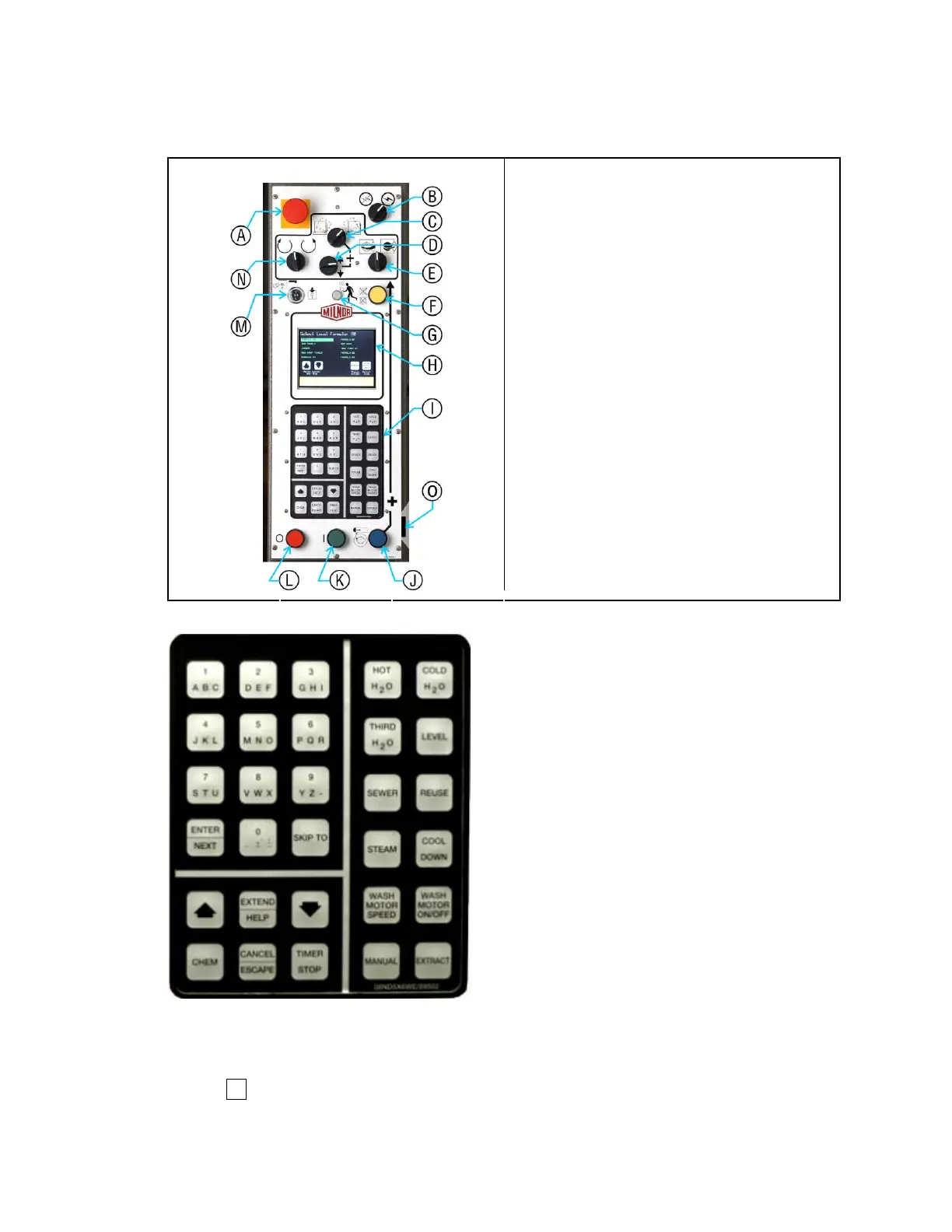
Figure 4: Mark VI Control Panel
Panel and Controls Legend
.
A. Emergency stop button
B. Master switch for power
C. Tilt front/rear selector switch (tilting
models only)
D. Tilt up/down selector switch (tilting models
only)
E. Door open/close switch
F. Operator signal cancel button
G. Operator signal light
H. Liquid crystal graphic display
I. Keypad
J. Door open button
K. Start button
L. Stop button
M. Run/Program keyswitch
N. Jog direction switch
O. Door open jog button (tilting models only)
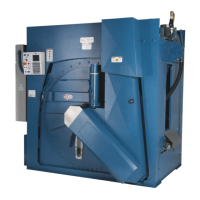
Figure 5: Keypad
Emergency stop button—disables the 3-wire circuit. This switch locks in when pressed, so you
must turn it a quarter turn to allow it to return to the normal position to allow the machine to
run.
Notice 1 : Press the emergency stop button immediately in any emergency situation. This
disables the 3-wire circuit, which stops all machine operation and causes the drain to open.
• When
ou reset this button,
ou have the o
tion of cancellin
or resumin
the inte
ru
ted
9



 To Next Page