EasyManua.ls Logo

Milwaukee 3712 - User Manual

Milwaukee 3712
28 pages
Print Icon
To Next Page IconTo Next Page
Loading...
OPERATOR'S MANUAL
MANUEL de L'UTILISATEUR
MANUAL del OPERADOR
WARNING To reduce the risk of injury, user must read and understand operator's manual.
AVERTISSEMENT An de réduire le risque de blessures, l'utilisateur doit lire et bien
comprendre le manuel.
ADVERTENCIA Para reducir el riesgo de lesiones, el usuario debe leer y entender el manual.
WARNING To reduce the risk of injury, user must read and understand operator's manual.
AVERTISSEMENT An de réduire le risque de blessures, l'utilisateur doit lire et bien
comprendre le manuel.
ADVERTENCIA Para reducir el riesgo de lesiones, el usuario debe leer y entender el manual.
Cat. No. / No de cat.
3712
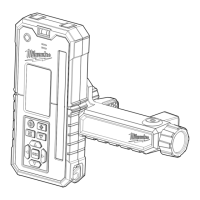
GREEN INTERIOR ROTARY LASER REMOTE CONTROL
& RECEIVER
RÉCEPTEUR ET TÉLÉCOMMANDE DE LASER
ROTATIF INTÉRIEUR VERT
RECEPTOR Y CONTROL REMOTO DE LÁSER
GIRATORIO INTERIOR VERDE

Questions and Answers

  • M
    Michael OwensAug 12, 2025
    What to do if Milwaukee Measuring Instruments show leveling error?
    • M
      Michael HouseAug 12, 2025
      If you experience a leveling error with your Milwaukee Measuring Instruments, ensure the laser is on a level surface. Pressing buttons on the rotary laser can trigger the bump alarm or re-leveling. If this doesn't work, press the leveling mode button or power cycle the laser.
  • D
    Dawn TorresAug 16, 2025
    Why is my Milwaukee Measuring Instruments pairing failing?
    • K
      Kathryn ShawAug 16, 2025
      If the remote/receiver fails to pair with your Milwaukee Measuring Instruments, several factors could be at play. Ensure the remote/receiver is powered on and within range, and that it's in Pairing Mode. Avoid artificial overhead lighting or the laser beam projecting onto the remote/receiver sensor during pairing. Also, avoid transmitting devices and ensure the laser is on a stable surface to prevent interruption from bump alarms. Pairing in the horizontal orientation may yield the best results.
  • J
    James KerrAug 20, 2025
    What to do if Milwaukee 3712 Measuring Instruments receiver freezes?
    • B
      Brandi DavisAug 20, 2025
      If the receiver of your Milwaukee Measuring Instruments freezes, press and hold the power button for 15 seconds or remove the batteries to reset it.
  • K
    krobinsonAug 25, 2025
    Why does my Milwaukee 3712 show a temperature alarm?
    • A
      Anthony AdamsAug 25, 2025
      If your Milwaukee Measuring Instruments display a temperature alarm, it means the laser is either too hot or too cold. To resume work, you must return the laser to a suitable operating temperature. Keep in mind that the internal temperature may be several degrees warmer than the ambient temperature.
  • E
    Ellen TorresAug 27, 2025
    What does 'Wrong Vertical Orientation Alarm' mean on Milwaukee 3712 Measuring Instruments?
    • C
      Cindy WareAug 27, 2025
      If your Milwaukee Measuring Instruments displays a 'Wrong Vertical Orientation Alarm', adjust the laser as directed on the LCD screen. The Keypad should face up and be parallel to the ground.
  • B
    Breanna McknightAug 31, 2025
    How to fix no connection error on Milwaukee 3712?
    • S
      stephaniehoAug 31, 2025
      If your Milwaukee Measuring Instruments have no connection, try repeating the pairing steps in the 'Pairing the Remote/Receiver with the Rotary Laser' section, as the devices may not be paired.
  • M
    Melissa NelsonSep 4, 2025
    How to insert batteries in Milwaukee Measuring Instruments?
    • J
      Jennifer AdamsSep 4, 2025
      If you're having trouble inserting the batteries into your Milwaukee Measuring Instruments, ensure they are correctly aligned according to the +/- polarity markings in the compartment.
  • O
    oconnellcoreySep 8, 2025
    What to do if Milwaukee 3712 Measuring Instruments batteries are at end of life?
    • A
      Amber LynchSep 8, 2025
      If your Milwaukee Measuring Instruments aren't working, and you suspect the batteries are the issue, replace them, as they may be at the end of their life.

Summary

GENERAL POWER TOOL SAFETY WARNINGS

BATTERY USE AND CARE

Guidelines for safe usage and care of AA batteries.

ROTARY LASER RECEIVER SAFETY RULES

ACCURACY FIELD CHECK NOTICE

Perform accuracy field check before jobsite exposure.

PRODUCT FUNCTIONAL DESCRIPTION

TECHNICAL SPECIFICATIONS

Detailed technical specifications of the laser receiver.

ASSEMBLY AND INSTALLATION

CHANGING THE BATTERIES

Procedure for replacing the AA batteries.

OPERATING THE RECEIVER

POWERING ON AND OFF

Steps to power the Remote/Receiver on and off.

LASER ALIGNMENT MODES

MASK FUNCTIONALITY

Turn off laser in specific quadrants to prevent interference.

CENTER LOCK OPERATION

PAIRING THE REMOTE;RECEIVER

OFFSET MODE OPERATION

LASER CALIBRATION PROCEDURE

RECALIBRATING HORIZONTAL AXIS

Procedure for recalibrating the horizontal laser axis.

TROUBLESHOOTING GUIDE

TROUBLESHOOTING PAIRING FAILURE

Steps to resolve issues when pairing fails.

ACCURACY FIELD CHECK PROCEDURE

PERFORMING ACCURACY CHECK

Step-by-step guide to check the receiver's accuracy.

TOOL MAINTENANCE

REPAIR INFORMATION

Information on where to return the tool for repairs.

Milwaukee 3712 Specifications

General IconGeneral
BrandMilwaukee
Model3712
CategoryMeasuring Instruments
LanguageEnglish

Related product manuals