Panorama® Service Manual 0070-10-0634 2 - 19
Repair Information Disassembly Instructions
2.6.10 Panorama Wireless Transceiver (WMTS Telemetry Only)
Before disassembling the unit, perform the following:
1. Power down the system and disconnect the AC line cord.
2. Remove all interface cables from the rear of the Panorama Wireless Transceiver.
3. Perform all work on a properly grounded, anti-static work area.
4. Discharge the static voltage from your body by wearing a grounded, anti-static wrist
strap.
5. Minimize the handling of static-sensitive components.
6. Store static-sensitive components in their original containers or in anti-static bags.
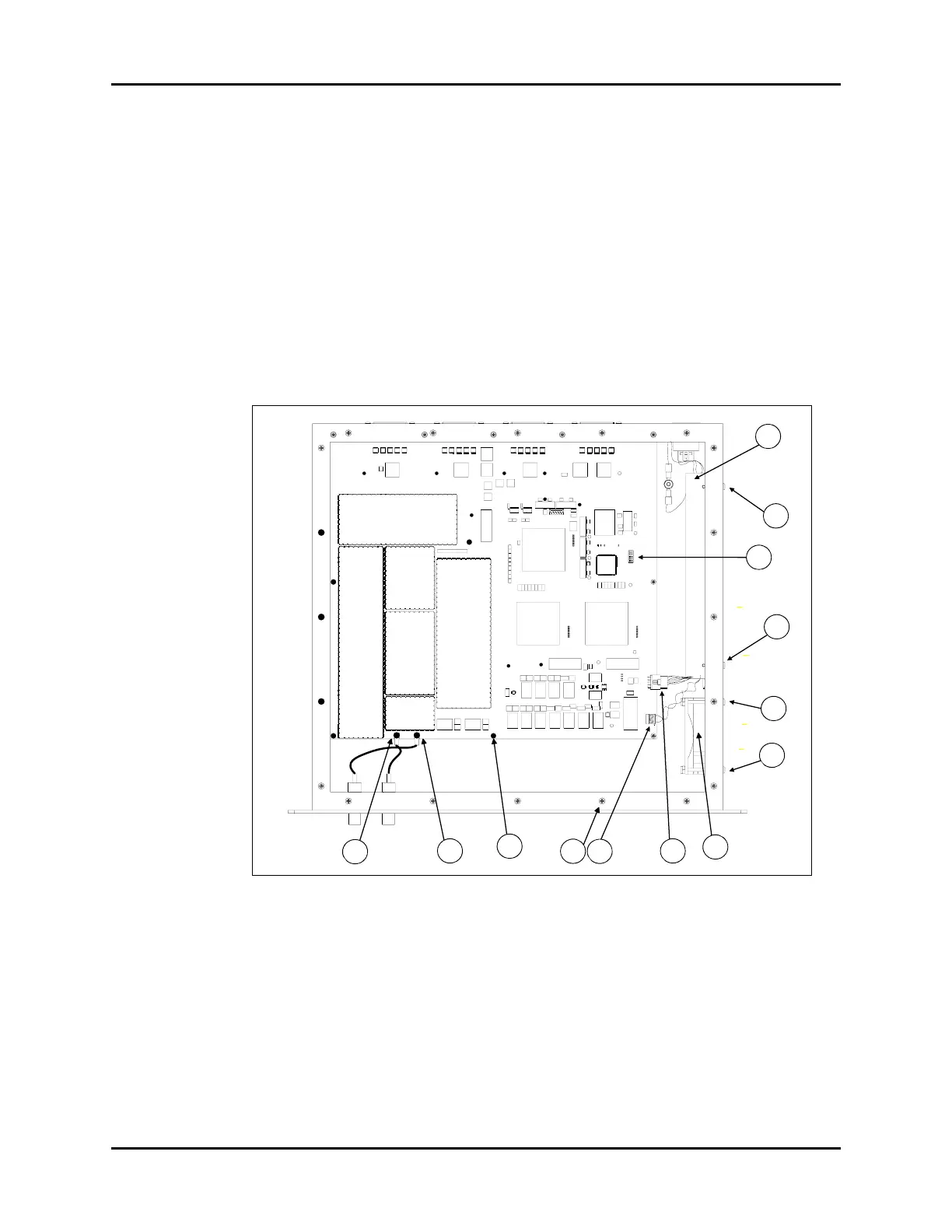
Refer to Figure 2-11 on page 2-19 for component locations.
FIGURE 2-11 Panorama Wireless Transceiver Components (Internal Top View)
1. Main RF Connector 6. AC Input Connector
2. Diversity RF Connector 7. Top Cover Screws (20)
3. 9 VDC Connector 8. TIM PCB Screws (11)
4. 5/12 VDC Connector 9. Fan Screws (4)
5. LED Connector 10. Power Supply Screws (4)
1
10
2
3
4
6
5
7
8
8
9
9
10



 To Next Page