
 To Next Page


J
jameshamiltonSep 18, 2025
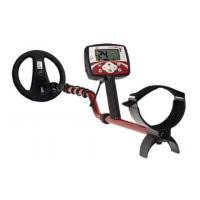
Why will the battery lid not close on my Minelab F3?
- WwilliammacdonaldSep 18, 2025
If the battery lid on your Minelab Metal Detector will not close, remove and clean the O-ring. If applicable, replace swollen batteries.

Why will the battery lid not close on my Minelab F3?
If the battery lid on your Minelab Metal Detector will not close, remove and clean the O-ring. If applicable, replace swollen batteries.
What to do if my Minelab F3 Metal Detector has a coil fault tone?
If your Minelab Metal Detector emits a “Coil Fault” tone (a low-pitched double tone every five seconds) upon switching on, first ensure the coil plug is firmly secured to the electronics pack. If the tone persists and there's no visible damage to the coil cable, consider replacing the electronics pack. However, if you notice any damage to the coil cable, replace it with a new coil.
What to do if my Minelab Metal Detector has no sound?
If your Minelab Metal Detector makes no sound from the speaker after switching it on, first check for a tone using the earset. If you hear a tone through the earset, replace the speaker pod. If there is no tone through the earset, replace the wiring loom or the electronics pack.
How to fix a Minelab F3 Metal Detector that will not switch on?
If your Minelab Metal Detector won't switch on, make sure the batteries are installed correctly and replace them with fresh ones if needed. You can also try removing and refitting the battery pack. If the problem persists, consider replacing the battery pack, wiring loom, or electronics pack.
Why is there water inside the battery lid of my Minelab Metal Detector?
If you find water inside the battery lid of your Minelab Metal Detector, clean the battery lid and apply silicone grease to the battery pack battery lid O-ring.
What to do if the camlocks will not stop shafts from collapsing on my Minelab F3?
If the camlocks will not stop the shafts from collapsing on your Minelab Metal Detector, replace the camlock pressure blocks.
Why do the start up tones keep repeating on my Minelab F3?
If the start-up tones keep repeating on your Minelab Metal Detector, insert new batteries. If the problem continues, consider replacing the electronics pack or the wiring loom.
Why is the threshold tone intermittent on my Minelab Metal Detector?
If the threshold tone is intermittent on your Minelab Metal Detector, including the LEDs for F3L models, consider replacing the wiring loom.
Why does my Minelab Metal Detector F3 make no sound?
If your Minelab Metal Detector F3 is not producing any sound, check the tone through the earset. If there is a tone through the earset, replace the speaker from the speaker pod. If there is no tone through the earset, replace the wiring loom or the electronics pack.
Why does the threshold tone vary on my Minelab Metal Detector?
If, after switching on your Minelab Metal Detector, the Threshold Tone varies in pitch and volume even when the coil is stationary, conduct a Noise Cancel.
Step-by-step guide for preparing the F3 detector for operation.
Procedure for fitting and exchanging Sensitivity Endcaps, including warnings.
Overview of F3 handle controls: On/Off, Ground Balance, Noise Cancel, and start-up.
Using Ground Balance, Audio Reset, and Noise Cancel for optimal performance.
Standard procedure (Switch ON, GB, Test) and optional Noise Cancel/Audio Reset.
Common problems and their recommended solutions for the F3 detector.
 General
| Brand | Minelab |
|---|---|
| Model | F3 |
| Category | Metal Detector |
| Language | English |