Test Solutions - User Guide Page 26
RCM Series Compact Modular Test Systems 4-Oct-17 (A3)
Direct Mode
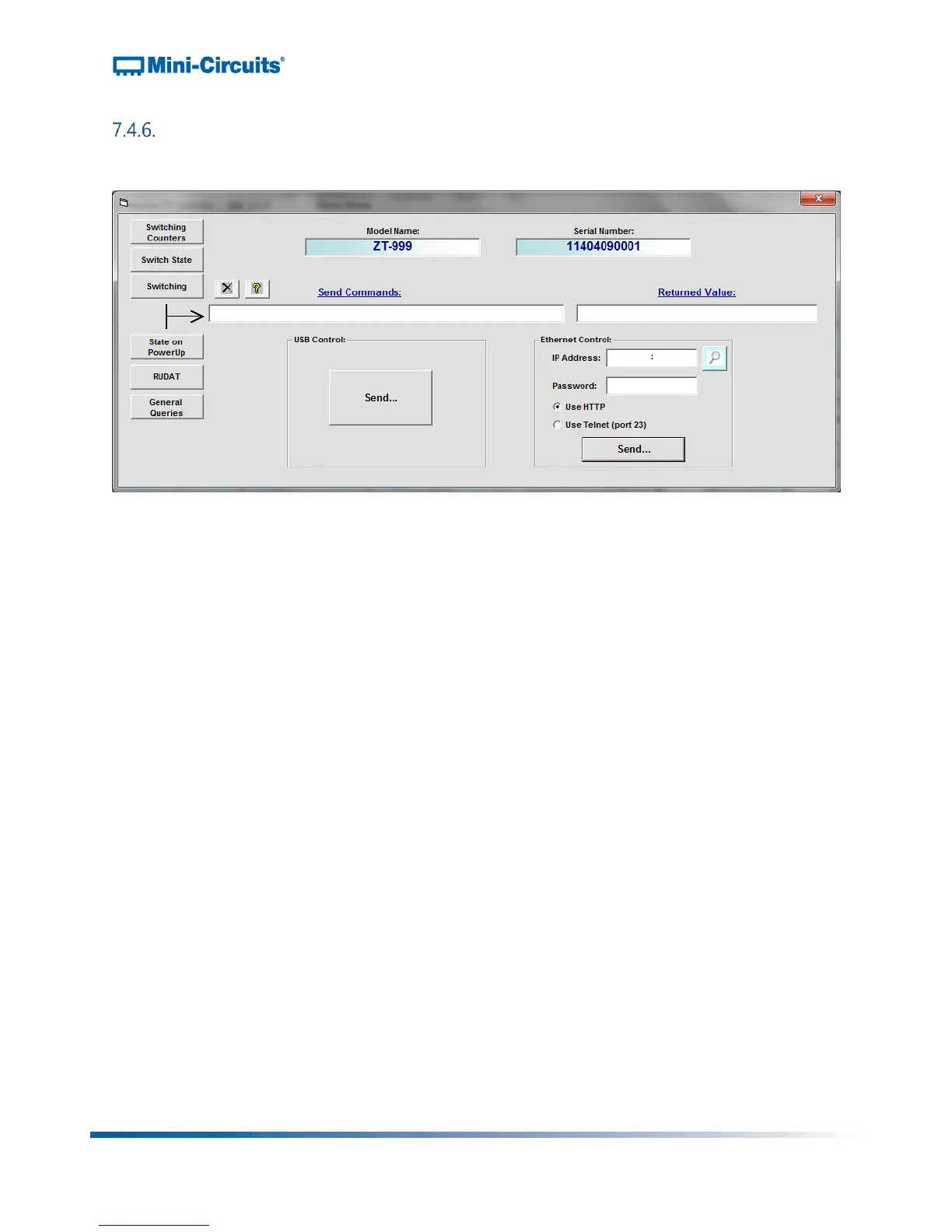
Clicking the “Run Direct Mode Program” button at the top of the GUI main screen opens the
direct mode screen:
Figure 23: Direct mode screen
Direct mode allows the user to send commands directly to the RCM unit. Multiple legal
commands may be sent simultaneously by separating them with a semicolon (;) or an
ampersand (&). After sending a command, the GUI returns a value of “1” if successful, or an
error code if unsuccessful.
Model Name: This field displays the RCM unit model name when connected.
Serial Number: This field displays the RCM unit 11-digit serial number when connected.
Send Commands: This field displays the list of commands sent to the RCM unit
separated by a semicolon (;) or an ampersand (&).
Returned Value: This field displays the returned values of each command once
commands are sent to the RCM unit.
IP Address: If connected to the RCM unit by Ethernet, the device IP address should be
entered in this field. Refer to the instructions in section section 8.3.2.
Password: If a password has been set for connection over a network, enter password
here.
Use HTTP/Use Telnet (Port 23): Allows user to toggle between HTTP and Telnet
protocols for Ethernet communication with the RCM unit.



 To Next Page